Share feedback directly with Fabric product managers, participate in targeted research studies and influence the Fabric roadmap.
Sign up nowGet Fabric certified for FREE! Don't miss your chance! Learn more
Hi @nagarjunakan ,
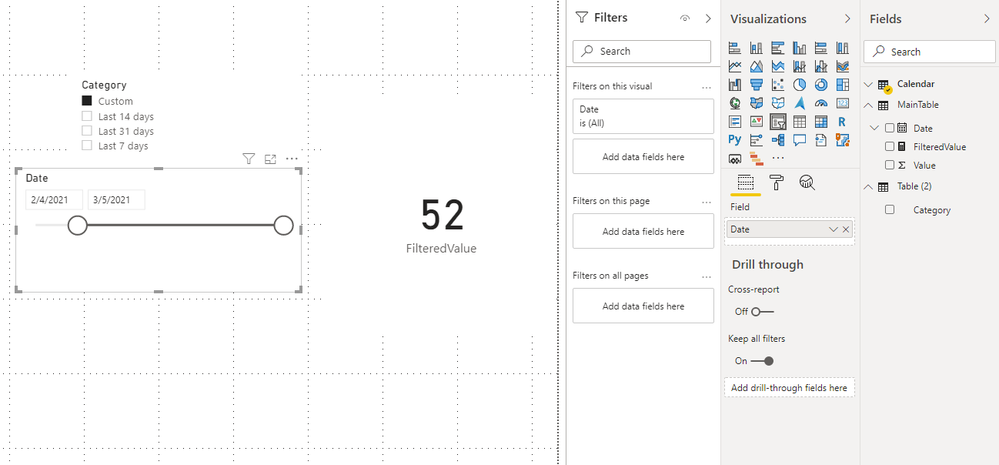
I didn't find the visual, but I made two slicers to achieve the effect you want.
1.Create a calendar table and there's no relationship between the calendar table and the main table.
Calendar = CALENDAR(MIN('MainTable'[Date]),TODAY())
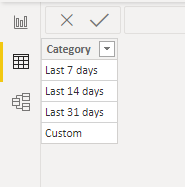
2.Create a table with categories by entering data.
3.Create the measure.
FilteredValue =
VAR nocustom =
SWITCH (
SELECTEDVALUE ( 'Table (2)'[Category] ),
"Last 7 days",
CALCULATE (
SUM ( MainTable[Value] ),
DATESINPERIOD ( 'MainTable'[Date], TODAY (), -7, DAY )
),
"Last 14 days",
CALCULATE (
SUM ( MainTable[Value] ),
DATESINPERIOD ( 'MainTable'[Date], TODAY (), -14, DAY )
),
"Last 31 days",
CALCULATE (
SUM ( MainTable[Value] ),
DATESINPERIOD ( 'MainTable'[Date], TODAY (), -31, DAY )
)
)
RETURN
IF (
SELECTEDVALUE ( 'Table (2)'[Category] ) = "Custom",
CALCULATE (
SUM ( MainTable[Value] ),
FILTER (
'MainTable',
[Date] >= MIN ( 'Calendar'[Date] )
&& [Date] <= MAX ( 'Calendar'[Date] )
)
),
nocustom
)
You can check more details from here.
Best Regards,
Stephen Tao
If this post helps, then please consider Accept it as the solution to help the other members find it more quickly.
Hi @nagarjunakan ,
I didn't find the visual, but I made two slicers to achieve the effect you want.
1.Create a calendar table and there's no relationship between the calendar table and the main table.
Calendar = CALENDAR(MIN('MainTable'[Date]),TODAY())
2.Create a table with categories by entering data.
3.Create the measure.
FilteredValue =
VAR nocustom =
SWITCH (
SELECTEDVALUE ( 'Table (2)'[Category] ),
"Last 7 days",
CALCULATE (
SUM ( MainTable[Value] ),
DATESINPERIOD ( 'MainTable'[Date], TODAY (), -7, DAY )
),
"Last 14 days",
CALCULATE (
SUM ( MainTable[Value] ),
DATESINPERIOD ( 'MainTable'[Date], TODAY (), -14, DAY )
),
"Last 31 days",
CALCULATE (
SUM ( MainTable[Value] ),
DATESINPERIOD ( 'MainTable'[Date], TODAY (), -31, DAY )
)
)
RETURN
IF (
SELECTEDVALUE ( 'Table (2)'[Category] ) = "Custom",
CALCULATE (
SUM ( MainTable[Value] ),
FILTER (
'MainTable',
[Date] >= MIN ( 'Calendar'[Date] )
&& [Date] <= MAX ( 'Calendar'[Date] )
)
),
nocustom
)
You can check more details from here.
Best Regards,
Stephen Tao
If this post helps, then please consider Accept it as the solution to help the other members find it more quickly.
what is the context to this? you have given very little information here if you use the filtering capability in power bi you should be able to do achieve this
see here for more information, and if you have a specific issue that you are struggling with please provide more information.
https://docs.microsoft.com/en-us/power-bi/create-reports/power-bi-report-filter-types
Proud to be a Super User!
Hi Vaness,
Thanks for ur help,
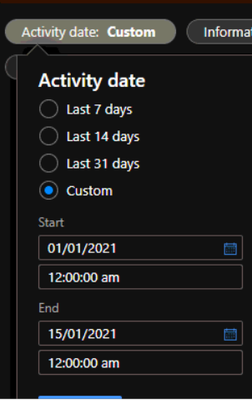
Actually i need start date and start time, End date and End Time in one slicer i need this kind of Format in one visual
Share feedback directly with Fabric product managers, participate in targeted research studies and influence the Fabric roadmap.
If you love stickers, then you will definitely want to check out our Community Sticker Challenge!
Check out the January 2026 Power BI update to learn about new features.
| User | Count |
|---|---|
| 62 | |
| 62 | |
| 42 | |
| 21 | |
| 18 |