FabCon is coming to Atlanta
Join us at FabCon Atlanta from March 16 - 20, 2026, for the ultimate Fabric, Power BI, AI and SQL community-led event. Save $200 with code FABCOMM.
Register now!- Power BI forums
- Get Help with Power BI
- Desktop
- Service
- Report Server
- Power Query
- Mobile Apps
- Developer
- DAX Commands and Tips
- Custom Visuals Development Discussion
- Health and Life Sciences
- Power BI Spanish forums
- Translated Spanish Desktop
- Training and Consulting
- Instructor Led Training
- Dashboard in a Day for Women, by Women
- Galleries
- Data Stories Gallery
- Themes Gallery
- Contests Gallery
- QuickViz Gallery
- Quick Measures Gallery
- Visual Calculations Gallery
- Notebook Gallery
- Translytical Task Flow Gallery
- TMDL Gallery
- R Script Showcase
- Webinars and Video Gallery
- Ideas
- Custom Visuals Ideas (read-only)
- Issues
- Issues
- Events
- Upcoming Events
The Power BI Data Visualization World Championships is back! Get ahead of the game and start preparing now! Learn more
- Power BI forums
- Forums
- Get Help with Power BI
- Desktop
- Re: unable to install power bi gateway
- Subscribe to RSS Feed
- Mark Topic as New
- Mark Topic as Read
- Float this Topic for Current User
- Bookmark
- Subscribe
- Printer Friendly Page


- Mark as New
- Bookmark
- Subscribe
- Mute
- Subscribe to RSS Feed
- Permalink
- Report Inappropriate Content
unable to install power bi gateway
I'm using win7 professional with 64 bit, i'm trying to install on permises gateway.
Mentioned below is the message I am getting.
"PowerBIGatewayInstaller has stopped working.
A problem caused the program to stop working correctly. Please close the program."
Please tell me how to solve this issue.
Solved! Go to Solution.
- Mark as New
- Bookmark
- Subscribe
- Mute
- Subscribe to RSS Feed
- Permalink
- Report Inappropriate Content
Hi @PraveenRaj,
I'd like some detail informations about this, such as install log, event logs, it is hard to troubleshoot your issue without any details informations.
Below is some tips to get trace logs:
Tools for troubleshooting
Collecting logs from the gateway configurator
There are several logs you can collect for the gateway, and you should always start with the logs. The simplest way to collect logs after installing the gateway is through the user interface. In the On-premises data gateway user interface, select Diagnostics and then select the Export logs link near the bottom of the page, as shown in the following image.
Installer logs
%localappdata%\Temp\On-premises_data_gateway_*.log
Configuration logs
%localappdata%\Microsoft\On-premises Data Gateway\GatewayConfigurator*.log
On-premises data gateway service logs
C:\Users\PBIEgwService\AppData\Local\Microsoft\On-premises Data Gateway\Gateway*.log
Event Logs
The On-premises data gateway service event logs are present under Application and Services Logs.
In addition, you can also consider to submit a support ticket for this issue, it is free for pro and above license users.

Regards,
Xiaoxin Sheng

- Mark as New
- Bookmark
- Subscribe
- Mute
- Subscribe to RSS Feed
- Permalink
- Report Inappropriate Content
Hi @PraveenRaj,
Please share some detail information and log to help us clarify your scenario, you can refer to following link to find out related logs:
Troubleshooting the On-premises data gateway
In addition, can you confirm your device suitable for the minimum requirement?
On-premises data gateway
Regards,
Xiaoxin Sheng
- Mark as New
- Bookmark
- Subscribe
- Mute
- Subscribe to RSS Feed
- Permalink
- Report Inappropriate Content
I previously installed on premises gateway on my laptop, it works good, no issues i found. Now i'm trying to install this gateway on my pc, i'm facing this issue, I don't know how to handle this problem, Please help me to get out this problem.
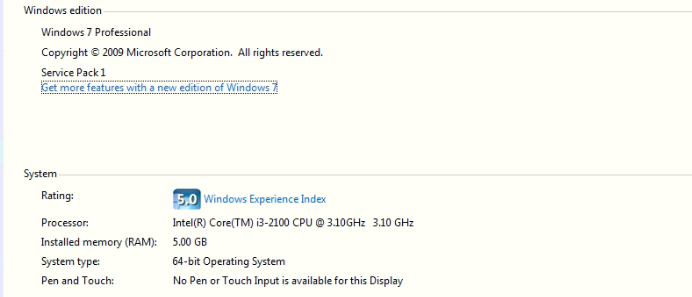
This is my pc specification, it needs statisfies minimum needs but, i'm unable to install the gateway
- Mark as New
- Bookmark
- Subscribe
- Mute
- Subscribe to RSS Feed
- Permalink
- Report Inappropriate Content
HI @PraveenRaj,
Please refer to above link I post about 'Troubleshooting on premise gateway' ->'Tools for troubleshooting' to find out related gateway logs and share here.
Regards,
Xiaoxin Sheng
- Mark as New
- Bookmark
- Subscribe
- Mute
- Subscribe to RSS Feed
- Permalink
- Report Inappropriate Content
Hi @Anonymous, I read the trouble shooting page already you shared, but it not helping to me get out of this issue, They are mostly written about the problems facing after installation, but my problem, i'm not yet installed it. When i just run the application as administrator, they pop up a window with this error.
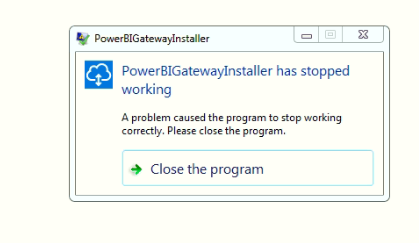
I dont know how to solve it, i also uninstalled the antivirus but still, i'm getting this error. Please help me to get out from this issue.
Thanks
- Mark as New
- Bookmark
- Subscribe
- Mute
- Subscribe to RSS Feed
- Permalink
- Report Inappropriate Content
Hi @PraveenRaj,
I'd like some detail informations about this, such as install log, event logs, it is hard to troubleshoot your issue without any details informations.
Below is some tips to get trace logs:
Tools for troubleshooting
Collecting logs from the gateway configurator
There are several logs you can collect for the gateway, and you should always start with the logs. The simplest way to collect logs after installing the gateway is through the user interface. In the On-premises data gateway user interface, select Diagnostics and then select the Export logs link near the bottom of the page, as shown in the following image.
Installer logs
%localappdata%\Temp\On-premises_data_gateway_*.log
Configuration logs
%localappdata%\Microsoft\On-premises Data Gateway\GatewayConfigurator*.log
On-premises data gateway service logs
C:\Users\PBIEgwService\AppData\Local\Microsoft\On-premises Data Gateway\Gateway*.log
Event Logs
The On-premises data gateway service event logs are present under Application and Services Logs.
In addition, you can also consider to submit a support ticket for this issue, it is free for pro and above license users.
Regards,
Xiaoxin Sheng
- Mark as New
- Bookmark
- Subscribe
- Mute
- Subscribe to RSS Feed
- Permalink
- Report Inappropriate Content
Hi @Anonymous
I installed the on premises gateway in my PC thank you so much for your support, Your guidings are more helpful to me.
Thanks&Regards
PraveenRaj.k
- Mark as New
- Bookmark
- Subscribe
- Mute
- Subscribe to RSS Feed
- Permalink
- Report Inappropriate Content
Hi @Anonymous,
Sorry for your inconvenience, But in my case, i just downloaded gateway, and trying to install the gateway, Nothing more than that i'm doing. When i'm trying to install the gateway, the popup window appears with this message. so i'm not having any logs to provide you. Please help me to get out from this issue.
Thanks

Helpful resources

Power BI Monthly Update - November 2025
Check out the November 2025 Power BI update to learn about new features.

Fabric Data Days
Advance your Data & AI career with 50 days of live learning, contests, hands-on challenges, study groups & certifications and more!

FabCon Atlanta 2026
Join us at FabCon Atlanta, March 16-20, for the ultimate Fabric, Power BI, AI and SQL community-led event. Save $200 with code FABCOMM.

| User | Count |
|---|---|
| 58 | |
| 45 | |
| 42 | |
| 21 | |
| 18 |


| User | Count |
|---|---|
| 172 | |
| 107 | |
| 92 | |
| 54 | |
| 46 |


