Join us at FabCon Atlanta from March 16 - 20, 2026, for the ultimate Fabric, Power BI, AI and SQL community-led event. Save $200 with code FABCOMM.
Register now!Get Fabric Certified for FREE during Fabric Data Days. Don't miss your chance! Request now
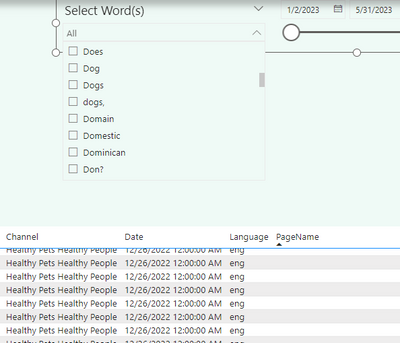
Hi I have a slicer that contains keywords that I pulled out from a field in an unrelated table.
I'm trying to filter that table, from the choice in the slicer. Since the slicer contains only a portion of the data in the record in that field, so I can't seem to create a way to filter a table where if the word from the slicer is found anywhere in the field in the record, i want to see that record .
When I check the word dogs, I want all records where the word dog appears in the pagename field.
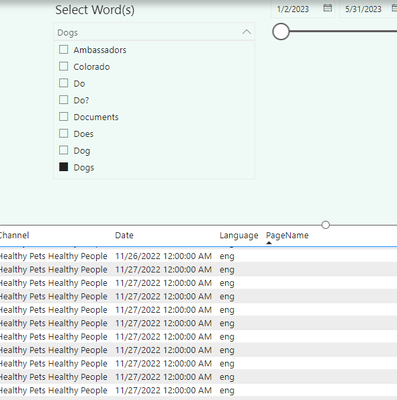
Currently when I choose the word in the slicer, this is what it looks like. PageName field shows nothing:
So the bottom line is, how do i filter the table below the slicer, if a word picked off the slicer is found anywhere in the record?
Any help is appreciated.
Thanks, Steve.
Solved! Go to Solution.
use a measure to compute the match (1) or no match (0) for each row of the filter context. use that measure as a visual filter.
Please provide sample data that covers your issue or question completely, in a usable format (not as a screenshot).
https://community.fabric.microsoft.com/t5/Community-Blog/How-to-provide-sample-data-in-the-Power-BI-...
Please show the expected outcome based on the sample data you provided.
https://community.fabric.microsoft.com/t5/Desktop/How-to-Get-Your-Question-Answered-Quickly/m-p/1447...
Thanks for your help on this challenge!
use a measure to compute the match (1) or no match (0) for each row of the filter context. use that measure as a visual filter.
Please provide sample data that covers your issue or question completely, in a usable format (not as a screenshot).
https://community.fabric.microsoft.com/t5/Community-Blog/How-to-provide-sample-data-in-the-Power-BI-...
Please show the expected outcome based on the sample data you provided.
https://community.fabric.microsoft.com/t5/Desktop/How-to-Get-Your-Question-Answered-Quickly/m-p/1447...
Check out the November 2025 Power BI update to learn about new features.
Advance your Data & AI career with 50 days of live learning, contests, hands-on challenges, study groups & certifications and more!