cancel
Showing results for 
Search instead for 
Did you mean: 

The Power BI Data Visualization World Championships is back! Get ahead of the game and start preparing now! Learn more

Reply
FrederikDec
Frequent Visitor

unable to change reporting server in Power BI SSRS

In the Power BI desktop Client (SSRS Preview), I typed a malformed URL and hit enter when trying to publish a report to the Reporting Service.

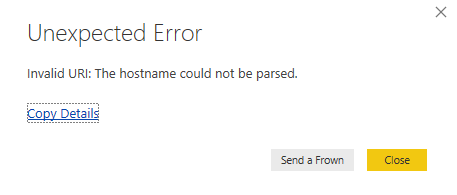
When I try to republish to SSRS an error appears instead of the prompt asking for the Reporting Server.

"Invalid URI: The hostname could not be parsed".


I'm unable to find the location to change this URL (which I'm aware of to be wrong). Anyone who can help?


An uninstall-reinstall did not help.


5 REPLIES 5
v-ljerr-msft
Microsoft Employee
Microsoft Employee

Hi @FrederikDec,


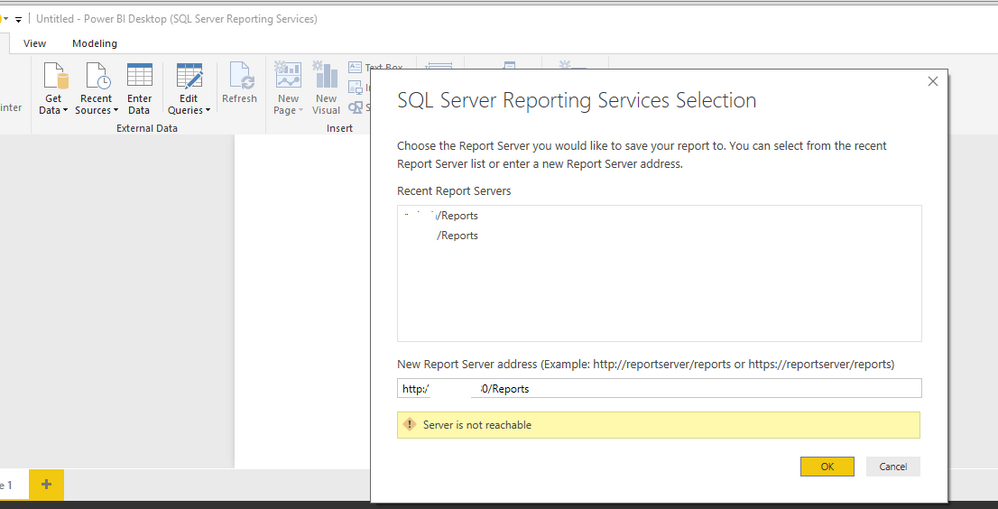
I just tested it on my environment, when republishing reports to SSRS, the prompt asking for the Reporting Server will appear no matter I typed a malformed or right URL previously.


Capture1.PNG


Regards

Hi @v-ljerr-msft


That is indeed the expected behaviour. The problem is, I can not go back to this dialog to correct the entry I did. I was too trigger happy, pressed enter when I typed a malformed URL. Everytime I go to Save As > SSRS Report I get the following screen:


sendafrown.PNG

When I check the details, I can not find the URL either. 


I'll send a frown then 🙂 


Regards

I tried to clean the app cache to remove the recent reportserver which appear after I click on Save as ---> SSRS report but with no success, maybe if there is a way to find the dat file/registry key which holds this information you will be able to open it again 


I would recommend performing a full uninstall with any free software like Revo/CCleaner


I hope this can solve your issue 


thanks 

eetester
Frequent Visitor

I don't know why you are using "Publish" , as i know to save PowerBI report to SSRS you can do this only through Save As --> SQL Server Reporting Service 


There, you can add the right reporting server "url"


Hi eetester


Actually that's what I use. I see that as 'publishing' but maybe that's the wrong terminology 🙂 .


I typed my URL there (the save as > SSRS report dialog) but it had a typo in it. I accidentally hit enter and now I'm unable to change the URL because I keep getting the error message I posted.


Regards


Frederik

Helpful resources

Announcements
Power BI DataViz World Championships

Power BI Dataviz World Championships

The Power BI Data Visualization World Championships is back! Get ahead of the game and start preparing now!

November Power BI Update Carousel

Power BI Monthly Update - November 2025

Check out the November 2025 Power BI update to learn about new features.

FabCon Atlanta 2026 carousel

FabCon Atlanta 2026

Join us at FabCon Atlanta, March 16-20, for the ultimate Fabric, Power BI, AI and SQL community-led event. Save $200 with code FABCOMM.