

Share feedback directly with Fabric product managers, participate in targeted research studies and influence the Fabric roadmap.
Sign up nowGet Fabric certified for FREE! Don't miss your chance! Learn more
Hello all,
I have made a connection with a tool, but the data is coming in as a long line of columns
similar to the example below but its hundreds of columns. Is there an easy way to transform this data so that I have a string column with all the strings listed, volume overall, month volume and then month and year column
similar to this. so its easy for me to work with and build visuals.
thank you in advance
Solved! Go to Solution.
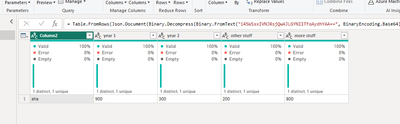
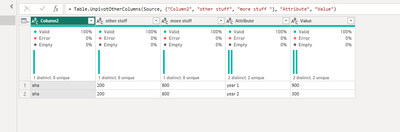
you should be able to do this in power query you just need to unpivot the the volume columns into one column, see example attached - im using year1 and year 2 in this example but thats irrelevant really, you can do this with any columns using UNPIVOT ans selecting the columns involved.
Proud to be a Super User!
you should be able to do this in power query you just need to unpivot the the volume columns into one column, see example attached - im using year1 and year 2 in this example but thats irrelevant really, you can do this with any columns using UNPIVOT ans selecting the columns involved.
Proud to be a Super User!
Share feedback directly with Fabric product managers, participate in targeted research studies and influence the Fabric roadmap.
If you love stickers, then you will definitely want to check out our Community Sticker Challenge!
Check out the January 2026 Power BI update to learn about new features.
| User | Count |
|---|---|
| 63 | |
| 62 | |
| 42 | |
| 20 | |
| 18 |