Join us at FabCon Atlanta from March 16 - 20, 2026, for the ultimate Fabric, Power BI, AI and SQL community-led event. Save $200 with code FABCOMM.
Register now!The Power BI Data Visualization World Championships is back! It's time to submit your entry. Live now!
hi
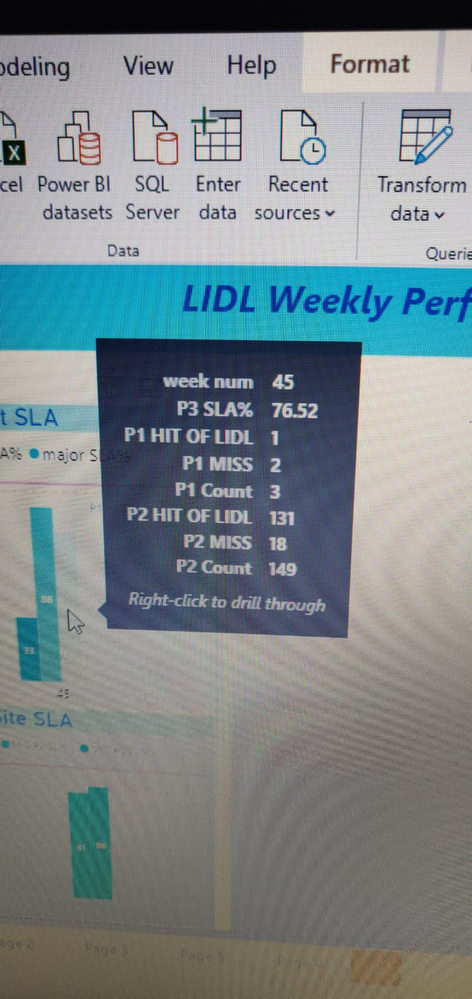
i have a bargraph where the tool tips display all the data related to all the bars
now what i want is i want my tool tip to display data realated to that particular bar only
how can i do that
current output
Solved! Go to Solution.
Hi @Anonymous ,
Based on your description, I have created the sample table like this:
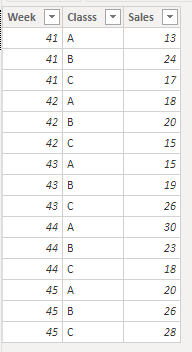
Create a measure and use it in tooltip to show each week's total sales:
Week total sales =
CALCULATE (
SUM ( 'Table'[Sales] ),
FILTER ( ALL ( 'Table' ), 'Table'[Week] IN DISTINCT ( 'Table'[Week] ) )
)
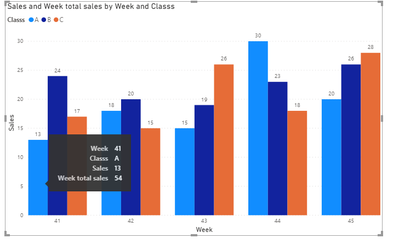
Attached a sample file in the below, hopes to help you.
Best Regards,
Community Support Team _ Yingjie Li
If this post helps, then please consider Accept it as the solution to help the other members find it more quickly.
Hi @Anonymous ,
Based on your description, I have created the sample table like this:
Create a measure and use it in tooltip to show each week's total sales:
Week total sales =
CALCULATE (
SUM ( 'Table'[Sales] ),
FILTER ( ALL ( 'Table' ), 'Table'[Week] IN DISTINCT ( 'Table'[Week] ) )
)
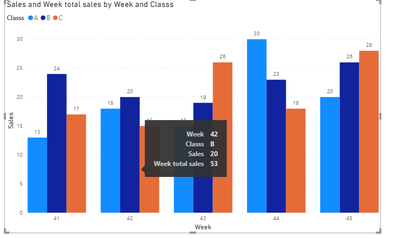
Attached a sample file in the below, hopes to help you.
Best Regards,
Community Support Team _ Yingjie Li
If this post helps, then please consider Accept it as the solution to help the other members find it more quickly.
| User | Count |
|---|---|
| 53 | |
| 37 | |
| 31 | |
| 21 | |
| 19 |
| User | Count |
|---|---|
| 138 | |
| 102 | |
| 59 | |
| 36 | |
| 35 |