
cancel
Showing results for 
Search instead for 
Did you mean: 

The Power BI Data Visualization World Championships is back! Get ahead of the game and start preparing now! Learn more

Reply
dwh
Helper II
Helper II

timeline filter

Hello everyone,
I am creating a report and I would like to use a visual that I find in the app store, timeline or paratimeline. My embed problem report is set to 5600 x 2600 pixels. Using those views I can't zoom in on all the data in them. Unfortunately I can only enlarge the names of the labels while all the other objects remain small. is it possible to change this setting in any way?
Do you know any filters that allow me to have a time selection bar that fit my graphics?

Thank you all

dwh_0-1647016801870.png


6 REPLIES 6
truptis
Community Champion
Community Champion

@dwh - Please try this visual may be this helps- https://www.youtube.com/watch?v=8gRqGQijsl0 

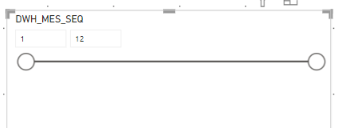
I would like this

dwh_0-1647341819098.png

but I don't want number but name of month (January, February, March, etc.)

truptis
Community Champion
Community Champion

Hi @truptis ,

Thanks for your help, but this thing is impossible for me because it is a bit complicated report. I have 5 facts that come from 5 different tables, some are month / year and some are year only. If I filter by month, however, I do not have to filter the data that have no month but only the facts that have the data in the months.
I tested a new solution. Using the classic filter with menus by year and one by month. But I have the problem that being a default filter does not allow me to have a complete view.
https://community.powerbi.com/t5/Desktop/Slicer-Filter/m-p/2395700#M859727
Unfortunately I have complicated business needs that require certain views otherwise I would have solved with an extended filter for horizontal.

truptis
Community Champion
Community Champion

Hi @dwh , 
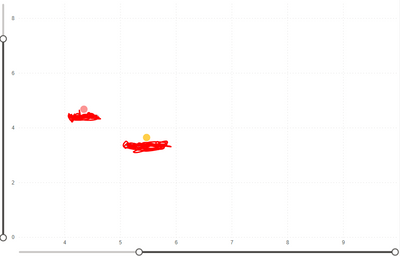
Not sure about this visual but we do have Zoom Slicers option available for zooming the values for some visuals. they look like this(screenshot):

truptis_0-1647018277177.png

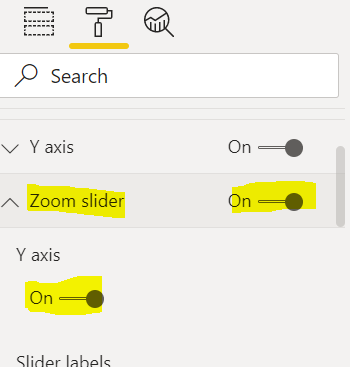
You can see this Zoom Slider option in format Pane.

truptis_1-1647018547787.png

Please hit thumbs up if it helps you. Thanks.

Regards,

TruptiS

Hi @truptis Thanks for the reply

Unfortunately this is not the visual object. In my case there is no zoom. Do you know any other visual filters or other ways to filter via timeline?
Thank you

Helpful resources

Announcements
Power BI DataViz World Championships

Power BI Dataviz World Championships

The Power BI Data Visualization World Championships is back! Get ahead of the game and start preparing now!

December 2025 Power BI Update Carousel

Power BI Monthly Update - December 2025

Check out the December 2025 Power BI Holiday Recap!

FabCon Atlanta 2026 carousel

FabCon Atlanta 2026

Join us at FabCon Atlanta, March 16-20, for the ultimate Fabric, Power BI, AI and SQL community-led event. Save $200 with code FABCOMM.