cancel
Showing results for 
Search instead for 
Did you mean: 

Get Fabric Certified for FREE during Fabric Data Days. Don't miss your chance! Request now

Reply
Anonymous
Not applicable

time format average

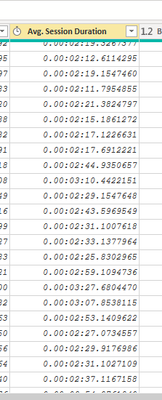
Hi!, I have a column in table1 , like this:

mhv22_0-1665199674882.png

then I have the same column name and format in 2 different tables : Table2 and Table3 .

I need the average of these 3  columns : (table1[avg.Session.Duration] + table2[avg.Session.Duration]+table3[avg.Session.Duration])/3


but the result must be shown in a card in a time format...I mean... if table1 avg time = 1min 10 seg,  table2 avg time = 1min 20 seg and table3 avg time = 1min 30 seg, I need to show in a card  00:01:20 in time format (hh:nn:ss) ....How could it be done?
Thanks in advance-!!!!

2 ACCEPTED SOLUTIONS
lukiz84
Memorable Member
Memorable Member

Hi,


Table1AvgTime = 
    AVERAGEX(Table1, Table1[Avg. Session Duration])

Table2AvgTime = 
    AVERAGEX(Table2, Table2[Avg. Session Duration])

Table3AvgTime = 
    AVERAGEX(Table3, Table3[Avg. Session Duration])

TotalAvg =
    DIVIDE(Table1AvgTime + Table2AvgTime + Table3AvgTime, 3)


View solution in original post

PaulDBrown
Community Champion
Community Champion

It would help if you showed the structure of the tabels and model. Ideally you should have dimension tables for fields common to all tables, which would make the calculation straightforward. Having said that, you can try the following measure:


Average Time = 
VAR _T1 = SELECTCOLUMNS('Table 1', "Duration", 'Table 1'[Duration 1])
VAR _T2 = SELECTCOLUMNS('Table 2', "Duration", 'Table 2'[Duration 2])
VAR _T3 = SELECTCOLUMNS('Table 3', "Duration", 'Table 3'[Duration 3])
VAR _FinalTable = UNION(_T1, _T2, _T3)
RETURN
CONVERT(AVERAGEX(_FinalTable, [Duration]), DATETIME)


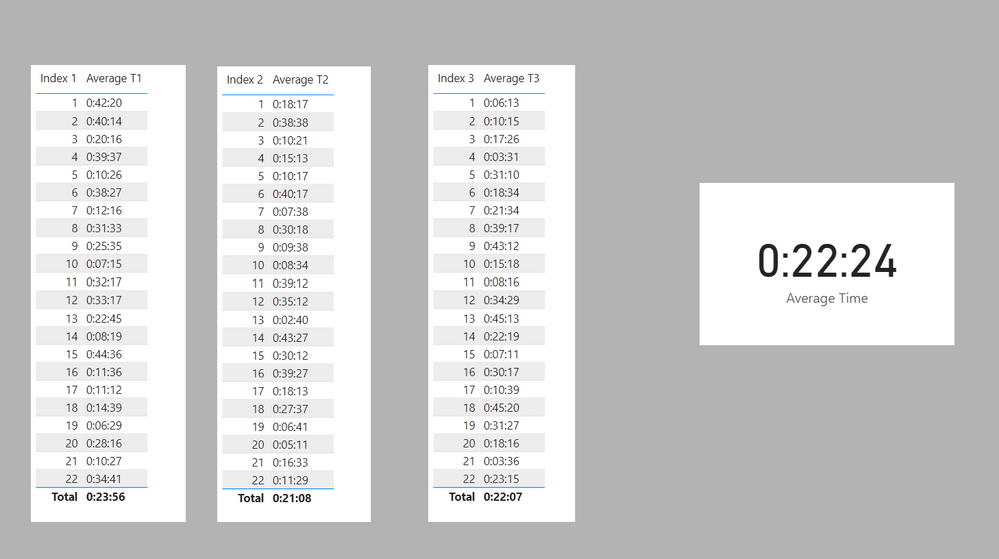
result.png

Sample file attached

EDIT: I just tested @lukiz84 approach and it delivers the same answer, and is of course much simpler!


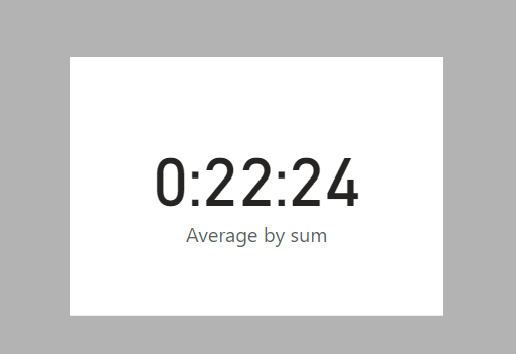
Average by sum = 
VAR _T1 = AVERAGE('Table 1'[Duration 1])
VAR _T2 = AVERAGE('Table 2'[Duration 2])
VAR _T3 = AVERAGE('Table 3'[Duration 3])
RETURN
CONVERT(DIVIDE(_T1 + _T2 + _T3, 3), DATETIME)


sum.png


Did I answer your question? Mark my post as a solution!
In doing so, you are also helping me. Thank you!

Proud to be a Super User!
Paul on Linkedin.


View solution in original post

2 REPLIES 2
PaulDBrown
Community Champion
Community Champion

It would help if you showed the structure of the tabels and model. Ideally you should have dimension tables for fields common to all tables, which would make the calculation straightforward. Having said that, you can try the following measure:


Average Time = 
VAR _T1 = SELECTCOLUMNS('Table 1', "Duration", 'Table 1'[Duration 1])
VAR _T2 = SELECTCOLUMNS('Table 2', "Duration", 'Table 2'[Duration 2])
VAR _T3 = SELECTCOLUMNS('Table 3', "Duration", 'Table 3'[Duration 3])
VAR _FinalTable = UNION(_T1, _T2, _T3)
RETURN
CONVERT(AVERAGEX(_FinalTable, [Duration]), DATETIME)


result.png

Sample file attached

EDIT: I just tested @lukiz84 approach and it delivers the same answer, and is of course much simpler!


Average by sum = 
VAR _T1 = AVERAGE('Table 1'[Duration 1])
VAR _T2 = AVERAGE('Table 2'[Duration 2])
VAR _T3 = AVERAGE('Table 3'[Duration 3])
RETURN
CONVERT(DIVIDE(_T1 + _T2 + _T3, 3), DATETIME)


sum.png


Did I answer your question? Mark my post as a solution!
In doing so, you are also helping me. Thank you!

Proud to be a Super User!
Paul on Linkedin.


lukiz84
Memorable Member
Memorable Member

Hi,


Table1AvgTime = 
    AVERAGEX(Table1, Table1[Avg. Session Duration])

Table2AvgTime = 
    AVERAGEX(Table2, Table2[Avg. Session Duration])

Table3AvgTime = 
    AVERAGEX(Table3, Table3[Avg. Session Duration])

TotalAvg =
    DIVIDE(Table1AvgTime + Table2AvgTime + Table3AvgTime, 3)


Helpful resources

Announcements
Fabric Data Days Carousel

Fabric Data Days

Advance your Data & AI career with 50 days of live learning, contests, hands-on challenges, study groups & certifications and more!

October Power BI Update Carousel

Power BI Monthly Update - October 2025

Check out the October 2025 Power BI update to learn about new features.

FabCon Atlanta 2026 carousel

FabCon Atlanta 2026

Join us at FabCon Atlanta, March 16-20, for the ultimate Fabric, Power BI, AI and SQL community-led event. Save $200 with code FABCOMM.

Top Solution Authors