Get Fabric or SQL Certified for Free.
Get certified for free when you join Fabric Data Days 2026 and dive into Fabric, Power BI, SQL, AI, and other essential data skills.
Join now- Power BI forums
- Get Help with Power BI
- Desktop
- Service
- Report Server
- Power Query
- Mobile Apps
- Developer
- DAX Commands and Tips
- Custom Visuals Development Discussion
- Health and Life Sciences
- Power BI Spanish forums
- Translated Spanish Desktop
- Training and Consulting
- Instructor Led Training
- Dashboard in a Day for Women, by Women
- Galleries
- Data Stories Gallery
- Themes Gallery
- Contests Gallery
- QuickViz Gallery
- Quick Measures Gallery
- Visual Calculations Gallery
- Fabric Apps Gallery
- Notebook Gallery
- Translytical Task Flow Gallery
- TMDL Gallery
- R Script Showcase
- Webinars and Video Gallery
- Ideas
- Custom Visuals Ideas (read-only)
- Issues
- Issues
- Events
- Upcoming Events
July 28 - August 9 | Final Round of the Power BI Dataviz World Championships. This is your chance. Learn more
- Power BI forums
- Forums
- Get Help with Power BI
- Desktop
- Re: time difference between 2 rows
- Subscribe to RSS Feed
- Mark Topic as New
- Mark Topic as Read
- Float this Topic for Current User
- Bookmark
- Subscribe
- Printer Friendly Page

- Mark as New
- Bookmark
- Subscribe
- Mute
- Subscribe to RSS Feed
- Permalink
- Report Inappropriate Content
time difference between 2 rows
Hi
who can help me?
I have a table like this:
ID | EMPLOYEE | |IN/OUT | Date | Time
1    1002        IN       2017-01-01 08:00
2    ......
5    1002        OUT      2017-01-01 18:00
6    ......
Now i want to know the attendance time for the EMPLOYEE keeping in mind that there a more rows for another people
It also can happen that people works in a nightshift
ID | EMPLOYEE | |IN/OUT | Date | Time
1    1002        IN       2017-01-01 22:00
2    .....
5    1002        OUT      2017-01-02 07:00
6    .....
Also then i want to know the time
Wiht kind regards,
Norbertus
Solved! Go to Solution.


- Mark as New
- Bookmark
- Subscribe
- Mute
- Subscribe to RSS Feed
- Permalink
- Report Inappropriate Content
In Power Query you can:
- Combine Date and Time to DateTime.
- Sort on employee and DateTime.
- Add 2 indices starting with 0 and 1.
- Merge the table with itself using the first and second index as key, so you have the previous values on the same row as the current values.
- Add a column with the DateTime minus the previous DateTime if the employee is the same and the previous was IN and the current is OUT, else null.
- Sort on ID to restore the original sort (not really necessary).
- Remove columns that are no longer needed.
let
    Source = Table1,
    #"Inserted Merged Date and Time" = Table.AddColumn(Source, "DateTime", each [Date] & [Time], type datetime),
    #"Sorted Rows" = Table.Sort(#"Inserted Merged Date and Time",{{"EMPLOYEE", Order.Ascending}, {"DateTime", Order.Ascending}}),
    #"Added Index" = Table.AddIndexColumn(#"Sorted Rows", "Index", 0, 1),
    #"Added Index1" = Table.AddIndexColumn(#"Added Index", "Index.1", 1, 1),
    #"Merged Queries" = Table.NestedJoin(#"Added Index1",{"Index"},#"Added Index1",{"Index.1"},"Prev",JoinKind.LeftOuter),
    #"Expanded Prev" = Table.ExpandTableColumn(#"Merged Queries", "Prev", {"EMPLOYEE", "IN/OUT", "DateTime"}, {"Prev.EMPLOYEE", "Prev.IN/OUT", "Prev.DateTime"}),
    #"Added Custom" = Table.AddColumn(#"Expanded Prev", "TimeDifference", each if [EMPLOYEE] = [Prev.EMPLOYEE] and [#"Prev.IN/OUT"] = "IN" and [#"IN/OUT"] = "OUT" then [DateTime] - [Prev.DateTime] else null, type nullable duration),
    #"Sorted Rows1" = Table.Sort(#"Added Custom",{{"ID", Order.Ascending}}),
    #"Removed Columns" = Table.RemoveColumns(#"Sorted Rows1",{"DateTime", "Index", "Index.1", "Prev.EMPLOYEE", "Prev.IN/OUT", "Prev.DateTime"})
in
    #"Removed Columns"
- Mark as New
- Bookmark
- Subscribe
- Mute
- Subscribe to RSS Feed
- Permalink
- Report Inappropriate Content
Hi @Anonymous,
You can refer to below formula to achieve your requirement.
Table:
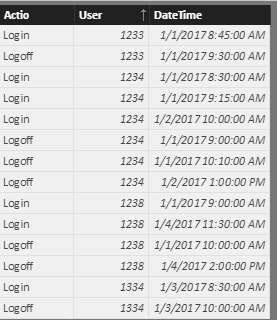
Measure:
diff =
var current_user=LASTNONBLANK(Record[User],[User])
var current_date=MAX(Record[DateTime])
var current_state=LASTNONBLANK(Record[Actio],[Actio])
var min_date=SWITCH(current_state,"Login",current_date,"Logoff",MAXX(FILTER(ALL(Record),[User]=current_user&&[DateTime]<current_date),[DateTime]))
var max_date=SWITCH(current_state,"Login",MINX(FILTER(ALL(Record),[User]=current_user&&[DateTime]>current_date),[DateTime]),"Logoff",current_date)
return
DATEDIFF(min_date,max_date,MINUTE)
Result:

Notice: datetime are merged by date and time column, 'user' = 'employee', 'action' = 'in/out'.
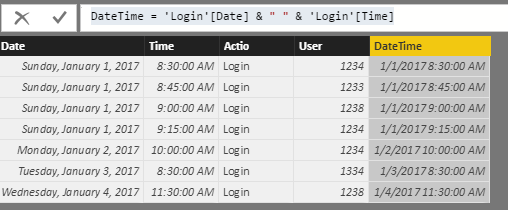
Regards,
Xiaoxin Sheng
- Mark as New
- Bookmark
- Subscribe
- Mute
- Subscribe to RSS Feed
- Permalink
- Report Inappropriate Content
what if we have more than 1 login and log off for the same employee in the same day, so u have any solution for that
- Mark as New
- Bookmark
- Subscribe
- Mute
- Subscribe to RSS Feed
- Permalink
- Report Inappropriate Content
help please as for the same employee i have more than login and log off for the same day and I need to calculate networking hours ( latest exit time - earliest entry time ) for same-day and same employee


- Mark as New
- Bookmark
- Subscribe
- Mute
- Subscribe to RSS Feed
- Permalink
- Report Inappropriate Content
Hey,
wondering if its possible that there are more ins and outs for one person, or a little rephrased. Your are looking for the duration a a person has been in when leaving (out), whereas this duration is the difference between the in and its immediate following out.
Right?
Did I answer your question? Mark my post as a solution, this will help others!
Proud to be a Super User!
I accept Kudos 😉
Hamburg, Germany
- Mark as New
- Bookmark
- Subscribe
- Mute
- Subscribe to RSS Feed
- Permalink
- Report Inappropriate Content
hi,
There are more Employees so i don't know which row is the OUT time for one specific Employee.
I need to know the time between IN and OUT for one Employee
- Mark as New
- Bookmark
- Subscribe
- Mute
- Subscribe to RSS Feed
- Permalink
- Report Inappropriate Content
In Power Query you can:
- Combine Date and Time to DateTime.
- Sort on employee and DateTime.
- Add 2 indices starting with 0 and 1.
- Merge the table with itself using the first and second index as key, so you have the previous values on the same row as the current values.
- Add a column with the DateTime minus the previous DateTime if the employee is the same and the previous was IN and the current is OUT, else null.
- Sort on ID to restore the original sort (not really necessary).
- Remove columns that are no longer needed.
let
    Source = Table1,
    #"Inserted Merged Date and Time" = Table.AddColumn(Source, "DateTime", each [Date] & [Time], type datetime),
    #"Sorted Rows" = Table.Sort(#"Inserted Merged Date and Time",{{"EMPLOYEE", Order.Ascending}, {"DateTime", Order.Ascending}}),
    #"Added Index" = Table.AddIndexColumn(#"Sorted Rows", "Index", 0, 1),
    #"Added Index1" = Table.AddIndexColumn(#"Added Index", "Index.1", 1, 1),
    #"Merged Queries" = Table.NestedJoin(#"Added Index1",{"Index"},#"Added Index1",{"Index.1"},"Prev",JoinKind.LeftOuter),
    #"Expanded Prev" = Table.ExpandTableColumn(#"Merged Queries", "Prev", {"EMPLOYEE", "IN/OUT", "DateTime"}, {"Prev.EMPLOYEE", "Prev.IN/OUT", "Prev.DateTime"}),
    #"Added Custom" = Table.AddColumn(#"Expanded Prev", "TimeDifference", each if [EMPLOYEE] = [Prev.EMPLOYEE] and [#"Prev.IN/OUT"] = "IN" and [#"IN/OUT"] = "OUT" then [DateTime] - [Prev.DateTime] else null, type nullable duration),
    #"Sorted Rows1" = Table.Sort(#"Added Custom",{{"ID", Order.Ascending}}),
    #"Removed Columns" = Table.RemoveColumns(#"Sorted Rows1",{"DateTime", "Index", "Index.1", "Prev.EMPLOYEE", "Prev.IN/OUT", "Prev.DateTime"})
in
    #"Removed Columns"
Helpful resources

Fabric Community Sticker Challenge - Barcelona 2026
If you love stickers, then you will definitely want to check out our community sticker challenge, Barcelona edition!

Power BI Monthly Update - July 2026
Check out the July 2026 Power BI update to learn about new features.

Power BI DataViz World Championships - June 2026
A new Power BI DataViz World Championship is coming this June! Don't miss out on submitting your entry.

| User | Count |
|---|---|
| 28 | |
| 28 | |
| 19 | |
| 19 | |
| 19 |


| User | Count |
|---|---|
| 35 | |
| 26 | |
| 18 | |
| 18 | |
| 17 |


