The ultimate Fabric, Power BI, SQL, and AI community-led learning event. Save €200 with code FABCOMM.
Get registeredEnhance your career with this limited time 50% discount on Fabric and Power BI exams. Ends August 31st. Request your voucher.
hello all,
i have a question about the "secondary axis", e.g. the Visualization "Line and stacked column chart",
course i have more than 1 data for "Line values", when i select "show secondary" in "Y axis", then all the data in the line chart will automatically correspond to the second y-axis. But I actually want some data still correspond to the first y-axis.
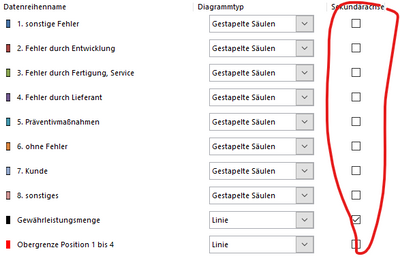
In Excel people can customize the data that needs to correspond to the second y-axis :s
So I am wondering if I could do the same in Power BI?
Thx a lot !!
HI @XidoMM,
Unfortunately, this effect may not be simply achieved on the secondary axis to interact with the first axis.
Did these axis fields include any relationship mappings? If that is the case, you can write a measure expression to get the current axis value and use it as a conditon to look up correspond another axis value for calculating.
In addition, you can also try to use script-based visuals to manually plot these graphs if you were familiar with these special visuals. (e.g. R, Python)
Regards,
Xiaoxin Sheng
@XidoMM , You can all lines on the first axis or none. You can switch of secondary axis and get all lines on the first axis.
Log an idea for support on both axis - https://ideas.powerbi.com/ideas/
check for any custom visual https://appsource.microsoft.com/en-us/product/power-bi-visuals/WA104380768?tab=Overview
Hi ami,
but all the lines will correspond to the same y-axis, right? 😕
How can I make one line correspond to the first y-axis and the other line correspond to the second y-axis?