Join us at FabCon Atlanta from March 16 - 20, 2026, for the ultimate Fabric, Power BI, AI and SQL community-led event. Save $200 with code FABCOMM.
Register now!The Power BI Data Visualization World Championships is back! Get ahead of the game and start preparing now! Learn more
Hello,
Is it possible to create a target line in a line and graph chart which increases by 1% each month?
Thanks.
Solved! Go to Solution.
Hi @Anonymous
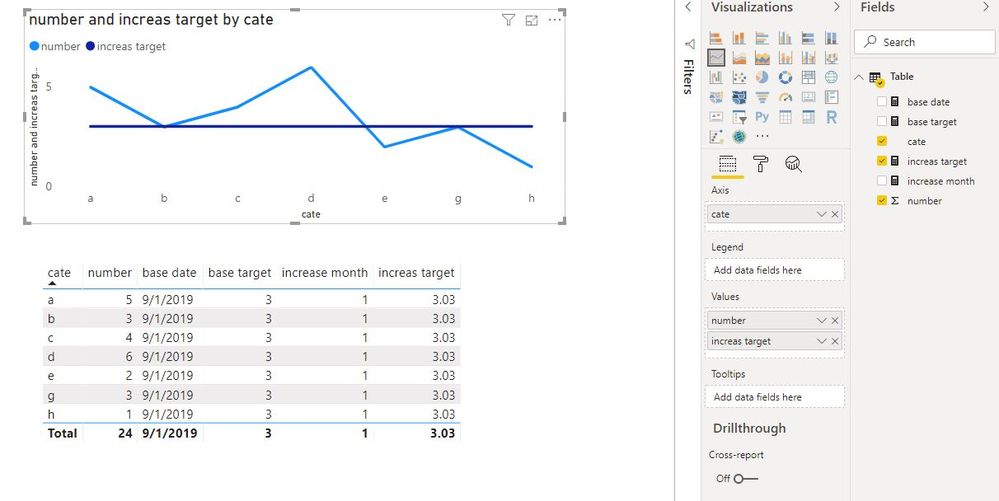
If you mean to add such a line in a line chart, you could refer to my test below.
base date = DATE(2019,9,1) base target = 3 increase month = DATEDIFF([base date],TODAY(),MONTH) increas target = [base target]*(1+[increase month]/100)
If
Hi @Anonymous
If you mean to add such a line in a line chart, you could refer to my test below.
base date = DATE(2019,9,1) base target = 3 increase month = DATEDIFF([base date],TODAY(),MONTH) increas target = [base target]*(1+[increase month]/100)
If
If you know the start month, let's say its Jan.
Then you can create a calculated column that divides the month number of the date by 100, which will give you .2, .3, .4 for feb mar and april etc
Then you can add that column to your graph
Help when you know. Ask when you don't!
Do you have time to do a screen share today ? I usually use Zoom. Then we can go over your problem in detail.
Help when you know. Ask when you don't!
Check out the November 2025 Power BI update to learn about new features.
Advance your Data & AI career with 50 days of live learning, contests, hands-on challenges, study groups & certifications and more!
| User | Count |
|---|---|
| 58 | |
| 45 | |
| 42 | |
| 21 | |
| 18 |
| User | Count |
|---|---|
| 172 | |
| 107 | |
| 92 | |
| 54 | |
| 46 |