Get certified for free when you join Fabric Data Days 2026 and dive into Fabric, Power BI, SQL, AI, and other essential data skills.
Join nowData Days is here! Join us now for 60+ days of learning, challenges, and connection. Learn more
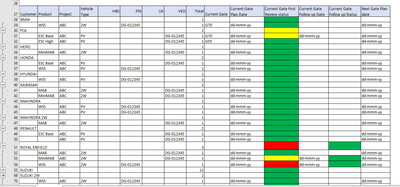
Hello Everyone, I have a data in .xlsx file which is to be represented in Table matrix in Power Bi exactly the same way as shown in image,find the attached image. solution for this plz...
Hi @Anonymous
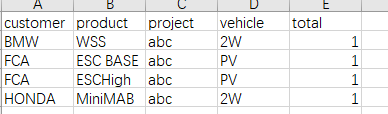
You need to deal with the data in excel , like below (delete summarize rows ,and fill all the customer column)
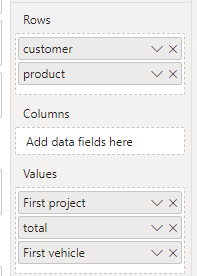
Then in power bi desktop , use a matrix, you can set the customer ,and product in rows bucket,and other columns send to Values bucket.
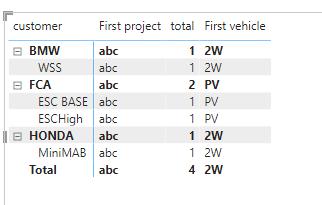
Preview result:
Best Regards,
Community Support Team _Isabella
If this post helps, then please consider Accept it as the solution to help the other members find it more quickly.
Hey isabella Thank you for the response but as you can see my snippet which i have uploaded, it displays nothing when minimised and when maximised it display all the data and you uploaded the last image which shows first project, first vehicle which is not to be displayed, i hope you understand my issue.
Hi @uif04775
The value in the matrix is based on the aggregation operation. There is no way to do aggregation only in the detail row, but not in the summary row.
Hi @Anonymous
Use the table visual and add the conditional formatting logic for the column.
Thanks
Hari
Don't miss out on Data Days, June 15 through August 7. Learn Fabric, Power BI, SQL, AI and more.
Check out the May 2026 Power BI update to learn about new features.
| User | Count |
|---|---|
| 23 | |
| 23 | |
| 21 | |
| 20 | |
| 15 |
| User | Count |
|---|---|
| 58 | |
| 54 | |
| 42 | |
| 30 | |
| 24 |