Join us at FabCon Atlanta from March 16 - 20, 2026, for the ultimate Fabric, Power BI, AI and SQL community-led event. Save $200 with code FABCOMM.
Register now!The Power BI Data Visualization World Championships is back! Get ahead of the game and start preparing now! Learn more
Hi all,
I have an issue with below.
I want to transfom my current data table to the desired data table.
Can somebody help me out?
Thanks!
John
Current data
| carrier_product_group | section | product_sub_group | partnumber_sup | order_amount | points_audit |
| Repaired Eletronics | 3.c | ML3 repaired microprocessor | 1256008 | 2 | 2 |
| Repaired Eletronics | 3.c | ML3 repaired microprocessor | 1256011 | 4 | 2 |
| Repaired Eletronics | 3.c | ML3 repaired microprocessor | 1256012 | 2 | 2 |
Desired data
| carrier_product_group | section | product_sub_group | average_points_audit |
| Repaired Eletronics | 3.c | ML3 repaired microprocessor | 2 |
Solved! Go to Solution.
Hi @Anonymous
just put columns
| carrier_product_group | section | product_sub_group |
on your vusiaul table.
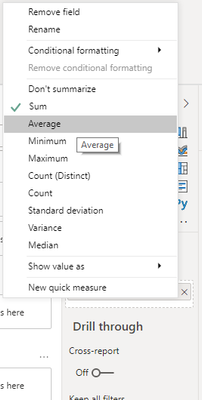
then put column points_audit and set aggregation as Average in Visualization pane
Hi @Anonymous ,
Or create a calculated table.
Desired data =
SUMMARIZE(
'Current data',
'Current data'[carrier_product_group],
'Current data'[section],
'Current data'[product_sub_group],
"average_points_audit", AVERAGE('Current data'[points_audit])
)
Best regards,
Lionel Chen
If this post helps, then please consider Accept it as the solution to help the other members find it more quickly.
Hi @Anonymous ,
Or create a calculated table.
Desired data =
SUMMARIZE(
'Current data',
'Current data'[carrier_product_group],
'Current data'[section],
'Current data'[product_sub_group],
"average_points_audit", AVERAGE('Current data'[points_audit])
)
Best regards,
Lionel Chen
If this post helps, then please consider Accept it as the solution to help the other members find it more quickly.
Hi @Anonymous
just put columns
| carrier_product_group | section | product_sub_group |
on your vusiaul table.
then put column points_audit and set aggregation as Average in Visualization pane
The Power BI Data Visualization World Championships is back! Get ahead of the game and start preparing now!
| User | Count |
|---|---|
| 63 | |
| 55 | |
| 42 | |
| 41 | |
| 23 |
| User | Count |
|---|---|
| 166 | |
| 135 | |
| 120 | |
| 79 | |
| 53 |