Get Fabric or SQL Certified for Free.
Get certified for free when you join Fabric Data Days 2026 and dive into Fabric, Power BI, SQL, AI, and other essential data skills.
Join now- Power BI forums
- Get Help with Power BI
- Desktop
- Service
- Report Server
- Power Query
- Mobile Apps
- Developer
- DAX Commands and Tips
- Custom Visuals Development Discussion
- Health and Life Sciences
- Power BI Spanish forums
- Translated Spanish Desktop
- Training and Consulting
- Instructor Led Training
- Dashboard in a Day for Women, by Women
- Galleries
- Data Stories Gallery
- Themes Gallery
- Contests Gallery
- QuickViz Gallery
- Quick Measures Gallery
- Visual Calculations Gallery
- Fabric Apps Gallery
- Notebook Gallery
- Translytical Task Flow Gallery
- TMDL Gallery
- R Script Showcase
- Webinars and Video Gallery
- Ideas
- Custom Visuals Ideas (read-only)
- Issues
- Issues
- Events
- Upcoming Events
July 28 - August 9 | Final Round of the Power BI Dataviz World Championships. This is your chance. Learn more
- Power BI forums
- Forums
- Get Help with Power BI
- Desktop
- summarize data
- Subscribe to RSS Feed
- Mark Topic as New
- Mark Topic as Read
- Float this Topic for Current User
- Bookmark
- Subscribe
- Printer Friendly Page

- Mark as New
- Bookmark
- Subscribe
- Mute
- Subscribe to RSS Feed
- Permalink
- Report Inappropriate Content
summarize data
hi , i have created a measure MaxID and drag column Requisition_id to get a clustered column visualization. the data came as:
| MaxID | requisition_id |
| 1 | 99 |
| 4 | 100 |
| 5 | 101 |
| 4 | 102 |
| 5 | 103 |
| 4 | 104 |
| 5 | 105 |
| 4 | 106 |
| 5 | 107 |
| 5 | 108 |
| 4 | 109 |
| 5 | 110 |
| 5 | 111 |
| 4 | 112 |
| 5 | 113 |
| 5 | 114 |
| 5 | 115 |
| 5 | 116 |
| 5 | 117 |
actual data i need is given below:
| Max ID | Count of requisition_id |
| 1 | 35 |
| 2 | 32 |
| 3 | 14 |
| 4 | 129 |
| 5 | 229 |
| 6 | 17 |
| 7 | 117 |
please help.
Solved! Go to Solution.


- Mark as New
- Bookmark
- Subscribe
- Mute
- Subscribe to RSS Feed
- Permalink
- Report Inappropriate Content
Hi @Anonymous
From you information, MaxID should be the max requisition_event_id per requisition_id, Count of requisition_id should be the count of requisition_id per MaxID, right?
in my test, [Measure] is the MaxID, i could also create a calculated column max to replace it, then create another column count for Count of requisition_id.
count = CALCULATE(COUNT(Sheet1[requisition_id,]),ALLEXCEPT(Sheet1,Sheet1[max]))

max = CALCULATE(MAX([requisition_event_id,]),ALLEXCEPT(Sheet1,Sheet1[requisition_id,]))
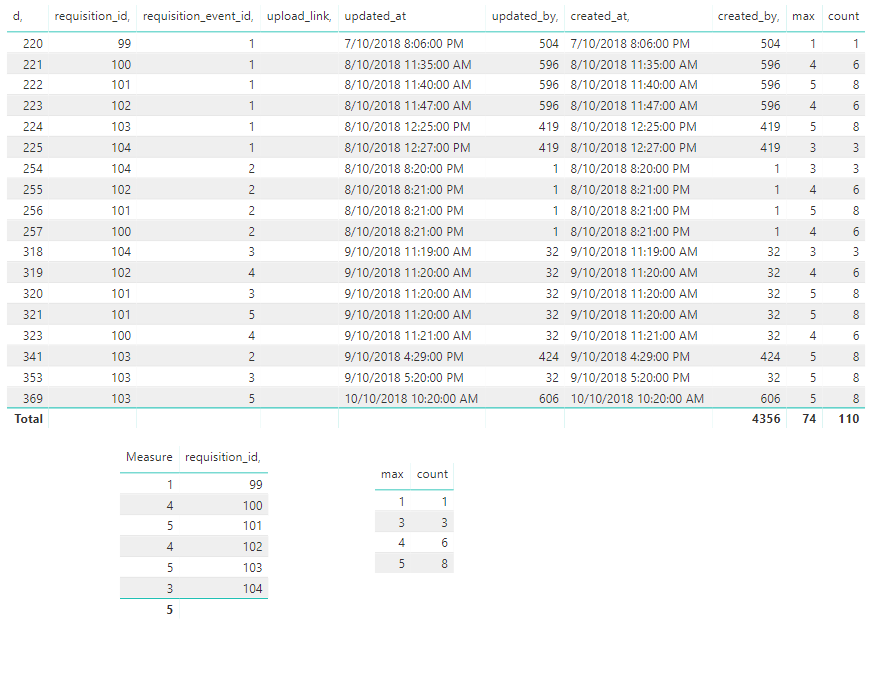
Or if you need distintcount, you can use the following formula
distintcount = CALCULATE(DISTINCTCOUNT(Sheet1[requisition_id,]),ALLEXCEPT(Sheet1,Sheet1[max]))
Best Regards
Maggie


- Mark as New
- Bookmark
- Subscribe
- Mute
- Subscribe to RSS Feed
- Permalink
- Report Inappropriate Content
Did I answer your question? Mark my post as a solution!
Proud to be a PBI Community Champion
- Mark as New
- Bookmark
- Subscribe
- Mute
- Subscribe to RSS Feed
- Permalink
- Report Inappropriate Content
hi @PattemManohar thanks for reply:
Dax formula for Max ID is MaxID = MAx('eta requisition_life_cycles'[requisition_event_id])
and table is
| id | event_name, sequence | required, | requires_upload | created_at | updated_at | |
| 1 | Created By User | Awaiting HOD's Approval | 1 | 1 | 0 | 22-06-2018 7:24 | 22-06-2018 7:26 |
| 2 | Approved by HOD | Awaiting Store's Approval | 2 | 1 | 0 | 22-06-2018 7:25 | 22-06-2018 7:26 |
| 3 | Approved by Store | Awaiting Delivery | 3 | 1 | 0 | 22-06-2018 7:26 | 10-07-2018 6:48 |
| 4 | Rejected by Store | Requisition Closed | 3 | 0 | 0 | 22-06-2018 7:27 | 06-08-2018 15:02 |
| 5 | Delivered | Requisition Closed | 3 | 1 | 0 | 10-07-2018 6:49 | 09-08-2018 8:06 |
| 6 | Rejected by HOD | Requisition Closed | 2 | 0 | 0 | 06-08-2018 14:19 | 06-08-2018 14:19 |
| 7 | Auto- approved | 2 | 0 | 0 | 25-10-2018 16:37 | 25-10-2018 16:37 |
- Mark as New
- Bookmark
- Subscribe
- Mute
- Subscribe to RSS Feed
- Permalink
- Report Inappropriate Content
sorry the sample of table data is given below
| id, | requisition_id, | requisition_event_id, | upload_link, | created_by, | updated_by, | created_at, | updated_at |
| 220 | 99 | 1 | 504 | 504 | 07-10-2018 20:06 | 07-10-2018 20:06 | |
| 221 | 100 | 1 | 596 | 596 | 08-10-2018 11:35 | 08-10-2018 11:35 | |
| 222 | 101 | 1 | 596 | 596 | 08-10-2018 11:40 | 08-10-2018 11:40 | |
| 223 | 102 | 1 | 596 | 596 | 08-10-2018 11:47 | 08-10-2018 11:47 | |
| 224 | 103 | 1 | 419 | 419 | 08-10-2018 12:25 | 08-10-2018 12:25 | |
| 225 | 104 | 1 | 419 | 419 | 08-10-2018 12:27 | 08-10-2018 12:27 | |
| 226 | 105 | 1 | 310 | 310 | 08-10-2018 14:15 | 08-10-2018 14:15 | |
| 227 | 106 | 1 | 310 | 310 | 08-10-2018 14:15 | 08-10-2018 14:15 | |
| 228 | 107 | 1 | 310 | 310 | 08-10-2018 14:16 | 08-10-2018 14:16 | |
| 229 | 108 | 1 | 310 | 310 | 08-10-2018 14:16 | 08-10-2018 14:16 | |
| 230 | 109 | 1 | 310 | 310 | 08-10-2018 14:17 | 08-10-2018 14:17 | |
| 231 | 110 | 1 | 310 | 310 | 08-10-2018 14:17 | 08-10-2018 14:17 | |
| 232 | 111 | 1 | 310 | 310 | 08-10-2018 14:18 | 08-10-2018 14:18 | |
| 233 | 112 | 1 | 310 | 310 | 08-10-2018 14:19 | 08-10-2018 14:19 | |
| 234 | 113 | 1 | 310 | 310 | 08-10-2018 14:20 | 08-10-2018 14:20 | |
| 235 | 114 | 1 | 251 | 251 | 08-10-2018 15:00 | 08-10-2018 15:00 |
- Mark as New
- Bookmark
- Subscribe
- Mute
- Subscribe to RSS Feed
- Permalink
- Report Inappropriate Content
or you can refer the final data. its more organized. u can see requisition id is repetitive and i am trying to get only max requisiion_event_id from given requisition_id
| id, | requisition_id, | requisition_event_id, | upload_link, | created_by, | updated_by, | created_at, | updated_at |
| 220 | 99 | 1 | 504 | 504 | 07-10-2018 20:06 | 07-10-2018 20:06 | |
| 221 | 100 | 1 | 596 | 596 | 08-10-2018 11:35 | 08-10-2018 11:35 | |
| 257 | 100 | 2 | 1 | 1 | 08-10-2018 20:21 | 08-10-2018 20:21 | |
| 323 | 100 | 4 | 32 | 32 | 09-10-2018 11:21 | 09-10-2018 11:21 | |
| 222 | 101 | 1 | 596 | 596 | 08-10-2018 11:40 | 08-10-2018 11:40 | |
| 256 | 101 | 2 | 1 | 1 | 08-10-2018 20:21 | 08-10-2018 20:21 | |
| 320 | 101 | 3 | 32 | 32 | 09-10-2018 11:20 | 09-10-2018 11:20 | |
| 321 | 101 | 5 | 32 | 32 | 09-10-2018 11:20 | 09-10-2018 11:20 | |
| 223 | 102 | 1 | 596 | 596 | 08-10-2018 11:47 | 08-10-2018 11:47 | |
| 255 | 102 | 2 | 1 | 1 | 08-10-2018 20:21 | 08-10-2018 20:21 | |
| 319 | 102 | 4 | 32 | 32 | 09-10-2018 11:20 | 09-10-2018 11:20 | |
| 224 | 103 | 1 | 419 | 419 | 08-10-2018 12:25 | 08-10-2018 12:25 | |
| 341 | 103 | 2 | 424 | 424 | 09-10-2018 16:29 | 09-10-2018 16:29 | |
| 353 | 103 | 3 | 32 | 32 | 09-10-2018 17:20 | 09-10-2018 17:20 | |
| 369 | 103 | 5 | 606 | 606 | 10-10-2018 10:20 | 10-10-2018 10:20 | |
| 225 | 104 | 1 | 419 | 419 | 08-10-2018 12:27 | 08-10-2018 12:27 | |
| 254 | 104 | 2 | 1 | 1 | 08-10-2018 20:20 | 08-10-2018 20:20 | |
| 318 | 104 | 3 | 32 | 32 | 09-10-2018 11:19 | 09-10-2018 11:19 |


- Mark as New
- Bookmark
- Subscribe
- Mute
- Subscribe to RSS Feed
- Permalink
- Report Inappropriate Content
@AnonymousI am bit confused. Can you post some example how do you want to see the data. I know, you have mentioned in first post. But, it will be great if you post example with the last posted data.
- Mark as New
- Bookmark
- Subscribe
- Mute
- Subscribe to RSS Feed
- Permalink
- Report Inappropriate Content
@rocky09 HI
my main table is
| d, | requisition_id, | requisition_event_id, | upload_link, | created_by, | updated_by, | created_at, | updated_at |
| 220 | 99 | 1 | 504 | 504 | 07-10-2018 20:06 | 07-10-2018 20:06 | |
| 221 | 100 | 1 | 596 | 596 | 08-10-2018 11:35 | 08-10-2018 11:35 | |
| 257 | 100 | 2 | 1 | 1 | 08-10-2018 20:21 | 08-10-2018 20:21 | |
| 323 | 100 | 4 | 32 | 32 | 09-10-2018 11:21 | 09-10-2018 11:21 | |
| 222 | 101 | 1 | 596 | 596 | 08-10-2018 11:40 | 08-10-2018 11:40 | |
| 256 | 101 | 2 | 1 | 1 | 08-10-2018 20:21 | 08-10-2018 20:21 | |
| 320 | 101 | 3 | 32 | 32 | 09-10-2018 11:20 | 09-10-2018 11:20 | |
| 321 | 101 | 5 | 32 | 32 | 09-10-2018 11:20 | 09-10-2018 11:20 | |
| 223 | 102 | 1 | 596 | 596 | 08-10-2018 11:47 | 08-10-2018 11:47 | |
| 255 | 102 | 2 | 1 | 1 | 08-10-2018 20:21 | 08-10-2018 20:21 | |
| 319 | 102 | 4 | 32 | 32 | 09-10-2018 11:20 | 09-10-2018 11:20 | |
| 224 | 103 | 1 | 419 | 419 | 08-10-2018 12:25 | 08-10-2018 12:25 | |
| 341 | 103 | 2 | 424 | 424 | 09-10-2018 16:29 | 09-10-2018 16:29 | |
| 353 | 103 | 3 | 32 | 32 | 09-10-2018 17:20 | 09-10-2018 17:20 | |
| 369 | 103 | 5 | 606 | 606 | 10-10-2018 10:20 | 10-10-2018 10:20 | |
| 225 | 104 | 1 | 419 | 419 | 08-10-2018 12:27 | 08-10-2018 12:27 | |
| 254 | 104 | 2 | 1 | 1 | 08-10-2018 20:20 | 08-10-2018 20:20 | |
| 318 | 104 | 3 | 32 | 32 | 09-10-2018 11:19 | 09-10-2018 11:19 |
i ahve created measure from above table : Measure name is Max ID
MaxID = MAx('eta requisition_life_cycles'[requisition_event_id])
then i created a visualization with measure max id and drag requisition_id in clustered column chart i get data as
| MaxID | requisition_id |
| 1 | 99 |
| 4 | 100 |
| 5 | 101 |
| 4 | 102 |
| 5 | 103 |
| 4 | 104 |
| 5 | 105 |
| 4 | 106 |
| 5 | 107 |
| 5 | 108 |
| 4 | 109 |
| 5 | 110 |
| 5 | 111 |
| 4 | 112 |
| 5 | 113 |
| 5 | 114 |
| 5 | 115 |
| 5 | 116 |
| 5 | 117 |
but i need data as
| Max ID | Count of requisition_id |
| 1 | 35 |
| 2 | 32 |
| 3 | 14 |
| 4 | 129 |
| 5 | 229 |
| 6 | 17 |
| 7 | 117 |
- Mark as New
- Bookmark
- Subscribe
- Mute
- Subscribe to RSS Feed
- Permalink
- Report Inappropriate Content
Hi @Anonymous
From you information, MaxID should be the max requisition_event_id per requisition_id, Count of requisition_id should be the count of requisition_id per MaxID, right?
in my test, [Measure] is the MaxID, i could also create a calculated column max to replace it, then create another column count for Count of requisition_id.
count = CALCULATE(COUNT(Sheet1[requisition_id,]),ALLEXCEPT(Sheet1,Sheet1[max]))

max = CALCULATE(MAX([requisition_event_id,]),ALLEXCEPT(Sheet1,Sheet1[requisition_id,]))
Or if you need distintcount, you can use the following formula
distintcount = CALCULATE(DISTINCTCOUNT(Sheet1[requisition_id,]),ALLEXCEPT(Sheet1,Sheet1[max]))
Best Regards
Maggie
- Mark as New
- Bookmark
- Subscribe
- Mute
- Subscribe to RSS Feed
- Permalink
- Report Inappropriate Content
@v-juanli-msft Hi Maggie, thank you so much.......you made my day. As a new user, this is my first perfect visualization.
- Mark as New
- Bookmark
- Subscribe
- Mute
- Subscribe to RSS Feed
- Permalink
- Report Inappropriate Content
still, I don't get. Are you counting requisition_ids against requisition_event_id?
- Mark as New
- Bookmark
- Subscribe
- Mute
- Subscribe to RSS Feed
- Permalink
- Report Inappropriate Content
- Mark as New
- Bookmark
- Subscribe
- Mute
- Subscribe to RSS Feed
- Permalink
- Report Inappropriate Content
I am not sure if i understand it correctly. Anyway, try to create New Table from Modeling tab and use this DAX. Make sure to replace the table name and column as per your data.
summarizedata = SUMMARIZE(Table1,Table1[requisition_event_id,],"Count",COUNT(Table1[requisition_id,]))
- Mark as New
- Bookmark
- Subscribe
- Mute
- Subscribe to RSS Feed
- Permalink
- Report Inappropriate Content
@rocky09 hi rocky thanks i get the data like
requisition_event id count
28 1896
but i need bifurcation according to requisition_event_id like you can see in table that requisition_id is repeated according to event id and i need count of requisition_id wrt count of max event id
Helpful resources

FabCon & SQLCon – Barcelona 2026
Join us in Barcelona for FabCon and SQLCon, the Fabric, Power BI, SQL, and AI community event. Save €200 with code FABCMTY200.

Fabric Community Sticker Challenge - Barcelona 2026
If you love stickers, then you will definitely want to check out our community sticker challenge, Barcelona edition!

Power BI Monthly Update - July 2026
Check out the July 2026 Power BI update to learn about new features.

Power BI DataViz World Championships - June 2026
A new Power BI DataViz World Championship is coming this June! Don't miss out on submitting your entry.

| User | Count |
|---|---|
| 31 | |
| 28 | |
| 24 | |
| 23 | |
| 19 |


| User | Count |
|---|---|
| 44 | |
| 32 | |
| 18 | |
| 17 | |
| 17 |


