cancel
Showing results for 
Search instead for 
Did you mean: 

The Power BI Data Visualization World Championships is back! Get ahead of the game and start preparing now! Learn more

Reply
Anonymous
Not applicable

'sumif' equivalent for power bi

Hi all - sorry if this is a simple one, or posted and answered before! 


New user to power bi - trying to figure out how to do a sumif equivalent formula


I have two tables, one is the raw data and the second is the summary data (example below)


I need a summary of the raw recovered field based on the individual 'job', calculated to the 'tot_recov' fields


raw     summary  
jobfromtorecovered  jobdepthtot_recov
h10109.8  h124.8 
h11014.84.7  h212 
h114.816.92.1  h316.2 
h116.924.87.8     
h236.53.5     
h26.592.4     
h29122.8     
h3098.8     
h3910.81.6     
h310.8154.2     
h31516.21.1     


in excel, I would use a simple sumif equation in the tot_recov field, like; =SUMIF(A:A,G3,D:D)


so I figure in power bi something like; = CALCULATE(SUM('raw'[recovered]),'raw'[job]='summary'[job])

however, this fails due to "expression contains multiple columns, but only a single column can be used in a True/False expression that is used as a table filter expression."


I figure this is meaning it would like a single criteria (eg. 'raw'[job]="h1" or along these lines), but this is illogical for this data set as there is approx. 500 individual jobs 


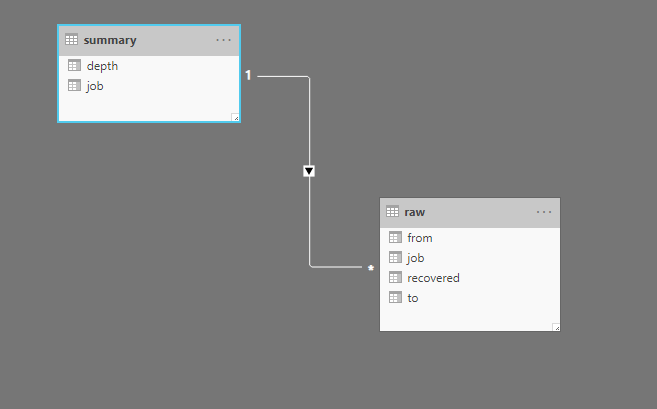
data is from 2 different data sources but linked through the 'job' field


Thanks in advance! 

4 REPLIES 4
harshnathani
Community Champion
Community Champion

Hi @Anonymous ,


You can use the below Measure.


Measure1 = CALCULATE(SUM('raw'[recovered]), ALLEXCEPT( 'raw', raw[job])


else create a TABLE

Summary TABLE = ADDCOLUMNS ( 
                                                          SUMMARIZE ( 'raw', raw[job]),

                                                           "depth" , CALCULATE(SUM('raw'[recovered]), ALLEXCEPT( 'raw', raw[job]))


Regards,

Harsh Nathani

Did I answer your question? Mark my post as a solution! Appreciate with a Kudos!!


camargos88
Community Champion
Community Champion

Hi @Anonymous ,


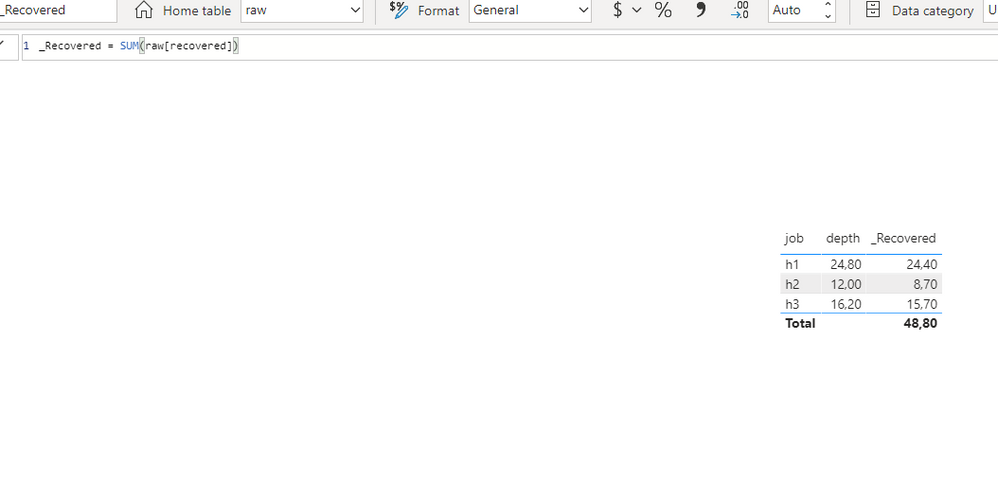
Once it's related you don't need to write this. Only :

SUM(raw[recovered])


Capture 1.PNGCapture.PNG


Did I answer your question? Mark my post as a solution!

Proud to be a Super User!


amitchandak
Super User
Super User

@Anonymous , You can use Sumx

Sumx(Table,<expression>)

Here you can use filter in Table and You can use if in expression


https://docs.microsoft.com/en-us/dax/sumx-function-dax


Share with Power BI Enthusiasts: Full Power BI Video (20 Hours) YouTube
Microsoft Fabric Series 60+ Videos YouTube
Microsoft Fabric Hindi End to End YouTube
Anonymous
Not applicable

worked perfectly! thanks @amitchandak 

Helpful resources

Announcements
Power BI DataViz World Championships

Power BI Dataviz World Championships

The Power BI Data Visualization World Championships is back! Get ahead of the game and start preparing now!

December 2025 Power BI Update Carousel

Power BI Monthly Update - December 2025

Check out the December 2025 Power BI Holiday Recap!

FabCon Atlanta 2026 carousel

FabCon Atlanta 2026

Join us at FabCon Atlanta, March 16-20, for the ultimate Fabric, Power BI, AI and SQL community-led event. Save $200 with code FABCOMM.