Join us at FabCon Atlanta from March 16 - 20, 2026, for the ultimate Fabric, Power BI, AI and SQL community-led event. Save $200 with code FABCOMM.
Register now!The Power BI Data Visualization World Championships is back! It's time to submit your entry. Live now!
Hi All,
I was trying to get the first date from a date field or you can say a measure is having a date from which I was trying to get the first date . E.g. the measure is consisting 03-23-2017 , then I want to get 03-01-2017. For which I tried two functions we have in DAX i.e. StartOfMonth & FirstDate. But none of these functions gave me the required result. Then I tried
EOMONTH(Measure,-1)+1. And it gave me the correct answer.
I just wanted to know whether the two functions are working fine for others and I have done something wrong or, these functions are not working at all.
Thanks & Regards,
SKD
Solved! Go to Solution.
Just to put it briefly
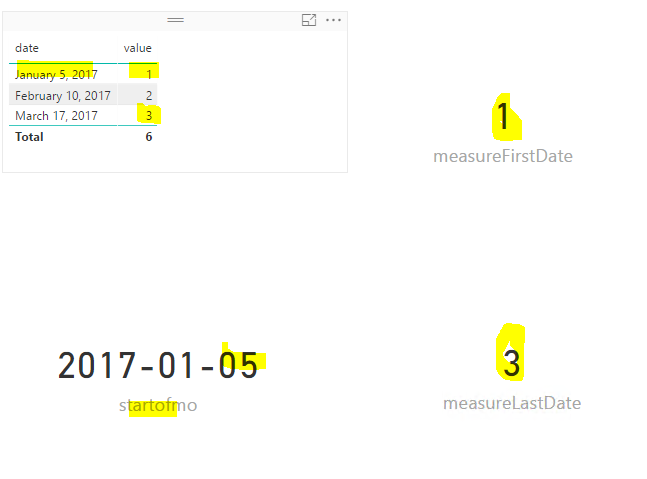
StartofMonth, EndofMonth, FirstDate return the first date/last date in the "Date Column" which they take as argument.
Not the first date/last date of the month
Hi,
I always use the startofmonth with a calculatetable function from my date table using
startofmonth today =
STARTOFMONTH (
CALCULATETABLE (
VALUES ( 'Date'[Date] ),
MONTH ( 'Date'[Date] ) = MONTH ( TODAY () )
)
)
It's easy to use and could also be build with DATEADD() 🙂
Have fun!
You can reference the online documentation. They have different actually funtionality.
measureFirstDate = CALCULATE(SUM(Table1[value]),FIRSTDATE(Table1[date])) measureLastDate = CALCULATE(SUM(Table1[value]),LASTDATE(Table1[date]))
startofmo = STARTOFMONTH(Table1[date])
To get the 1st day of a given date, eg in your case, you can apply EOMONTH or
Measure = DATE(YEAR([yourMeasure]),MONTH([yourMeasure]),1)
Just to put it briefly
StartofMonth, EndofMonth, FirstDate return the first date/last date in the "Date Column" which they take as argument.
Not the first date/last date of the month
The Power BI Data Visualization World Championships is back! It's time to submit your entry.
Check out the January 2026 Power BI update to learn about new features.
| User | Count |
|---|---|
| 56 | |
| 40 | |
| 38 | |
| 21 | |
| 21 |
| User | Count |
|---|---|
| 141 | |
| 105 | |
| 63 | |
| 36 | |
| 35 |