cancel
Showing results for 
Search instead for 
Did you mean: 

The Power BI Data Visualization World Championships is back! Get ahead of the game and start preparing now! Learn more

Reply
pankajdeol
Frequent Visitor

stacked and column chart

Hello Champs, I have a table containing One column, "ID" and 2nd column, "Order type". Now I want to display 2 lines displaying count of ID over the time based on the order type in a combined stack column chart, Columns data is coming form another table.

Please help.

1 ACCEPTED SOLUTION

Hi @pankajdeol,

You can create two measures using the formulas below.

Order Type1=CALCULATE(Counta(Table[OrderType]),FILTER(Table,Table[OrderType]="Order Type1"))

Order Type2=CALCULATE(Counta(Table[OrderType]),FILTER(Table,Table[OrderType]="Order Type2"))


Then add two measure above as Line values.

Best Regards,
Angelia

View solution in original post

4 REPLIES 4
v-huizhn-msft
Microsoft Employee
Microsoft Employee

Hi @pankajdeol,

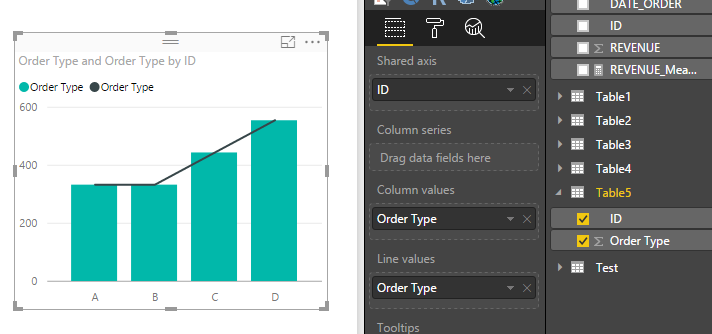
I try to reproduce your scenario using the following sample table, but I can't imagine what it looks. Could you please share your resource table? 

>>count of ID over the time based on the order type in a combined stack column chart, Columns data is coming form another table.

Which date will be shown in line and please post your data in another table.

1.PNG2.PNG

Best Regards,

Angelia

pbi.JPG

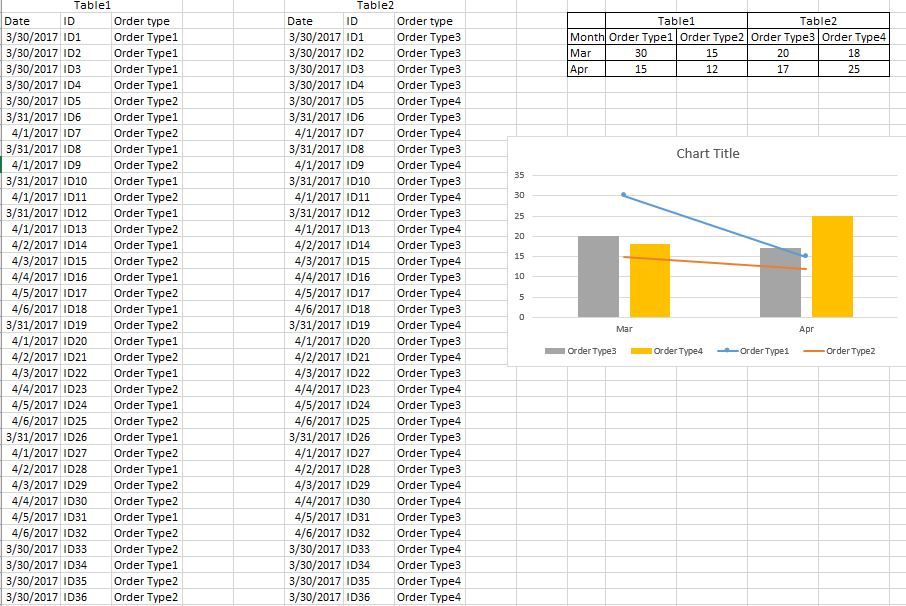
Hi @v-huizhn-msft, Thanks for your reply. I am attaching a sample data screenshot . Please see if this can help to understand the data.

Hi @pankajdeol,

You can create two measures using the formulas below.

Order Type1=CALCULATE(Counta(Table[OrderType]),FILTER(Table,Table[OrderType]="Order Type1"))

Order Type2=CALCULATE(Counta(Table[OrderType]),FILTER(Table,Table[OrderType]="Order Type2"))


Then add two measure above as Line values.

Best Regards,
Angelia

Thanks Angelia. this works great.

Helpful resources

Announcements
Power BI DataViz World Championships

Power BI Dataviz World Championships

The Power BI Data Visualization World Championships is back! Get ahead of the game and start preparing now!

November Power BI Update Carousel

Power BI Monthly Update - November 2025

Check out the November 2025 Power BI update to learn about new features.

FabCon Atlanta 2026 carousel

FabCon Atlanta 2026

Join us at FabCon Atlanta, March 16-20, for the ultimate Fabric, Power BI, AI and SQL community-led event. Save $200 with code FABCOMM.