Join us at FabCon Atlanta from March 16 - 20, 2026, for the ultimate Fabric, Power BI, AI and SQL community-led event. Save $200 with code FABCOMM.
Register now!Learn from the best! Meet the four finalists headed to the FINALS of the Power BI Dataviz World Championships! Register now
Hi,
I have following data.
| status | source | balance | date |
| live | a | 3000 | 31-Oct |
| live | b | 2000 | 30-Oct |
| terminated | a | 1500 | 29-Oct |
| live | b | 1000 | 30-Oct |
| terminated | a | 2000 | 29-Oct |
| terminated | b | 1000 | 31-Oct |
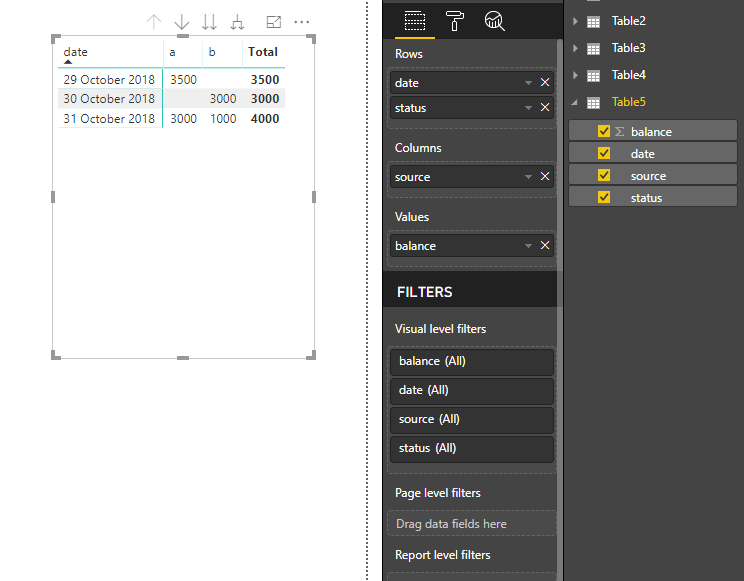
I need to create a matrix with source as column header and date and status in rows and balance as values, seperat for live and terminated. My dashboard should look like this:
| date | status | a | b | Grand Total |
| 29-Oct | terminated | 3500 | 3500 | |
| 30-Oct | live | 3000 | 3000 | |
| 31-Oct | live | 3000 | 3000 | |
| terminated | 1000 | 1000 |
However if i put status in rows, it gives me count of reasons separately like this. If i put status in rows and not values, it is not showing me status at all.
| date | a | b | Grand Total | |
| 29-Oct | balance | 3500 | 3500 | |
| count of status | 2 | 2 | ||
| 30-Oct | balance | 3000 | 3000 | |
| count of status | 2 | 2 | ||
| 31-Oct | balance | 3000 | 1000 | 4000 |
| count of status | 1 | 1 | 2 | |
| Grand Total | 6500 | 4000 | 10500 |
How do i split my balance between live and terminated?
Solved! Go to Solution.
Hi @Greg_Deckler,
the two settings you mentioned are already off.
Surprisingly, in your file, i removed and re added status to rows and it is not showing now.
can you figure out the issue. I did not change anything else
You want Page 2 of the attached PBIX. Basically, turn off stepped row header layout and turn off row subtotals.
Hi @Greg_Deckler,
the two settings you mentioned are already off.
Surprisingly, in your file, i removed and re added status to rows and it is not showing now.
can you figure out the issue. I did not change anything else
Found the issue. Thanks! 🙂
Share feedback directly with Fabric product managers, participate in targeted research studies and influence the Fabric roadmap.
Check out the February 2026 Power BI update to learn about new features.
| User | Count |
|---|---|
| 67 | |
| 59 | |
| 45 | |
| 19 | |
| 15 |