Get certified for free when you join Fabric Data Days 2026 and dive into Fabric, Power BI, SQL, AI, and other essential data skills.
Join nowJuly 7 - July 17 | Round 2 of the Power BI Dataviz World Championships. Don't miss your chance! Learn more
dears
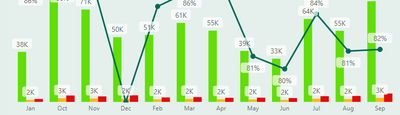
i have a chart where the dates are not sorted correctlly, the date data i have are in text form JAN-DEC
im trying to creat a new column with this DAX: Month number = month(tablename[Month]) so i can sort correctlly but when i create this column it give me this errorr : Cannot convert value 'Jan' of type Text to type Date.
Solved! Go to Solution.
Hi @160475 ,
There is a tip to convert Month name to Month number—— combine Month name and " 1" , then change its type to DateTime, finally use MONTH() to get the number:
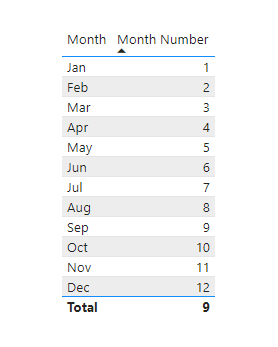
Month Number = MONTH( CONVERT( MAX('Table'[Month]) &" 1", DATETIME))
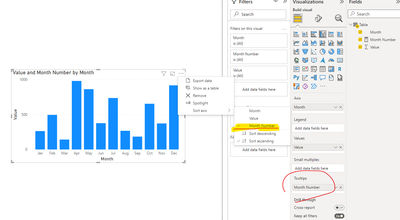
In visuals , you could apply it to Tooltips field , and then sort by it:
Best Regards,
Eyelyn Qin
If this post helps, then please consider Accept it as the solution to help the other members find it more quickly.
Hi @160475 ,
There is a tip to convert Month name to Month number—— combine Month name and " 1" , then change its type to DateTime, finally use MONTH() to get the number:
Month Number = MONTH( CONVERT( MAX('Table'[Month]) &" 1", DATETIME))
In visuals , you could apply it to Tooltips field , and then sort by it:
Best Regards,
Eyelyn Qin
If this post helps, then please consider Accept it as the solution to help the other members find it more quickly.
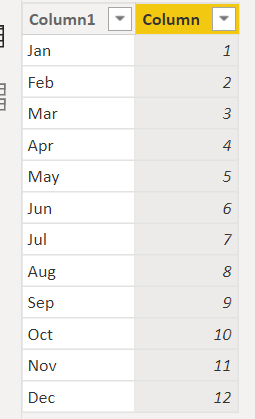
if you only have the text column, you can try this
Column = SWITCH('Table'[Column1],"Jan",1,"Feb",2,"Mar",3,"Apr",4,"May",5,"Jun",6,"Jul",7,"Aug",8,"Sep",9,"Oct",10,"Nov",11,"Dec",12)
Proud to be a Super User!
Hi @160475
Do you have a Date column? Month needs Date, Month number = month(tablename[Date]), even if you use SWITCH to get month number from your current text, it still has a circular dependency error...
Join us in Barcelona for FabCon and SQLCon, the Fabric, Power BI, SQL, and AI community event. Save €200 with code FABCMTY200.
Check out the July 2026 Power BI update to learn about new features.
Join Data Days 2026: 60 days of free live/on-demand sessions, challenges, study groups, and certification opportunities.
| User | Count |
|---|---|
| 30 | |
| 25 | |
| 25 | |
| 23 | |
| 16 |
| User | Count |
|---|---|
| 54 | |
| 35 | |
| 27 | |
| 24 | |
| 20 |