Join us at FabCon Atlanta from March 16 - 20, 2026, for the ultimate Fabric, Power BI, AI and SQL community-led event. Save $200 with code FABCOMM.
Register now!Learn from the best! Meet the four finalists headed to the FINALS of the Power BI Dataviz World Championships! Register now
Hi All,
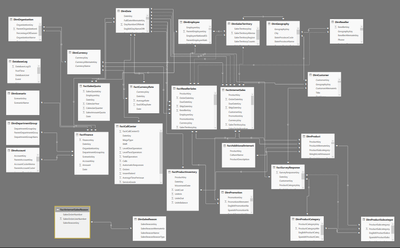
How to deal with the Snowflake schema data model in Power BI.
These are the list of issuses i am facing while creating dashboard:
Thanks,
Pratima
hi those are very broad problems which could have a multitude of issues creating the problems.
1. provide actual examples
2. what are you your calculations?
3. Screeshot of your relationships
4. stating the problem and expected result?
Proud to be a Super User!
Hi Dear,
I have taken the SQLServerAdventureDW2012.
In this DW I am facing above problems.
Thanks,
Pratima
hi ok but can you highlight which measures are giving you those issues? thats a big model, you still aren't saying where exactly the issues are or what you expecting.
Please provide the actual detail of the issues with examples
Proud to be a Super User!
Hi i am trying get values from indirect relationship tables like
(geography wise unitcost as well as customer wise unit cose)
here i am getting like this and cannt found autodetect relationship
Help me on these
Hi @Pratima,
What visual did you use? What columns and measures did you add to this visual that caused this error? Please click on 'See Details' to get more detailed error message.
Regards,
Yuliana Gu
Hi Yuliana Gu,
As I mentioned earlier Email like:
For these fields for any visualisation types..................
e.g. (geography wise unit cost as well as customer wise unit cost)
here I am getting like this and can't found autodetect relationship
Thanks,
Pratima
Hi .
Your post i a couple of years old but i am facing the same problem, how did you solve your problem.
Please do respond.
All and any help is greatly appriciated. Thanks
Share feedback directly with Fabric product managers, participate in targeted research studies and influence the Fabric roadmap.
Check out the February 2026 Power BI update to learn about new features.
| User | Count |
|---|---|
| 68 | |
| 61 | |
| 45 | |
| 19 | |
| 15 |
| User | Count |
|---|---|
| 108 | |
| 107 | |
| 39 | |
| 30 | |
| 26 |