cancel
Showing results for 
Search instead for 
Did you mean: 

The Power BI Data Visualization World Championships is back! Get ahead of the game and start preparing now! Learn more

Reply
ecoale
Helper I
Helper I

smart filter sudden display problems

Good morning to all,

I have a big problem with smart filter in my reports, where I usually have three lines of filters. I set them so that:

- when I open a drop-down menu in third line, I can still view the hidden info of any lower plots;

- when I open a drop-down menu in first, second or third line, then I can select some elements in that box.


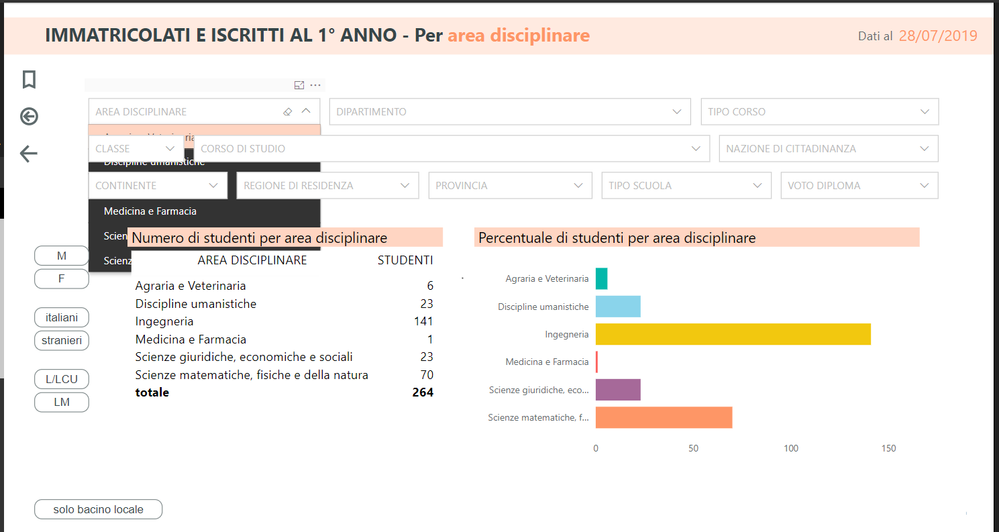
The problem is that, now, I cannot select the elemets any longer, because the open drop-down menu goes under the filter area located in the next lines (as indicated in the photo). This did not happen before...


Immagine.png


Could you help me in any way?? 😕

Thanks for your time.

Dear greetings,

Alessio


4 REPLIES 4
v-juanli-msft
Community Support
Community Support

Hi @ecoale 

I can't reproduce your problem.

Do you use the lastest version of Power BI Desktop and visual?

Version: 2.71.5523.941 64-bit (July 2019)

Smart Filter Pro 1.2.2


Or could you create a simple test file, then upload to One Drive and share the link here.


Best Regards
Maggie


Community Support Team _ Maggie Li
If this post helps, then please consider Accept it as the solution to help the other members find it more quickly.

Hi Maggie,

thank for your reply.


I have the same Power BI version, but the 1.2.3 smart filter version.

I tried to come back to the 1.2.2 version, but I still have that problem... If I try to remove the problem bringing in first level for example the first line of smart filter, then I cannot select anything from second and third lines of filters...

Hi @ecoale 

How about change to a default slicer?

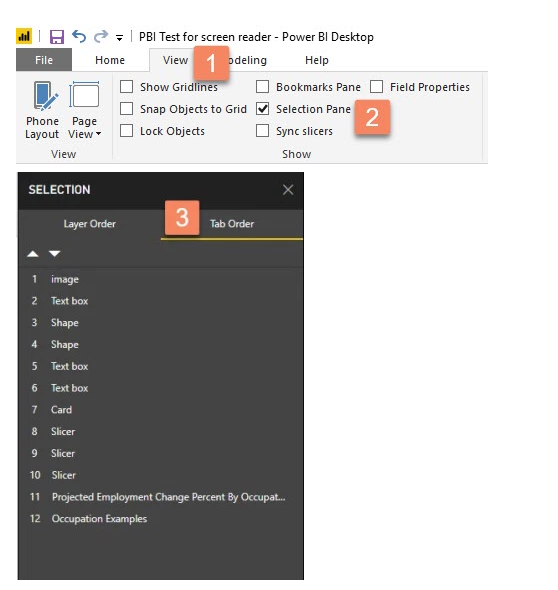
Open the selection pane, you can move visuals up and down in order.

4.png

If it make no sense, I would suggest you contact the author.

The custom visual Smart Filter by OKViz is developed by OKViz.

You can send a message to support@okviz.com as suggested here: https://okviz.com/support/. 


Best Regards
Maggie


Community Support Team _ Maggie Li
If this post helps, then please consider Accept it as the solution to help the other members find it more quickly.

Thanks for your reply Maggie, now I try.

In the meantime, I leave here an url, so you may better understand the problem...

https://app.powerbi.com/view?r=eyJrIjoiNTUzOTc4OTYtY2EwMC00MTU4LWEwNmUtYTYwYWM0M2M0Mjk2IiwidCI6ImM3N...

Alessio

Helpful resources

Announcements
Power BI DataViz World Championships

Power BI Dataviz World Championships

The Power BI Data Visualization World Championships is back! Get ahead of the game and start preparing now!

December 2025 Power BI Update Carousel

Power BI Monthly Update - December 2025

Check out the December 2025 Power BI Holiday Recap!

FabCon Atlanta 2026 carousel

FabCon Atlanta 2026

Join us at FabCon Atlanta, March 16-20, for the ultimate Fabric, Power BI, AI and SQL community-led event. Save $200 with code FABCOMM.