Join us at FabCon Atlanta from March 16 - 20, 2026, for the ultimate Fabric, Power BI, AI and SQL community-led event. Save $200 with code FABCOMM.
Register now!Get Fabric Certified for FREE during Fabric Data Days. Don't miss your chance! Request now
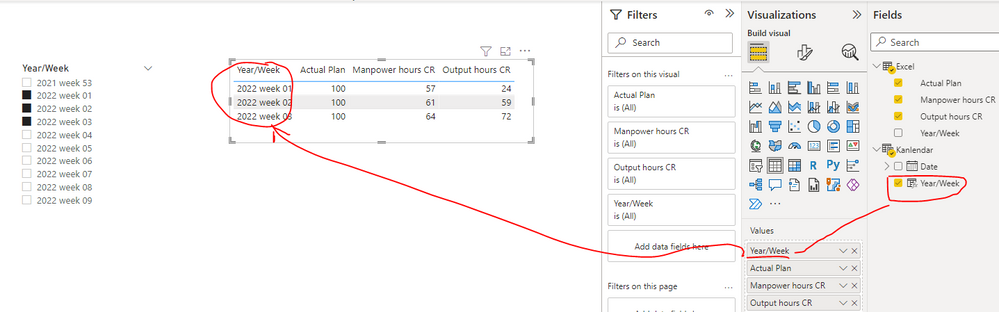
I create slicer and table as below.
Unfortunately the data in table are not reflect with the slicer.
Could someone help where is I did wrong and how to resolved this issue?
I want to upload my pbix file here but seems this entry are not support to upload pbix file.

Solved! Go to Solution.
Hi @space83 ,
Do the Kalendar and Excel tables create a relationship through the field [Year/Week]? Please replace the [Year/Week] field in the table visual with the [Year/Week] field in the Kalendar table instead of the Excel table as shown in the screenshot below.
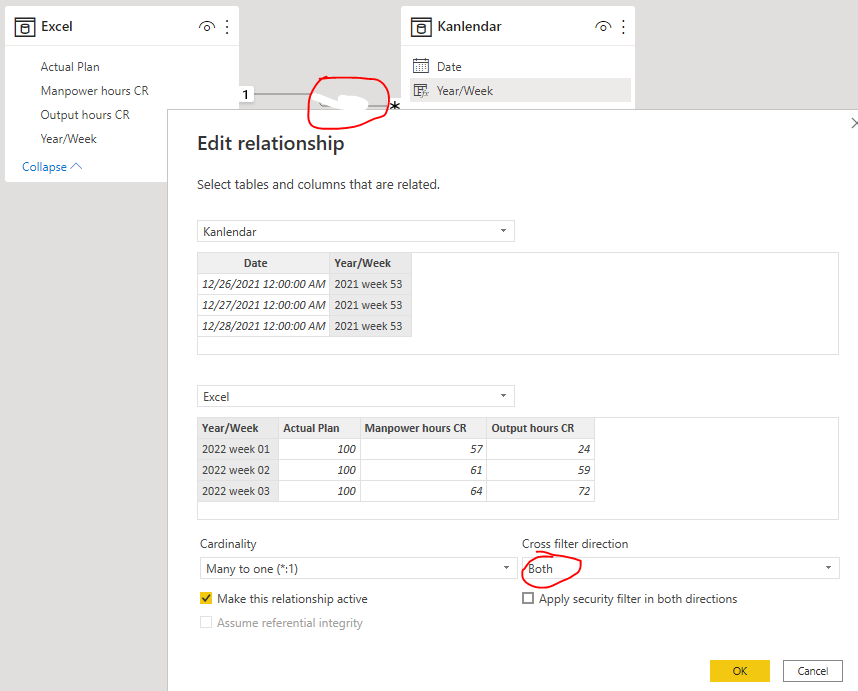
Or you can change the Cross filter direction of the two tables to Both. Please find the details in the attachment.
If the above ones can't help you, you can refer the following thread to upload your pbix file in your thread.
Best Regards
@Greg_Deckler , its 2 different table.
slicer is from table calendar and table is from another table.

Hi @space83 ,
Do the Kalendar and Excel tables create a relationship through the field [Year/Week]? Please replace the [Year/Week] field in the table visual with the [Year/Week] field in the Kalendar table instead of the Excel table as shown in the screenshot below.
Or you can change the Cross filter direction of the two tables to Both. Please find the details in the attachment.
If the above ones can't help you, you can refer the following thread to upload your pbix file in your thread.
Best Regards
amazingly perfect.
change relationship to both and it totally solved my problem.
thank you very much!
@space83 Is the Year/Week column that shows up in the slicer and the table visual coming from the same Table/Column? Also, you might want to check the Edit Interactions by selecting the slicer and then going to the View tab.
Check out the November 2025 Power BI update to learn about new features.
Advance your Data & AI career with 50 days of live learning, contests, hands-on challenges, study groups & certifications and more!