


This time we’re going bigger than ever. Fabric, Power BI, SQL, AI and more. We're covering it all. You won't want to miss it.
Learn moreDid you hear? There's a new SQL AI Developer certification (DP-800). Start preparing now and be one of the first to get certified. Register now
Hello,
I try to change the alignment of the text that is in hebrew in a slicer.
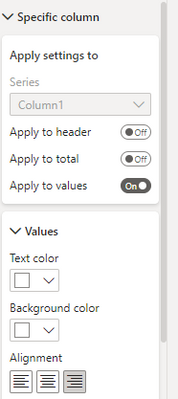
There is the possibility in the table taype in specific column to choses the alignment in the value:
How can I do the same for a slicer, the alignment option I found in slicer is only in the title.
Thanks
Enath
Solved! Go to Solution.
@enath שלום 🙂
You just don't have this option in the native slicer.
You can look for maybe a custom visual slicer that does that (will probably be free) or you can add spaces to the name that will very dynamically based on the name text length so they will be indented to the right but the boxes will be there anyway on the left, so I guess it will look ugly. Best hope is a custom visual.
toda raba!
Do you know any custom visual slicer that can make it?
Actually no, but I never looked for it cause I'm only working in English. Try to Google power bi custom visual slicer right indentation or just slicer and in the app source for each visual you have a list of it's capabilities.
Please don't forget to accept the previous message as a solution for community visibility.
P.S. Check out my showcase report - got some high level stuff there. Sure you will find there a lot of cool ideas.
https://community.powerbi.com/t5/Data-Stories-Gallery/SpartaBI-Feat-Contoso-100K/td-p/2449543
Give it a thumbs up over there if you liked it 🙂
@enath שלום 🙂
You just don't have this option in the native slicer.
You can look for maybe a custom visual slicer that does that (will probably be free) or you can add spaces to the name that will very dynamically based on the name text length so they will be indented to the right but the boxes will be there anyway on the left, so I guess it will look ugly. Best hope is a custom visual.
Check out the April 2026 Power BI update to learn about new features.
Sign up to receive a private message when registration opens and key events begin.
If you have recently started exploring Fabric, we'd love to hear how it's going. Your feedback can help with product improvements.
| User | Count |
|---|---|
| 34 | |
| 31 | |
| 30 | |
| 21 | |
| 16 |
| User | Count |
|---|---|
| 60 | |
| 48 | |
| 29 | |
| 23 | |
| 23 |