cancel
Showing results for 
Search instead for 
Did you mean: 

A new Data Days event is coming soon! This time we’re going bigger than ever. Fabric, Power BI, SQL, AI and more. Don't miss out.

Reply
Anonymous
Not applicable

slice selection determine visualization

aHi all,

I have a question and am wondering how you implement this in PBI.

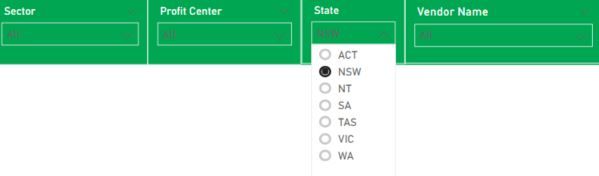
For example, I have a slicer below consists of all the states in Australia and the slicer only allows one selection a time.
J1.JPG

Hence,  when a user select state "NSW", the visualisation will compute:

1) Spend incurred in NSW

2) Spend incurred in Non-NSW

J2.JPG


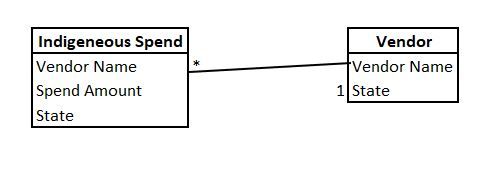
The following is my two query table models:
J3.JPG

Questions - 

The problem that I am facing is ... since the slicer is wither using 'Vendor'[State]  or 'Indigenenous Spend'[State], the moment when I select NSW in the slicer, how is my DAX going to implement the below two items below:


* To exclude NSW to compute the NON-NSW Spend?

* To include NSW to compute the NSW spend?


The problem is I cannot manually assign the value like below as user can select any state anytime. Hence the following two are not possible:

* TargetStateSpend =Calculate(SUM('Indigeneous Spend'[Spend Amount]), filter(''Indigeneous Spend', ''Indigeneous Spend'[State]="NSW"))  


* NonTargetStateSpend = Calculate(SUM('Indigeneous Spend'[Spend Amount]), filter(''Indigeneous Spend', ''Indigeneous Spend'[State] <> "NSW"))  


How to pass the value in the slicer into the above two measurements as variable? 


Thanks.

Tuff

1 ACCEPTED SOLUTION
v-xicai
Community Support
Community Support

Hi @Anonymous ,


You can create measures like DAX below.


* TargetStateSpend =Calculate(SUM('Indigeneous Spend'[Spend Amount]), ALLSELECTED(''Indigeneous Spend'[State]))  
 
* NonTargetStateSpend = Calculate(SUM('Indigeneous Spend'[Spend Amount]), EXCEPT ( ALL ( 'Indigeneous Spend'[State] ), ALLSELECTED ( 'Indigeneous Spend'[State])))  


Best Regards,

Amy


Community Support Team _ Amy

If this post helps, then please consider Accept it as the solution to help the other members find it more quickly.

View solution in original post

1 REPLY 1
v-xicai
Community Support
Community Support

Hi @Anonymous ,


You can create measures like DAX below.


* TargetStateSpend =Calculate(SUM('Indigeneous Spend'[Spend Amount]), ALLSELECTED(''Indigeneous Spend'[State]))  
 
* NonTargetStateSpend = Calculate(SUM('Indigeneous Spend'[Spend Amount]), EXCEPT ( ALL ( 'Indigeneous Spend'[State] ), ALLSELECTED ( 'Indigeneous Spend'[State])))  


Best Regards,

Amy


Community Support Team _ Amy

If this post helps, then please consider Accept it as the solution to help the other members find it more quickly.

Helpful resources

Announcements
May Power BI Update Carousel

Power BI Monthly Update - May 2026

Check out the May 2026 Power BI update to learn about new features.

Fabric SQL PBI Data Days

Data Days 2026 coming soon!

Sign up to receive a private message when registration opens and key events begin.

New to Fabric survey Carousel

New to Fabric Survey

If you have recently started exploring Fabric, we'd love to hear how it's going. Your feedback can help with product improvements.

Power BI DataViz World Championships carousel

Power BI DataViz World Championships - June 2026

A new Power BI DataViz World Championship is coming this June! Don't miss out on submitting your entry.