Learn from the best! Meet the four finalists headed to the FINALS of the Power BI Dataviz World Championships! Register now
Hello. I have this new column "line Seperation" coded to get me an increnmenting number that coresponds to a line EX. three rows if data might correspond to #1 and the next 5 rows to #2 . My main question is if there is a way to simplifly my code and then an easier way to set it up so it is automaticly applied to new data I add in.
I know its a lot and might be difficult but I would really appriciate the help.
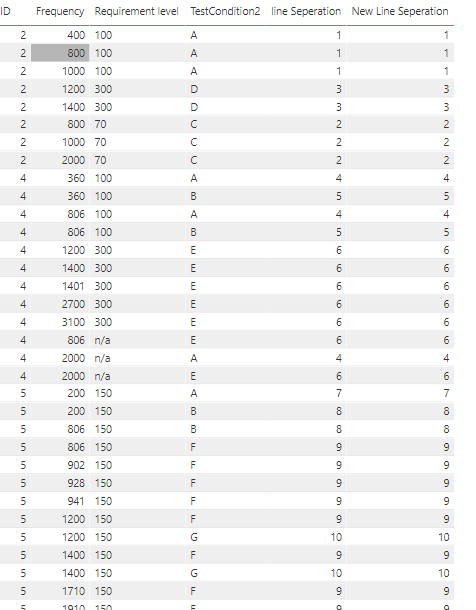
below is some pictures to show what i have
this is the code for the new column
line Seperation =
IF([TestCondition2] = "A" && [ID] = 2, 1,
IF([TestCondition2] = "C" && [ID] = 2, 2,
IF([TestCondition2] = "D" && [ID] = 2 , 3 ,
IF([TestCondition2] = "A" && [ID] = 4 , 4 ,
IF([TestCondition2] = "B" && [ID] = 4 , 5 ,
IF([TestCondition2] = "E" && [ID] = 4 , 6 ,
IF([TestCondition2] = "A" && [ID] = 5 , 7 ,
IF([TestCondition2] = "B" && [ID] = 5 , 8 ,
IF([TestCondition2] = "F" && [ID] = 5 , 9 ,
IF([TestCondition2] = "G" && [ID] = 5 , 10 ,-1
))))))))))
The data for chart
| ID | Frequency | Requirement level | TestCondition2 | line Seperation |
| 2 | 400 | 100 | A | 1 |
| 2 | 800 | 100 | A | 1 |
| 2 | 1000 | 100 | A | 1 |
| 2 | 800 | 70 | C | 2 |
| 2 | 1000 | 70 | C | 2 |
| 2 | 2000 | 70 | C | 2 |
| 2 | 1200 | 300 | D | 3 |
| 2 | 1400 | 300 | D | 3 |
| 4 | 360 | 100 | A | 4 |
| 4 | 806 | 100 | A | 4 |
| 4 | 2000 | n/a | A | 4 |
| 4 | 360 | 100 | B | 5 |
| 4 | 806 | 100 | B | 5 |
| 4 | 806 | n/a | E | 6 |
| 4 | 2000 | n/a | E | 6 |
| 4 | 1200 | 300 | E | 6 |
| 4 | 1400 | 300 | E | 6 |
| 4 | 1401 | 300 | E | 6 |
| 4 | 2700 | 300 | E | 6 |
| 4 | 3100 | 300 | E | 6 |
| 5 | 200 | 150 | A | 7 |
| 5 | 3200 | 150 | A | 7 |
| 5 | 200 | 150 | B | 8 |
| 5 | 806 | 150 | B | 8 |
| 5 | 806 | 150 | F | 9 |
| 5 | 902 | 150 | F | 9 |
| 5 | 928 | 150 | F | 9 |
| 5 | 941 | 150 | F | 9 |
| 5 | 1200 | 150 | F | 9 |
| 5 | 1400 | 150 | F | 9 |
| 5 | 1710 | 150 | F | 9 |
| 5 | 1910 | 150 | F | 9 |
| 5 | 2110 | 150 | F | 9 |
| 5 | 2170 | 150 | F | 9 |
| 5 | 2500 | 150 | F | 9 |
| 5 | 2700 | 150 | F | 9 |
| 5 | 1200 | 150 | G | 10 |
| 5 | 1400 | 150 | G | 10 |
| 5 | 2700 | 150 | G | 10 |
| 5 | 3200 | 150 | G | 10 |
Thanks for the help.
-Collin
Solved! Go to Solution.
How about this:
Column = Table1[ID] & Table1[TestCondition2]
Column 2 = RANKX(Table1, Table1[Column], , ASC, Dense)
Hey,
your question to simplify your DAX and prepare for automation is not that simple to answer, but it seems that you already have the answer you are looking for 😉
First, the DAX could be simplified by modifying your data model and adding a separate table that contains the ID and testcondition2 as columns then you could use LOOKUPVALUE to "pull" the value from this new table, instead of an evergrowing nested IF. But I think this would be just a smaller optimization, if ever possible.
If none of the already given answers matches your requirement please consider describing the underlying rule(s), that builds the nested IF...
From the data I derive the following:
Wondering how many different possible values for testcondition2 exist.
Regards,
Tom
@Anonymous
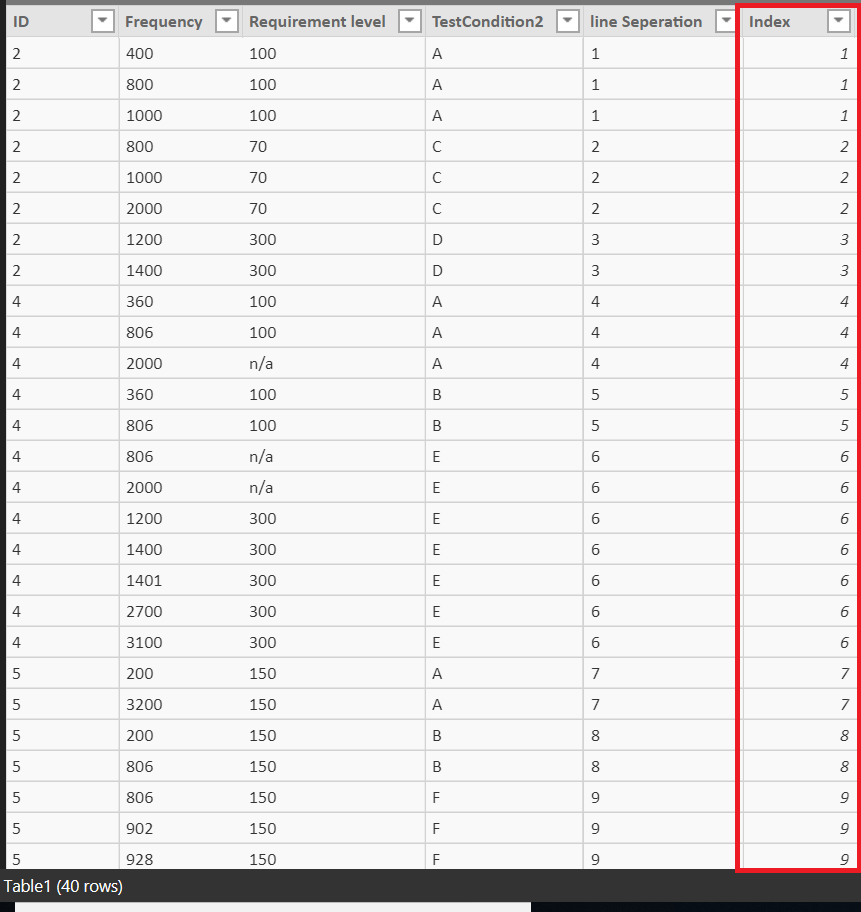
Another way is to add an Index Column using Power Query. We can Group using TestCondition2 column (using GroupKind.Local)
then add an index column. It assigns a new index to every different TestCondition2 in sequence. and will work when you add new rows
See the attached file
let
Source = Table.FromRows(Json.Document(Binary.Decompress(Binary.FromText("hdJLEoMgDAbgq3RYO1MSQHDZ9yEcF71A778soFKh+XWRTMZvEgM6jopVp6zWMVPOl1SpqZslQInP9pt8SrdTTNw2ScSYiDOZnO+p+pEVyaaqr/ezRYLugSxLfM7vP9qOu8Zw4jhJ5mmPGL38opqq0zZk94gAsYddhkRy84ZprFsvyRcxmLaSriIUWS7pQJ4xhiKDZiQckFgCQtvlGrKYPEEaIDHtkIfk4BrLNzw81yv/ifLBGqtGNmakmdMX", BinaryEncoding.Base64), Compression.Deflate)), let _t = ((type text) meta [Serialized.Text = true]) in type table [ID = _t, Frequency = _t, #"Requirement level" = _t, TestCondition2 = _t, #"line Seperation" = _t]),
#"Changed Type" = Table.TransformColumnTypes(Source,{{"ID", Int64.Type}, {"Frequency", Int64.Type}, {"Requirement level", type text}, {"TestCondition2", type text}, {"line Seperation", Int64.Type}}),
#"Grouped Rows" = Table.Group(#"Changed Type", {"TestCondition2"}, {{"AllRows", each _, type table}},GroupKind.Local),
#"Added Index" = Table.AddIndexColumn(#"Grouped Rows", "Index", 1, 1),
#"Expanded AllRows" = Table.ExpandTableColumn(#"Added Index", "AllRows", {"ID", "Frequency", "Requirement level", "line Seperation"}, {"ID", "Frequency", "Requirement level", "line Seperation"})
in
#"Expanded AllRows"
How about this:
Column = Table1[ID] & Table1[TestCondition2]
Column 2 = RANKX(Table1, Table1[Column], , ASC, Dense)
Exactly what i needed , Thankyou.
your post after this was helpfull as well.
Collin-
See if this is what you had in mind:
1) Created a new column that combined your ID and TestCondtion2 Columns. I did this in Power Query, but could also do in a calculated column.
2) Used the following caclulated column to get the "Line Seperation":
New Line Seperation =
VAR CurrentIDTest = Table2[ID TestCondition2]
RETURN
CALCULATE(
DISTINCTCOUNT( Table2[ID TestCondition2]),
FILTER(
ALL ( TABLE2 ),
CurrentIDTest > Table2[ID TestCondition2]
)
)which I believe matches your output you were looking for:
A new Power BI DataViz World Championship is coming this June! Don't miss out on submitting your entry.
Share feedback directly with Fabric product managers, participate in targeted research studies and influence the Fabric roadmap.
| User | Count |
|---|---|
| 47 | |
| 36 | |
| 27 | |
| 15 | |
| 15 |
| User | Count |
|---|---|
| 58 | |
| 56 | |
| 38 | |
| 21 | |
| 21 |