Join us at FabCon Atlanta from March 16 - 20, 2026, for the ultimate Fabric, Power BI, AI and SQL community-led event. Save $200 with code FABCOMM.
Register now!The Power BI Data Visualization World Championships is back! Get ahead of the game and start preparing now! Learn more
I'm at a loss. I can't figure out how to render a simple scatter plot.
I have a table (from sharepoint). I can export that table into excel, click on two columns, and insert -> scatter.
I can successfully "get data", the same sharepoint list, into Power BI Desktop. But it wants to aggregate the columns, and won't render a normal, typical, usual, boring old scatter plot.
How do I do that?
Solved! Go to Solution.
The fields you're using for the X Axis and Y Axis both need to be numeric types, and you have to have Details populated with something.
I tried this, both my X and Y axis are numberic and I odn't get a scatterplot.
What kind of data goes into Details field? Thank you! Any help appreciated.
It can be literally almost anything in the details field. The easiest way to select something is what would you want to show up in the tooltip if a user hovers over a particular point (the X, Y, and Detail values will be displayed in the tooltip).
Ah! Not intuitive, but it works. I suppose if I keep playing with it I might even figure out the best/appropriate/correct data to put in the Details field.
Thank you
Hey @Anonymous,
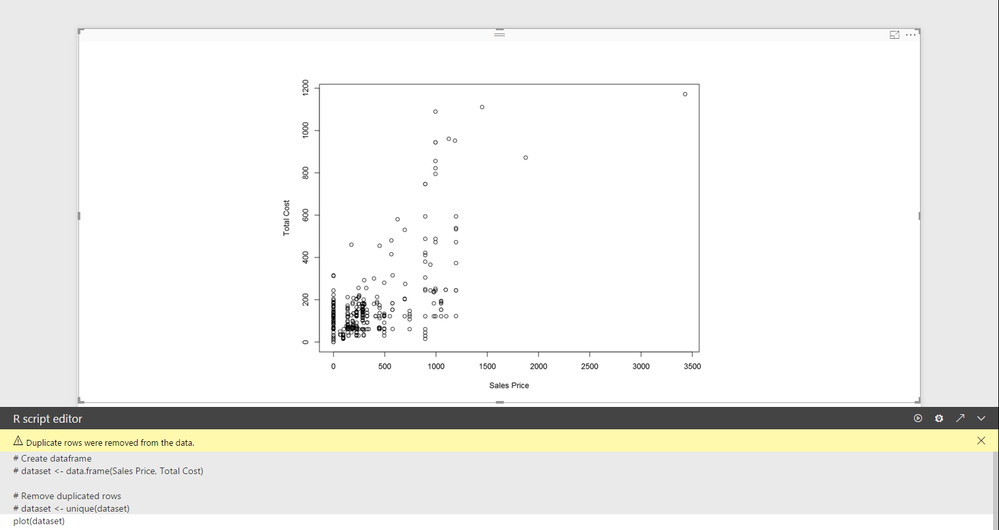
This can easily be done with an R visual. Just put the 2 columns into the "Values" and type "plot(dataset)" in the console.
Best,
Alan
The Power BI Data Visualization World Championships is back! Get ahead of the game and start preparing now!
| User | Count |
|---|---|
| 39 | |
| 37 | |
| 33 | |
| 32 | |
| 29 |
| User | Count |
|---|---|
| 133 | |
| 88 | |
| 85 | |
| 68 | |
| 64 |