cancel
Showing results for 
Search instead for 
Did you mean: 

The Power BI Data Visualization World Championships is back! Get ahead of the game and start preparing now! Learn more

Reply
lavina03
Helper I
Helper I

shows wrong year

Hi,


Please help me figure out why my year is shown wrong. I have created date Hierarchy and when I go to drill down by year it shows 2000 and 2500. I have attached screenshot


http://screencast.com/t/61zIfa1nNE

2 REPLIES 2
v-sihou-msft
Microsoft Employee
Microsoft Employee

Hi @lavina03,


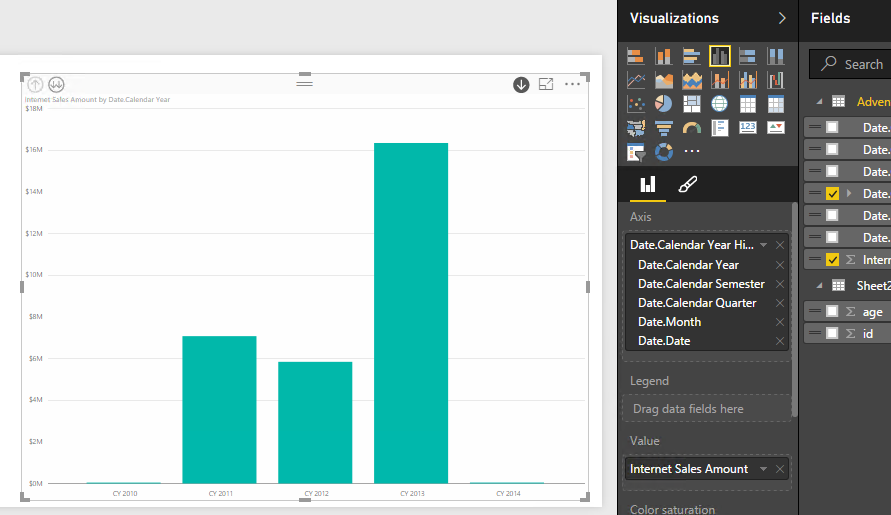
Based on your screenshot, you build your date and import it into chart properly. Please check your if it aggreate all data on Year 2000 only. And if you use numeric data type for Year, please select "Continuous" type in format for X-axis so that it will not use a big interval on X-axis. Please refer to link below:


Tutorial: Customize X-axis and Y-axis properties


Also I suggest you use text type for Year name column, it will have all years appear on axis. See my sample below:


Capture.PNG


Regards,

MattAllington
Community Champion
Community Champion

You could try changing the data type of your year column to text. 


* Matt is an 8 times Microsoft MVP (Power BI) and author of the Power BI Book Supercharge Power BI.
I will not give you bad advice, even if you unknowingly ask for it.

Helpful resources

Announcements
Power BI DataViz World Championships

Power BI Dataviz World Championships

The Power BI Data Visualization World Championships is back! Get ahead of the game and start preparing now!

December 2025 Power BI Update Carousel

Power BI Monthly Update - December 2025

Check out the December 2025 Power BI Holiday Recap!

FabCon Atlanta 2026 carousel

FabCon Atlanta 2026

Join us at FabCon Atlanta, March 16-20, for the ultimate Fabric, Power BI, AI and SQL community-led event. Save $200 with code FABCOMM.