cancel
Showing results for 
Search instead for 
Did you mean: 

The Power BI Data Visualization World Championships is back! Get ahead of the game and start preparing now! Learn more

Reply
Johan
Advocate II
Advocate II

showing value of last year

hi,


I want to show the value of last year, of the selected month.

So if I select month 1703 (march 2017), it should also show the valule of last year: 1603 (march 2016)


Thanks,

Johan

1 ACCEPTED SOLUTION

Thanks for your input.


1613 is the closing period of the accounting system. It's like between december and january. It's quite common in finance to have this period. Also periods can be 4 week periods,  than you would have 13 regular periods and 1 closing. So a regular calendar month won't do.


In the period table I have now created to columns, for year (16) and period (1,2,3, etc.), In this way I can create the formula to show year-1 and period = current period.


View solution in original post

5 REPLIES 5
vanessafvg
Super User
Super User


@Johan

py value = calculate(sum(value), SAMEPERIODLASTYEAR(date[date]))


If I took the time to answer your question and I came up with a solution, please mark my post as a solution and /or give kudos freely for the effort 🙂 Thank you!

Proud to be a Super User!


Thanks.

I forgot to mention that it's not based on a date table, but a financial periods table. Thus


..

1610

1611

1612

1613 (closing period)

1701

1701

etc.


so when 1703 is selected, 1603 is the comparing period.

Eric_Zhang
Microsoft Employee
Microsoft Employee


@Johan wrote:

Thanks.

I forgot to mention that it's not based on a date table, but a financial periods table. Thus


..

1610

1611

1612

1613 (closing period)

1701

1701

etc.


so when 1703 is selected, 1603 is the comparing period.


@Johan

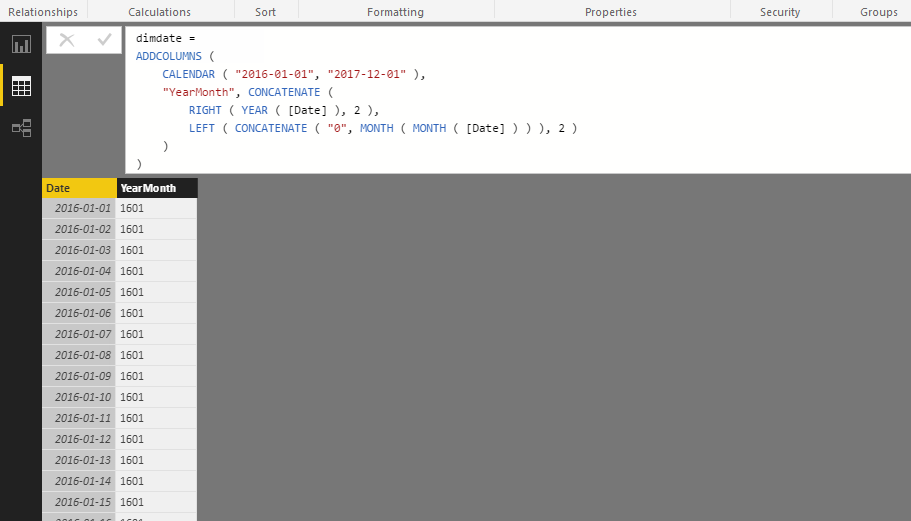
You need a calendar table as

dimdate = 
ADDCOLUMNS (
    CALENDAR ( "2016-01-01", "2017-12-01" ),
    "YearMonth", CONCATENATE (
        RIGHT ( YEAR ( [Date] ), 2 ),
        LEFT ( CONCATENATE ( "0", MONTH ( MONTH ( [Date] ) ) ), 2 )
    )
)

Capture.PNG


Then link the calendar table to your table. After that @vanessafvg's SAMEPERIODLASTYEAR measure could work.


By the way, what is 1613? There's no such a 13 month.

Thanks for your input.


1613 is the closing period of the accounting system. It's like between december and january. It's quite common in finance to have this period. Also periods can be 4 week periods,  than you would have 13 regular periods and 1 closing. So a regular calendar month won't do.


In the period table I have now created to columns, for year (16) and period (1,2,3, etc.), In this way I can create the formula to show year-1 and period = current period.


@Johan  would it not make sense to marry your period data with your date table otherwise its gonna be a slog to use date type functions


If I took the time to answer your question and I came up with a solution, please mark my post as a solution and /or give kudos freely for the effort 🙂 Thank you!

Proud to be a Super User!


Helpful resources

Announcements
Power BI DataViz World Championships

Power BI Dataviz World Championships

The Power BI Data Visualization World Championships is back! Get ahead of the game and start preparing now!

November Power BI Update Carousel

Power BI Monthly Update - November 2025

Check out the November 2025 Power BI update to learn about new features.

FabCon Atlanta 2026 carousel

FabCon Atlanta 2026

Join us at FabCon Atlanta, March 16-20, for the ultimate Fabric, Power BI, AI and SQL community-led event. Save $200 with code FABCOMM.