
Join us at FabCon Atlanta from March 16 - 20, 2026, for the ultimate Fabric, Power BI, AI and SQL community-led event. Save $200 with code FABCOMM.
Register now!The Power BI Data Visualization World Championships is back! Get ahead of the game and start preparing now! Learn more
Hi community,
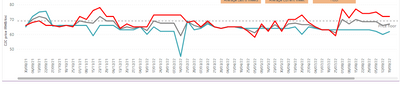
I wanted to show dates in the x axis, say every four weeks, in ther x axis as below. How to proceed?
Many thanks.
Hi @FreemanZ this is a great tip to work out "the every four weeks" part. The thing is my client wanted to show 20 months of data without a scolling bar. And the x axis can't be continuous, because they wanted to leave the missing data points as blanks. The width of my chart can only fit in 12 months of data. I'm trying to figour out how to display 20 months of data without a scrolling bar. I thought if I show dates every four weeks, I could manipulate the width. But the client didn't want to see the week No., they wanted to see the specific date.
hi @thisiskl
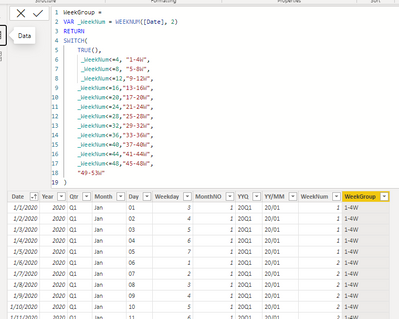
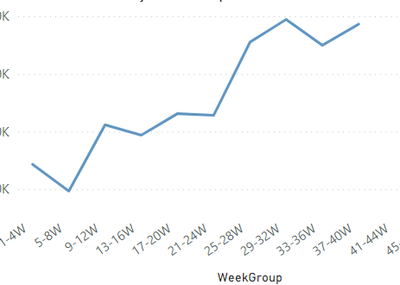
you may need to create a new grouping column in your Date table with the code below and pull the new column to your x-axis of your chart.
hope you feel comfortable with this solution, otherwise you may try the easy but loose solution, like this:
https://learn.microsoft.com/en-us/power-bi/create-reports/desktop-grouping-and-binning
The Power BI Data Visualization World Championships is back! Get ahead of the game and start preparing now!
Check out the November 2025 Power BI update to learn about new features.
| User | Count |
|---|---|
| 59 | |
| 43 | |
| 42 | |
| 23 | |
| 17 |
| User | Count |
|---|---|
| 190 | |
| 122 | |
| 96 | |
| 66 | |
| 47 |