Join us at FabCon Atlanta from March 16 - 20, 2026, for the ultimate Fabric, Power BI, AI and SQL community-led event. Save $200 with code FABCOMM.
Register now!The Power BI Data Visualization World Championships is back! Get ahead of the game and start preparing now! Learn more
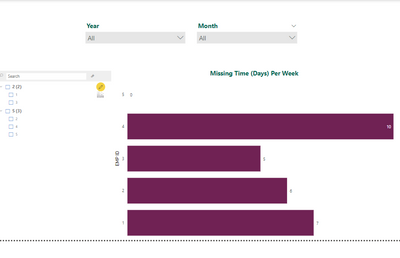
i have a month filter which is filtering the chart with the respective selections , i have an requirments where i need to show all employees irrespective of selection in month and show 0 for them ,,i tried show values with no data but its not working .
Note : chart has to filter the employees according to slicer selection , only month selection should return all employees .
| EMP ID | Month | Year | Manager ID | Planned Time | Recorded Time |
| 1 | Apr | 2022 | 2 | 35 | 28 |
| 2 | Mar | 2022 | 5 | 35 | 29 |
| 3 | Jan | 2022 | 2 | 35 | 30 |
| 4 | Feb | 2022 | 5 | 35 | 25 |
| 5 | Mar | 2022 | 5 | 35 | 35 |
values in chart has below caluclated column
Solved! Go to Solution.
Hi @balu810 ,
You should create a new table only contains Year and Month, and use these columns to do filter.
Date slicer = crossjoin(VALUES('Table'[Year]),VALUES('Table'[Month]))
Use this expression to calcualte the Missing Time:
Measure =
VAR _c =
CALCULATE (
SUM ( 'Table'[Missing Time] ),
FILTER (
'Table',
[Year]
IN VALUES ( 'Date slicer'[Year] )
&& [Month] IN VALUES ( 'Date slicer'[Month] )
)
)
RETURN
IF ( ISBLANK ( _c ), 0, _c )
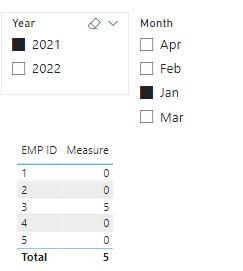
Result:
Pbix in the end you can refer.
Best Regards
Community Support Team _ chenwu zhu
If this post helps, then please consider Accept it as the solution to help the other members find it more quickly.
Hi @balu810 ,
You should create a new table only contains Year and Month, and use these columns to do filter.
Date slicer = crossjoin(VALUES('Table'[Year]),VALUES('Table'[Month]))
Use this expression to calcualte the Missing Time:
Measure =
VAR _c =
CALCULATE (
SUM ( 'Table'[Missing Time] ),
FILTER (
'Table',
[Year]
IN VALUES ( 'Date slicer'[Year] )
&& [Month] IN VALUES ( 'Date slicer'[Month] )
)
)
RETURN
IF ( ISBLANK ( _c ), 0, _c )
Result:
Pbix in the end you can refer.
Best Regards
Community Support Team _ chenwu zhu
If this post helps, then please consider Accept it as the solution to help the other members find it more quickly.
The Power BI Data Visualization World Championships is back! Get ahead of the game and start preparing now!
| User | Count |
|---|---|
| 38 | |
| 38 | |
| 36 | |
| 28 | |
| 28 |
| User | Count |
|---|---|
| 124 | |
| 88 | |
| 74 | |
| 66 | |
| 65 |