Join us at FabCon Atlanta from March 16 - 20, 2026, for the ultimate Fabric, Power BI, AI and SQL community-led event. Save $200 with code FABCOMM.
Register now!The Power BI Data Visualization World Championships is back! Get ahead of the game and start preparing now! Learn more
We have upgraded our database to SQL Server 2022 to be able to use composite models.
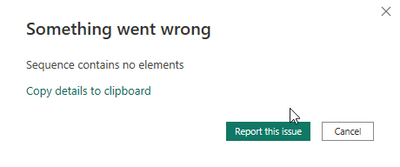
When I try to add a power bi dataset to an Imported excel I get the following message:
Hi @SasVer ,
I can't reproduce your problem, usually when we encounter this kind of problem, we will suggest the user to optimize the report and reduced the rows or roll back to the previous version to see if it works.
This is the related document, you can view this content:
sequence contains no matching element - Microsoft Power BI Community
Sequence contains no matching element - Microsoft Power BI Community
Solved: Error: Sequence contains no matching element - Microsoft Power BI Community
Best Regards,
Liu Yang
If this post helps, then please consider Accept it as the solution to help the other members find it more quickly.
The Power BI Data Visualization World Championships is back! Get ahead of the game and start preparing now!
| User | Count |
|---|---|
| 39 | |
| 36 | |
| 33 | |
| 31 | |
| 28 |
| User | Count |
|---|---|
| 129 | |
| 88 | |
| 79 | |
| 68 | |
| 63 |