Join us at FabCon Atlanta from March 16 - 20, 2026, for the ultimate Fabric, Power BI, AI and SQL community-led event. Save $200 with code FABCOMM.
Register now!Learn from the best! Meet the four finalists headed to the FINALS of the Power BI Dataviz World Championships! Register now
Hi there,
I've recently joined a new team, they have report that has sensitivity label applied as confidential, I've been granted admin access to the workspace, I'm able to download the pbix file but, I'm unable to open it, getting below message please advise what should be done to be able to open the pbix file.
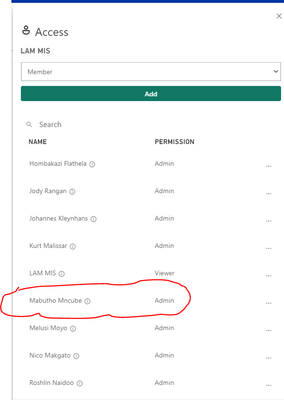
Work space access :
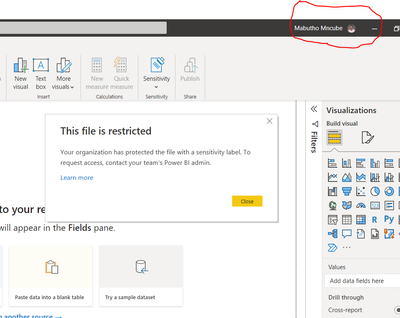
Message when trying to open the file :
please help!!
Yes, I'm getting same massege even though I've signed in to power bi, see below screen print
Hi @amitchandak I'm still getting the same problem,
is there any access I need to get since this has sensitivity level applied?
@Mabutho_joe , Open power bi from the menu and make sure you are login/sign-in to power bi. Once signed in, open the file and check
Share feedback directly with Fabric product managers, participate in targeted research studies and influence the Fabric roadmap.
Check out the February 2026 Power BI update to learn about new features.
| User | Count |
|---|---|
| 65 | |
| 59 | |
| 45 | |
| 19 | |
| 15 |
| User | Count |
|---|---|
| 109 | |
| 108 | |
| 39 | |
| 30 | |
| 26 |