Join us at FabCon Atlanta from March 16 - 20, 2026, for the ultimate Fabric, Power BI, AI and SQL community-led event. Save $200 with code FABCOMM.
Register now!The Power BI Data Visualization World Championships is back! Get ahead of the game and start preparing now! Learn more
Hi,
I have a distinctcount measure (total tickets).
This measure should not been filtered by table "incidencias_similares". I can not configurate this exception in " visuals interactions", and should be indicated in DAX measure.
Nevertheless, this measure should be filtered by [Patron] and [causa] columns from "Data" table.
I have tried this formula:
You may use CROSSFILTER instead and set cross-filter direction to None.
It does not work. If I change crossfilter between Data and Incidencias_similares is true that "Total incidencias" is the same of "Total tickets"= CALCULATE(DISTINCTCOUNT(Data[Ticket ID]);ALL('Incidencias_similares')) wont be filtered.
But I need that the other metric (Tickets Repetidos) to be filtered.
This is the reason because I have tried with ALLEXCEPT and ALL to avoid filtering
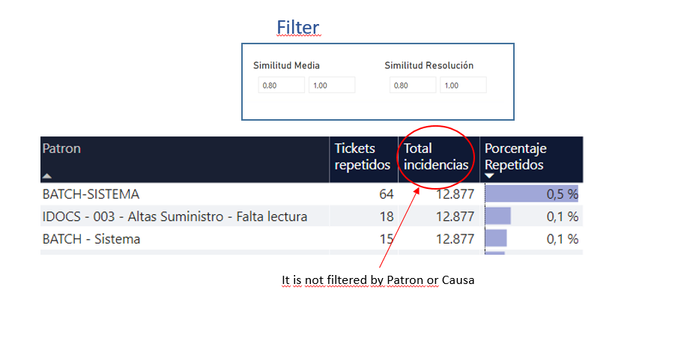
I show an example,
As you can see Total incidencias Total tickets= CALCULATE(DISTINCTCOUNT(Data[Ticket ID]);ALL('Incidencias_similares'))
is not afected by filter, but it is not filtered by Patron
Is Patron part of data?
Try
CALCULATE(DISTINCTCOUNT(Data[Ticket ID]);ALLSELECTED('Incidencias_similares'))
CALCULATE(DISTINCTCOUNT(Data[Ticket ID]);ALL('Incidencias_similares'[Total Incidences]))
if you need more help make me @
Appreciate your Kudos.
This 'Incidencias_similares' table refers to what in that data? Because, as you are applying an ALL, I believe it is directly linked to 'Patron'.
Incidencias_similares is a table that is used to create two filter (in the top of the image). Total tickets should not been filtered by Incidencias_similares.
Nevertheless, this measure should be filtered by [Patron] and [causa] columns from another table, "Data" table.
The Power BI Data Visualization World Championships is back! Get ahead of the game and start preparing now!
Check out the November 2025 Power BI update to learn about new features.
| User | Count |
|---|---|
| 59 | |
| 43 | |
| 42 | |
| 23 | |
| 17 |
| User | Count |
|---|---|
| 190 | |
| 122 | |
| 96 | |
| 66 | |
| 47 |