FabCon is coming to Atlanta
Join us at FabCon Atlanta from March 16 - 20, 2026, for the ultimate Fabric, Power BI, AI and SQL community-led event. Save $200 with code FABCOMM.
Register now!- Power BI forums
- Get Help with Power BI
- Desktop
- Service
- Report Server
- Power Query
- Mobile Apps
- Developer
- DAX Commands and Tips
- Custom Visuals Development Discussion
- Health and Life Sciences
- Power BI Spanish forums
- Translated Spanish Desktop
- Training and Consulting
- Instructor Led Training
- Dashboard in a Day for Women, by Women
- Galleries
- Data Stories Gallery
- Themes Gallery
- Contests Gallery
- QuickViz Gallery
- Quick Measures Gallery
- Visual Calculations Gallery
- Notebook Gallery
- Translytical Task Flow Gallery
- TMDL Gallery
- R Script Showcase
- Webinars and Video Gallery
- Ideas
- Custom Visuals Ideas (read-only)
- Issues
- Issues
- Events
- Upcoming Events
Get Fabric Certified for FREE during Fabric Data Days. Don't miss your chance! Request now
- Power BI forums
- Forums
- Get Help with Power BI
- Desktop
- Re: see the original value where error is displaye...
- Subscribe to RSS Feed
- Mark Topic as New
- Mark Topic as Read
- Float this Topic for Current User
- Bookmark
- Subscribe
- Printer Friendly Page


- Mark as New
- Bookmark
- Subscribe
- Mute
- Subscribe to RSS Feed
- Permalink
- Report Inappropriate Content
see the original value where error is displayed
After Close & Apply in query editor i get few lines with errors in two columns.
How can I see what was the original value that caused this error.


- Mark as New
- Bookmark
- Subscribe
- Mute
- Subscribe to RSS Feed
- Permalink
- Report Inappropriate Content
You can look to previous steps in the query editor and from there look to see what stage of the query the error comes into play and what values are causing it
- Mark as New
- Bookmark
- Subscribe
- Mute
- Subscribe to RSS Feed
- Permalink
- Report Inappropriate Content
I found this in you tube: https://www.youtube.com/watch?v=9-Lag0VOiTs
I still have a question:
I suppose the lines with errors were not passed to the table while "close & load". Am I right?
Now I see the "-" and the "*".
.

I replaced the "-" with nothing, and the "*" with blank
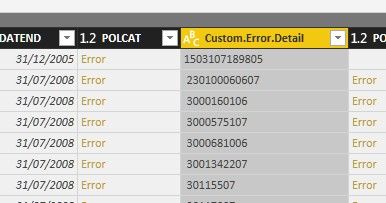
How do I finish the operation and load the corrected values to the table?
- Mark as New
- Bookmark
- Subscribe
- Mute
- Subscribe to RSS Feed
- Permalink
- Report Inappropriate Content
Hi @gtamir,
I think you need to remove these error columns and transform your custom column to right type.
Regards,
Xiaoxin Sheng
- Mark as New
- Bookmark
- Subscribe
- Mute
- Subscribe to RSS Feed
- Permalink
- Report Inappropriate Content
Hi, You see that I fixed them by removing the "*" at the begining. now if I "close & Load" will they be added to the other records?
- Mark as New
- Bookmark
- Subscribe
- Mute
- Subscribe to RSS Feed
- Permalink
- Report Inappropriate Content
Hi @gtamir,
>>now if I "close & Load" will they be added to the other records?
Nope, other records won't auto generate similar columns to handling error records. I think you can try to package them as custom function and invoke this function to replace other similar error.
Regards,
Xiaoxin Sheng
- Mark as New
- Bookmark
- Subscribe
- Mute
- Subscribe to RSS Feed
- Permalink
- Report Inappropriate Content
This is not what I meant. I don't want to add columns, I want to add the raws that I fixed to the table.
- Mark as New
- Bookmark
- Subscribe
- Mute
- Subscribe to RSS Feed
- Permalink
- Report Inappropriate Content
Hi @gtamir,
Do you means replace original error value?
If this is a case, I'd like to suggest you take a look at below links which told about use replace function to dynamic replace value based on conditions.
Query editor replacing values based on another column
Regards,
Xiaoxin Sheng
- Mark as New
- Bookmark
- Subscribe
- Mute
- Subscribe to RSS Feed
- Permalink
- Report Inappropriate Content
Thank you for the effort you do to explain me that. I'll try to explain my problem again.
I have an excell table with 100 lines.
I bring them to power bi and press load.
It loads the file but says that there were 5 raws with errors.
I look at the "query errors" and see the 5 lines. I know what the errors are and I fix all the 5 errors.
Now...I press "Close&Apply". Are these 5 lines added to the table?
- Mark as New
- Bookmark
- Subscribe
- Mute
- Subscribe to RSS Feed
- Permalink
- Report Inappropriate Content
HI @gtamir,
>>Now...I press "Close&Apply". Are these 5 lines added to the table?
If you already replace these error records and save close the change, these new values will replace original records, it not means power bi will add new lines to original table.
Regards,
Xiaoxin Sheng
- Mark as New
- Bookmark
- Subscribe
- Mute
- Subscribe to RSS Feed
- Permalink
- Report Inappropriate Content
I know from the excel that a few records contain some wrong values. But I don't want to go each time to the original table in excel, I want to replace or show the value on each cell within the query were error is displayed.

Helpful resources

Power BI Monthly Update - November 2025
Check out the November 2025 Power BI update to learn about new features.

Fabric Data Days
Advance your Data & AI career with 50 days of live learning, contests, hands-on challenges, study groups & certifications and more!

FabCon Atlanta 2026
Join us at FabCon Atlanta, March 16-20, for the ultimate Fabric, Power BI, AI and SQL community-led event. Save $200 with code FABCOMM.


