cancel
Showing results for 
Search instead for 
Did you mean: 

Learn from the best! Meet the four finalists headed to the FINALS of the Power BI Dataviz World Championships! Register now

Reply
miniheft
New Member

sankey

I have imported the very nice Sankey custom visual and wonder if any of you know:

  1. How to change the font size on the data labels
  2. How to modify the names (ex. weight) of the black hover-over pop up boxes

Thank you

1 ACCEPTED SOLUTION

@miniheft have you got latest version of custom visual downloaded.

View solution in original post

3 REPLIES 3
ankitpatira
Community Champion
Community Champion

@miniheft


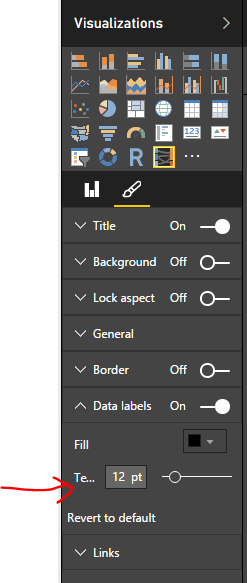
1. you can change font size by going to paintbrush icon Data Labels as shown below.


Capture.PNG


2. you can't currently change name but can submit that as an feedback to the custom visual developer and it might get actioned.

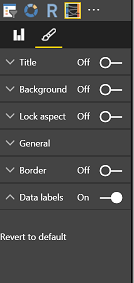
sankey labels.png


Thanks for your reply.  I don't see the same options when I expand Data labels, I see only the above, with option for on/off and revert to default.

@miniheft have you got latest version of custom visual downloaded.

Helpful resources

Announcements
Power BI DataViz World Championships carousel

Power BI DataViz World Championships - June 2026

A new Power BI DataViz World Championship is coming this June! Don't miss out on submitting your entry.

Join our Fabric User Panel

Join our Fabric User Panel

Share feedback directly with Fabric product managers, participate in targeted research studies and influence the Fabric roadmap.

March Power BI Update Carousel

Power BI Community Update - March 2026

Check out the March 2026 Power BI update to learn about new features.