Join us at FabCon Atlanta from March 16 - 20, 2026, for the ultimate Fabric, Power BI, AI and SQL community-led event. Save $200 with code FABCOMM.
Register now!The Power BI Data Visualization World Championships is back! Get ahead of the game and start preparing now! Learn more
Hi,
I've created a running total measure with the following formula:
Running Realised Cost =
CALCULATE (
SUM ( test_data_powerbi[Realised Cost] ),
FILTER (
(ALLSELECTED( test_data_powerbi[Issue Date] )),
test_data_powerbi[Issue Date] <= MAX ( test_data_powerbi[Issue Date])
)
)
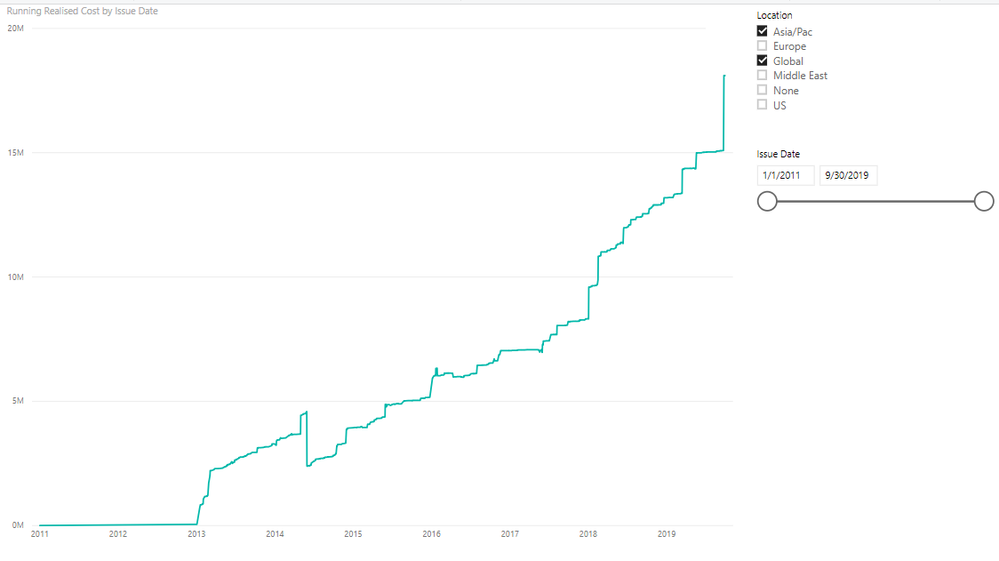
It looks good with slicers by category...
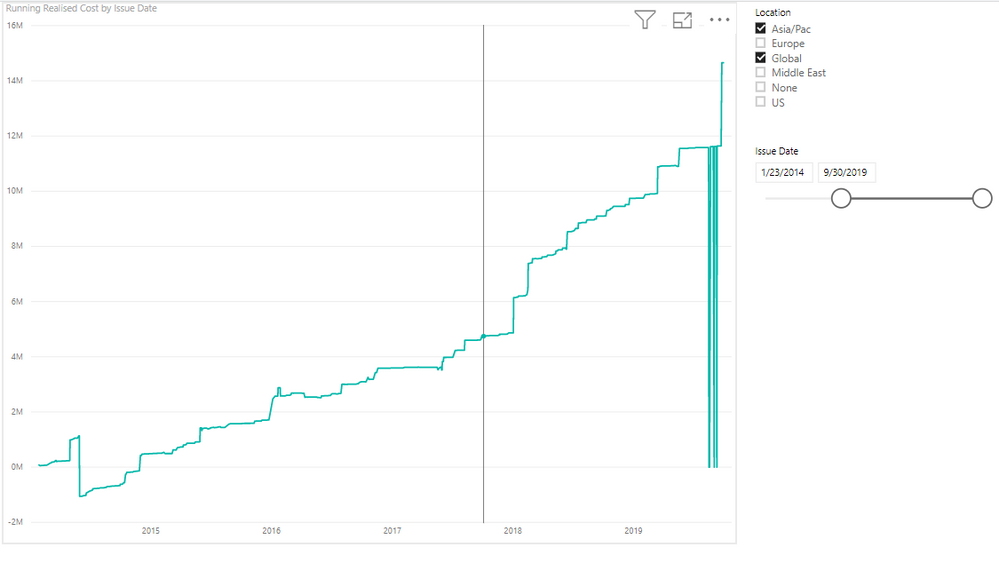
But when I'm playing with the date it bazzes:
Do you know how to avoid this? Feel like it would be a common problem. I can also provide the .pbix and data if needed
Thank you!
Katie
Solved! Go to Solution.
Hi @katie1234 ,
Could you please try the following measure?
Running Realised Cost =
CALCULATE (
SUM ( test_data_powerbi[Realised Cost] ),
FILTER (
ALLSELECTED(test_data_powerbi),
[Issue Date] <= MAX ( test_data_powerbi[Issue Date])
)
)
Best regards,
Community Support Team _ Dong Li
If this post helps, then please consider Accept it as the solution to help the other members find it more quickly.
Hi @katie1234 ,
Could you please try the following measure?
Running Realised Cost =
CALCULATE (
SUM ( test_data_powerbi[Realised Cost] ),
FILTER (
ALLSELECTED(test_data_powerbi),
[Issue Date] <= MAX ( test_data_powerbi[Issue Date])
)
)
Best regards,
Community Support Team _ Dong Li
If this post helps, then please consider Accept it as the solution to help the other members find it more quickly.
yes. The pbix would definitely help
The Power BI Data Visualization World Championships is back! Get ahead of the game and start preparing now!
Check out the November 2025 Power BI update to learn about new features.
| User | Count |
|---|---|
| 59 | |
| 46 | |
| 42 | |
| 23 | |
| 18 |
| User | Count |
|---|---|
| 193 | |
| 123 | |
| 99 | |
| 67 | |
| 49 |