cancel
Showing results for 
Search instead for 
Did you mean: 

The Power BI Data Visualization World Championships is back! Get ahead of the game and start preparing now! Learn more

Reply
Magpie_Rob
Helper I
Helper I

row total percentage DAX

Hello, 


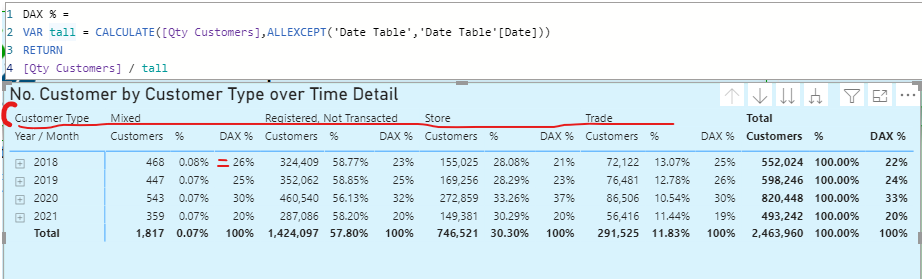
I have a matrix with dates as rows and 'Customer Type' as columns, I'm trying to recreate the row total % as a DAX measure so I can change the formating from 2 decimal places to 0. 


I usually use ALLEXCEPT for the rows but I think this is ignoring the Column context (customer type) I tired added in another all except condition but this didn't help. 


I'm expecting the Dax % to be the same as %


Magpie_Rob_1-1629278178568.png


Any help is greatly appreciated. 


Thanks 

Magpie


7 REPLIES 7
v-luwang-msft
Community Support
Community Support

Hi @Magpie_Rob ,

Has your problem been solved, if so, please consider Accept a correct reply as the solution or share your own solution to help others find it.

Best Regards
Lucien

Hi @Magpie_Rob ,

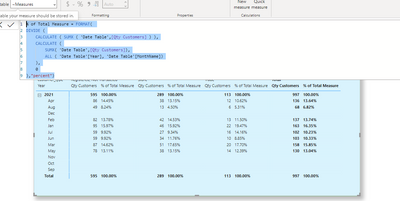
Try measure like below:

% of Total Measure = FORMAT( 
DIVIDE (
    CALCULATE ( SUMX ( 'Date Table',[Qty Customers] ) ),
    CALCULATE (
        SUMX( 'Date Table',[Qty Customers]),
        ALL ( 'Date Table'[Year], 'Date Table'[MonthName])
    ),
    0
),"percent")

Final get :

vluwangmsft_0-1630981131393.png


Best Regards

Lucien

Excellent Example! I have the same issue, and this measure works excellent in my Report. Thanks!

hi @v-luwang-msft  unfortunately this still isn't working - I'm going to upload a sample pbix shortly. 

v-luwang-msft
Community Support
Community Support

Hi @Magpie_Rob ,

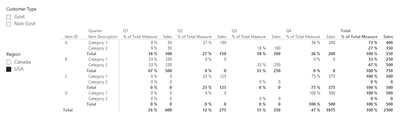
To calculate the % for each item this is the dax sentence:

Since I do not have your specific data, I have made a relevant presentation on my data at,see the below:


% of Total Measure =
DIVIDE (
    CALCULATE ( SUM ( Table1[Sales] ) ),
    CALCULATE (
        SUM ( Table1[Sales] ),
        ALL ( Table1[Quarter], Table1[Item Description] )
    ),
    0
)

vluwangmsft_0-1629795677282.png


If question still not solved ,could pls share your pbix file?Remember to remove confidential data.


Don't forget to give thumbs up and accept this as a solution if it helped you!!!

Best Regards

Lucien

amitchandak
Super User
Super User

@Magpie_Rob , Try a measure like

calculate([Qty Customer], filter(allselected('Date Table'), 'Date Table'[Date] = max('Date Table'[Date])))

Share with Power BI Enthusiasts: Full Power BI Video (20 Hours) YouTube
Microsoft Fabric Series 60+ Videos YouTube
Microsoft Fabric Hindi End to End YouTube

Helpful resources

Announcements
Power BI DataViz World Championships

Power BI Dataviz World Championships

The Power BI Data Visualization World Championships is back! Get ahead of the game and start preparing now!

December 2025 Power BI Update Carousel

Power BI Monthly Update - December 2025

Check out the December 2025 Power BI Holiday Recap!

FabCon Atlanta 2026 carousel

FabCon Atlanta 2026

Join us at FabCon Atlanta, March 16-20, for the ultimate Fabric, Power BI, AI and SQL community-led event. Save $200 with code FABCOMM.