cancel
Showing results for 
Search instead for 
Did you mean: 

A new Data Days event is coming soon! This time we’re going bigger than ever. Fabric, Power BI, SQL, AI and more. Don't miss out.

Reply
Anonymous
Not applicable

row numbering wrong/ how to calculate

Hi all,

below is a simple table.

I want to calculate the values in the column difference.

Preferably in power query.

the difference between 2 and 1 = 1

the difference between 3 and 2 = 1

the difference between 5 and 3 = 2

etc.

How you can give me some guidance how to do that.

Thanks!

John


Capture.PNG

1 ACCEPTED SOLUTION
ribisht17
Super User
Super User

4 REPLIES 4
Vijay_A_Verma
Most Valuable Professional

Added an Index column and put following formula in a custom column

=try [number]-#"Added Index"[number]{[Index]-1} otherwise 0

See the working here - Open a blank query - Home - Advanced Editor - Remove everything from there and paste the below code to test

let
    Source = Table.FromRows(Json.Document(Binary.Decompress(Binary.FromText("i45WMlSK1YlWMgKTxmDSFEyag0kLMGkJJg0NlGJjAQ==", BinaryEncoding.Base64), Compression.Deflate)), let _t = ((type nullable text) meta [Serialized.Text = true]) in type table [number = _t]),
    #"Changed Type" = Table.TransformColumnTypes(Source,{{"number", Int64.Type}}),
    #"Added Index" = Table.AddIndexColumn(#"Changed Type", "Index", 0, 1, Int64.Type),
    #"Added Custom" = Table.AddColumn(#"Added Index", "difference", each try [number]-#"Added Index"[number]{[Index]-1} otherwise 0, type number),
    #"Removed Columns" = Table.RemoveColumns(#"Added Custom",{"Index"})
in
    #"Removed Columns"


Jihwan_Kim
Super User
Super User

Hi,

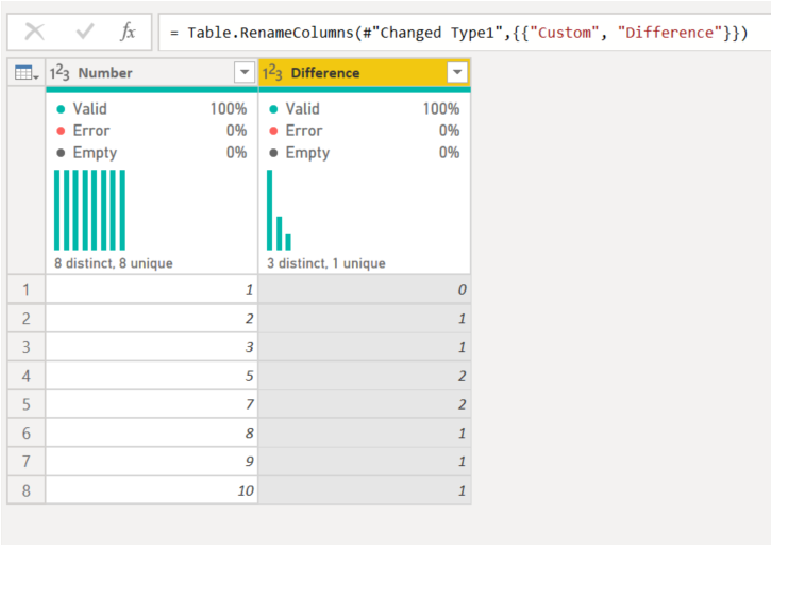
Please check the below picture and the attached pbix file.

I tried to do this in Power Query Editor by clicking UI.
 

Untitled.png


The below is the copy from the Advaned Editor.


let
    Source = Table.FromRows(Json.Document(Binary.Decompress(Binary.FromText("i45WMlSK1YlWMgKTxmDSFEyag0kLMGkJJg0NlGJjAQ==", BinaryEncoding.Base64), Compression.Deflate)), let _t = ((type nullable text) meta [Serialized.Text = true]) in type table [Number = _t]),
    #"Changed Type" = Table.TransformColumnTypes(Source,{{"Number", Int64.Type}}),
    #"Added Index" = Table.AddIndexColumn(#"Changed Type", "Index", 1, 1, Int64.Type),
    #"Added Index1" = Table.AddIndexColumn(#"Added Index", "Index.1", 0, 1, Int64.Type),
    #"Merged Queries" = Table.NestedJoin(#"Added Index1", {"Index.1"}, #"Added Index1", {"Index"}, "Added Index1", JoinKind.LeftOuter),
    #"Expanded Added Index1" = Table.ExpandTableColumn(#"Merged Queries", "Added Index1", {"Number"}, {"Added Index1.Number"}),
    #"Sorted Rows" = Table.Sort(#"Expanded Added Index1",{{"Number", Order.Ascending}}),
    #"Added Custom" = Table.AddColumn(#"Sorted Rows", "Custom", each if [Added Index1.Number] = null then 0 else 
[Number]-[Added Index1.Number]),
    #"Removed Columns" = Table.RemoveColumns(#"Added Custom",{"Index", "Index.1", "Added Index1.Number"}),
    #"Changed Type1" = Table.TransformColumnTypes(#"Removed Columns",{{"Custom", Int64.Type}}),
    #"Renamed Columns" = Table.RenameColumns(#"Changed Type1",{{"Custom", "Difference"}})
in
    #"Renamed Columns"


If this post helps, then please consider accepting it as the solution to help other members find it faster, and give a big thumbs up.


Click here to visit my LinkedIn page

ribisht17
Super User
Super User

@Anonymous 


This has been solved here Solved: Calculate Difference Between Previous Row - Microsoft Power BI Community


Regards,

Ritesh

Anonymous
Not applicable

Hi @ribisht17 , @Vijay_A_Verma , @Jihwan_Kim 


problem solved, thank you!


John

Helpful resources

Announcements
May Power BI Update Carousel

Power BI Monthly Update - May 2026

Check out the May 2026 Power BI update to learn about new features.

Fabric SQL PBI Data Days

Data Days 2026 coming soon!

Sign up to receive a private message when registration opens and key events begin.

New to Fabric survey Carousel

New to Fabric Survey

If you have recently started exploring Fabric, we'd love to hear how it's going. Your feedback can help with product improvements.

Power BI DataViz World Championships carousel

Power BI DataViz World Championships - June 2026

A new Power BI DataViz World Championship is coming this June! Don't miss out on submitting your entry.