Don't miss your chance to take the Fabric Data Engineer (DP-700) exam on us!
Learn moreWe've captured the moments from FabCon & SQLCon that everyone is talking about, and we are bringing them to the community, live and on-demand. Starts on April 14th. Register now
Hi all,
below is a simple table.
I want to calculate the values in the column difference.
Preferably in power query.
the difference between 2 and 1 = 1
the difference between 3 and 2 = 1
the difference between 5 and 3 = 2
etc.
How you can give me some guidance how to do that.
Thanks!
John
Solved! Go to Solution.
@Anonymous
This has been solved here Solved: Calculate Difference Between Previous Row - Microsoft Power BI Community
Regards,
Ritesh
Added an Index column and put following formula in a custom column
=try [number]-#"Added Index"[number]{[Index]-1} otherwise 0See the working here - Open a blank query - Home - Advanced Editor - Remove everything from there and paste the below code to test
let
Source = Table.FromRows(Json.Document(Binary.Decompress(Binary.FromText("i45WMlSK1YlWMgKTxmDSFEyag0kLMGkJJg0NlGJjAQ==", BinaryEncoding.Base64), Compression.Deflate)), let _t = ((type nullable text) meta [Serialized.Text = true]) in type table [number = _t]),
#"Changed Type" = Table.TransformColumnTypes(Source,{{"number", Int64.Type}}),
#"Added Index" = Table.AddIndexColumn(#"Changed Type", "Index", 0, 1, Int64.Type),
#"Added Custom" = Table.AddColumn(#"Added Index", "difference", each try [number]-#"Added Index"[number]{[Index]-1} otherwise 0, type number),
#"Removed Columns" = Table.RemoveColumns(#"Added Custom",{"Index"})
in
#"Removed Columns"
Hi,
Please check the below picture and the attached pbix file.
I tried to do this in Power Query Editor by clicking UI.
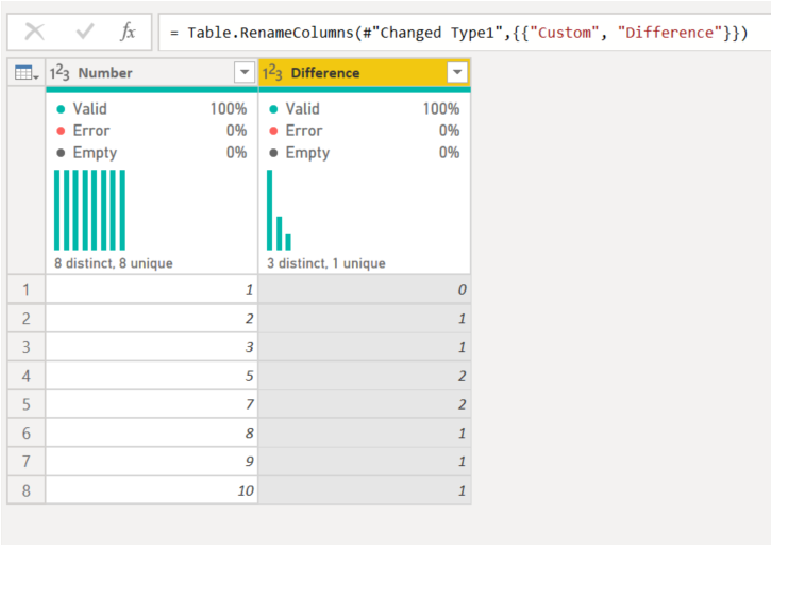
The below is the copy from the Advaned Editor.
let
Source = Table.FromRows(Json.Document(Binary.Decompress(Binary.FromText("i45WMlSK1YlWMgKTxmDSFEyag0kLMGkJJg0NlGJjAQ==", BinaryEncoding.Base64), Compression.Deflate)), let _t = ((type nullable text) meta [Serialized.Text = true]) in type table [Number = _t]),
#"Changed Type" = Table.TransformColumnTypes(Source,{{"Number", Int64.Type}}),
#"Added Index" = Table.AddIndexColumn(#"Changed Type", "Index", 1, 1, Int64.Type),
#"Added Index1" = Table.AddIndexColumn(#"Added Index", "Index.1", 0, 1, Int64.Type),
#"Merged Queries" = Table.NestedJoin(#"Added Index1", {"Index.1"}, #"Added Index1", {"Index"}, "Added Index1", JoinKind.LeftOuter),
#"Expanded Added Index1" = Table.ExpandTableColumn(#"Merged Queries", "Added Index1", {"Number"}, {"Added Index1.Number"}),
#"Sorted Rows" = Table.Sort(#"Expanded Added Index1",{{"Number", Order.Ascending}}),
#"Added Custom" = Table.AddColumn(#"Sorted Rows", "Custom", each if [Added Index1.Number] = null then 0 else
[Number]-[Added Index1.Number]),
#"Removed Columns" = Table.RemoveColumns(#"Added Custom",{"Index", "Index.1", "Added Index1.Number"}),
#"Changed Type1" = Table.TransformColumnTypes(#"Removed Columns",{{"Custom", Int64.Type}}),
#"Renamed Columns" = Table.RenameColumns(#"Changed Type1",{{"Custom", "Difference"}})
in
#"Renamed Columns"
@Anonymous
This has been solved here Solved: Calculate Difference Between Previous Row - Microsoft Power BI Community
Regards,
Ritesh
If you have recently started exploring Fabric, we'd love to hear how it's going. Your feedback can help with product improvements.
A new Power BI DataViz World Championship is coming this June! Don't miss out on submitting your entry.
Share feedback directly with Fabric product managers, participate in targeted research studies and influence the Fabric roadmap.
| User | Count |
|---|---|
| 51 | |
| 37 | |
| 35 | |
| 19 | |
| 17 |
| User | Count |
|---|---|
| 72 | |
| 70 | |
| 39 | |
| 34 | |
| 23 |