cancel
Showing results for 
Search instead for 
Did you mean: 

The Power BI Data Visualization World Championships is back! Get ahead of the game and start preparing now! Learn more

Reply
Anonymous
Not applicable

row number

Hello

I need row number for my table.I want it as a measure as my data model is Azure Analysis Services,I cant edit my data model.So I want a measure in report itself.

1 ACCEPTED SOLUTION
Anonymous
Not applicable

Hi @Anonymous ,


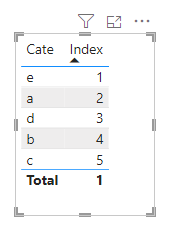
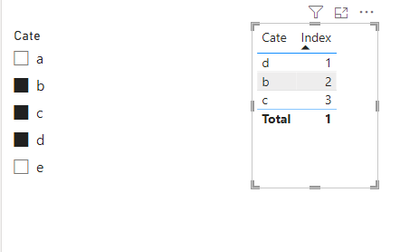
As @Ritaf1983 said, you can implement the creation of line numbers by MEASURE through the rankx function.


The usual practice can be combined with the allselected function, which can be dynamically adjusted according to the slicer.

vkongfanfmsft_0-1712542893368.pngvkongfanfmsft_1-1712542904326.png

result_ = SUM('Table'[Value])

Index = RANKX(ALLSELECTED('Table'[Cate]),[result_])


Best Regards,
Adamk Kong


If this post helps, then please consider Accept it as the solution to help the other members find it more quickly.

View solution in original post

4 REPLIES 4
Anonymous
Not applicable

Hi @Anonymous ,


As @Ritaf1983 said, you can implement the creation of line numbers by MEASURE through the rankx function.


The usual practice can be combined with the allselected function, which can be dynamically adjusted according to the slicer.

vkongfanfmsft_0-1712542893368.pngvkongfanfmsft_1-1712542904326.png

result_ = SUM('Table'[Value])

Index = RANKX(ALLSELECTED('Table'[Cate]),[result_])


Best Regards,
Adamk Kong


If this post helps, then please consider Accept it as the solution to help the other members find it more quickly.

Anonymous
Not applicable

No,I dont have access to use edit query mode.So I want that as a measure only.

@Anonymous 
Then it sounds like you should use rankx function.
Take a look at the linked video :

https://www.youtube.com/watch?v=gXF47dSmIwI

If this post helps, then please consider Accepting it as the solution to help the other members find it more quickly

Regards,
Rita Fainshtein | Microsoft MVP
https://www.linkedin.com/in/rita-fainshtein/
Blog : https://www.madeiradata.com/profile/ritaf/profile
Ritaf1983
Super User
Super User

Hi @Anonymous 
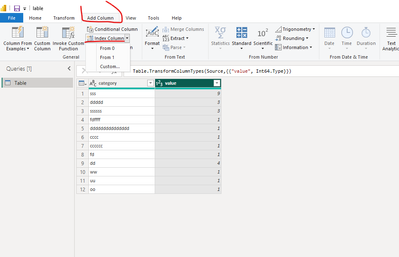
You can add an index column with PQ:

Ritaf1983_0-1712321447931.png

If this post helps, then please consider Accepting it as the solution to help the other members find it more quickly

Regards,
Rita Fainshtein | Microsoft MVP
https://www.linkedin.com/in/rita-fainshtein/
Blog : https://www.madeiradata.com/profile/ritaf/profile

Helpful resources

Announcements
Power BI DataViz World Championships

Power BI Dataviz World Championships

The Power BI Data Visualization World Championships is back! Get ahead of the game and start preparing now!

December 2025 Power BI Update Carousel

Power BI Monthly Update - December 2025

Check out the December 2025 Power BI Holiday Recap!

FabCon Atlanta 2026 carousel

FabCon Atlanta 2026

Join us at FabCon Atlanta, March 16-20, for the ultimate Fabric, Power BI, AI and SQL community-led event. Save $200 with code FABCOMM.