Don't miss your chance to take the Fabric Data Engineer (DP-600) exam for FREE! Find out how by attending the DP-600 session on April 23rd (pacific time), live or on-demand.
Learn moreNext up in the FabCon + SQLCon recap series: The roadmap for Microsoft SQL and Maximizing Developer experiences in Fabric. All sessions are available on-demand after the live show. Register now
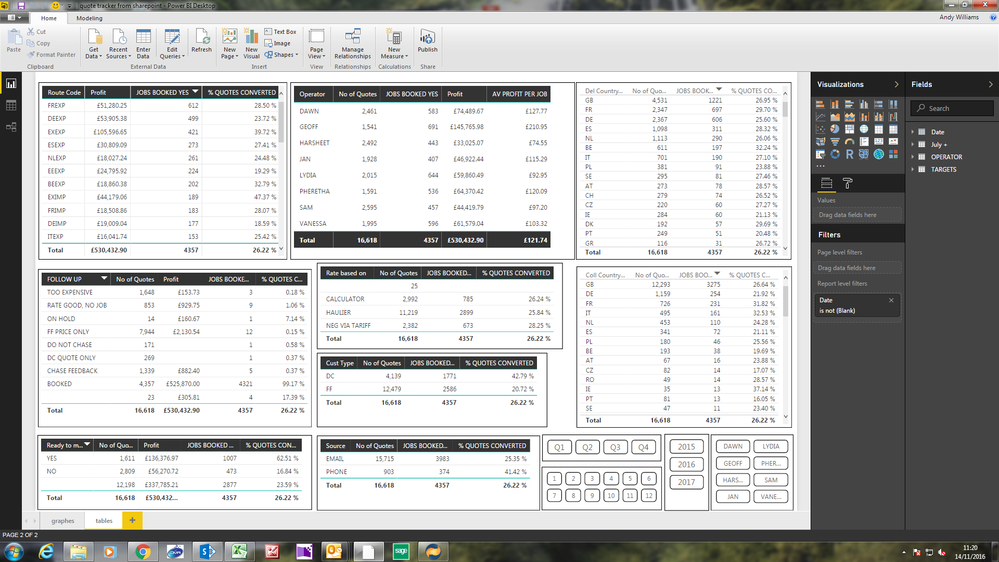
I have created a dashboard that shows the company wide performance, which can also be filtered by employee.
We want to publish and share this with our staff but only want each staff member to be able to view the company's and their own performance and not other staff members. I have created a rule that is filtered by employee but this will not show the company's performance.
Hi @andywil456
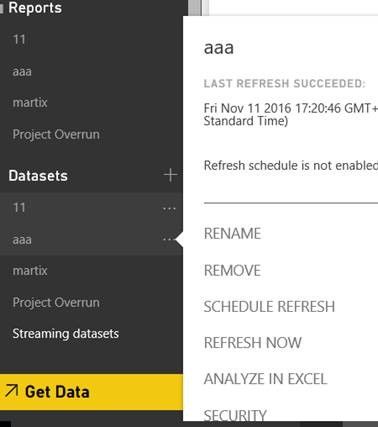
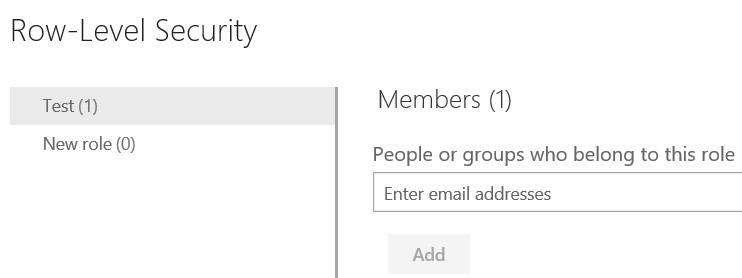
You should add a column in the dataset to identify the company performance. Add roles for the company performance like your screenshot. Therefore in your dataset you can include column of company performance and write DAX filter as (suppose column is called Company), [Company] = Yes.) Then publish it to Power BI service, select the report project name in Datesets->SECURITY, then you get the second screenshot window. Add the stuff member addresses applied the roles, so the member will see the company performance.
Reference:
Row Level Security using Power BI.
Login Based Security in Power BI.
If this is not what you want, please provide us some sample data, so that we can make further analysis.
Best Regards,
Angelia
Thank you @v-huizhn-msft,
I'm not sure i follow. |The company performance is the total of all employees.
What i'm trying to achieve is to be able to share out the dashboard to all employees, where that are able to see the dashboard in full but are only able to filter by their own name via a ChicletSlicer and not select other employees. Is there a way to only allow users to select certain catorgories within the slicer?
@andywil456 You'd better to feliter it in measure rather than dashbaord. I give the following simple example, please review.
1. The table below is all employee sales. Every row dispalys one emplyee's sale record.
2. Create a measure to calculate the sum of all the employees' sales.
ALL Company = CALCULATE(SUM(Table1[Sale]),ALL(Table1))
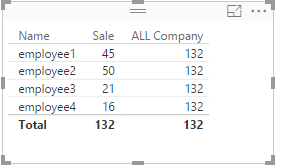
3. I create a simple report as the following screenshot.
4. Add a new role, [Name] = "employee1". Mark the stuff member addresses applied the roles. When you filter by the employee, the employee will see the sales of himself and the total of company.
Best Regards,
Angelia
Hi @v-huizhn-msft,
I'm not sure this gives me what i'm after. As you can see from my screenshot, I have a number of tables, and what i'm hoping to achieve is to allow each staff member to see the dashbaord as per the screenshot (company figures) and then to able to filter only by there own name and not be able to drill down by a collegue.
If you have recently started exploring Fabric, we'd love to hear how it's going. Your feedback can help with product improvements.
A new Power BI DataViz World Championship is coming this June! Don't miss out on submitting your entry.
Share feedback directly with Fabric product managers, participate in targeted research studies and influence the Fabric roadmap.
| User | Count |
|---|---|
| 44 | |
| 43 | |
| 38 | |
| 19 | |
| 15 |
| User | Count |
|---|---|
| 68 | |
| 64 | |
| 31 | |
| 29 | |
| 24 |