
cancel
Showing results for 
Search instead for 
Did you mean: 

The Power BI Data Visualization World Championships is back! Get ahead of the game and start preparing now! Learn more

Reply
Truelearner
Helper III
Helper III

rls problem

PATHCONTAINS(Emp[epath],MAXX(FILTER(Emp,Emp[email] = USERPRINCIPALNAME()),Emp[id]))


above role is not working 


id       name          email                               manager epath

1krishnakrishna@taged.onmicrosoft.com 1
2testuser1tester1@taged.onmicrosoft.com11|2
3testuser2tester2@taged.onmicrosoft.com21|2|3
4testuser3tester3@taged.onmicrosoft.com21|2|4
5testuser4tester4@taged.onmicrosoft.com21|2|5


id        sales

1100
240
350
245
477
523


@mgwena @cham @amitchandak @Greg_Deckler @Mariusz 

1 ACCEPTED SOLUTION
v-yingjl
Community Support
Community Support

Hi @Truelearner ,

In Manage roles, you can create roles and try this DAX expression to solve your problem:

IF (
    CALCULATE (
        COUNTROWS ( 'Emp' ),
        FILTER ( 'Emp', 'Emp'[email] = USERPRINCIPALNAME () )
    ) > 0,
    [id]
        = CALCULATE (
            MAX ( 'Emp'[id] ),
            FILTER ( 'Emp', 'Emp'[email] = USERPRINCIPALNAME () )
        ),
    [email] = USERPRINCIPALNAME ()
)

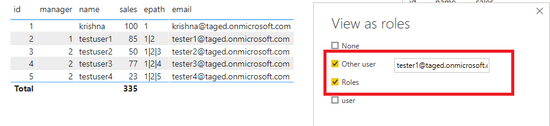
When you use View as roles, you will get the following result:

view as roles.pngRole result.png

Here is the demo, please try it:

PBIX 


Best Regards,

Yingjie Li


If this post helps then please consider Accept it as the solution to help the other members find it more quickly.

View solution in original post

3 REPLIES 3
v-yingjl
Community Support
Community Support

Hi @Truelearner ,

In Manage roles, you can create roles and try this DAX expression to solve your problem:

IF (
    CALCULATE (
        COUNTROWS ( 'Emp' ),
        FILTER ( 'Emp', 'Emp'[email] = USERPRINCIPALNAME () )
    ) > 0,
    [id]
        = CALCULATE (
            MAX ( 'Emp'[id] ),
            FILTER ( 'Emp', 'Emp'[email] = USERPRINCIPALNAME () )
        ),
    [email] = USERPRINCIPALNAME ()
)

When you use View as roles, you will get the following result:

view as roles.pngRole result.png

Here is the demo, please try it:

PBIX 


Best Regards,

Yingjie Li


If this post helps then please consider Accept it as the solution to help the other members find it more quickly.

amitchandak
Super User
Super User

@Truelearner ,On a Card please check what USERPRINCIPALNAME() is coming.  and then check if is matching with email of not

Share with Power BI Enthusiasts: Full Power BI Video (20 Hours) YouTube
Microsoft Fabric Series 60+ Videos YouTube
Microsoft Fabric Hindi End to End YouTube

CHECKED ,, I TRIED IN DESKTOP USING USER ROLES AS WELL


I CAN SEND THE FILE IF REQUIRED , CAN YOU TELL ME HOW CAN I ATTACH PBIX HERE I DONT SEE ANY OPTION 


ucan download it here 

https://drive.google.com/open?id=1OFQ9RsF9ZtxsZVU-JpsYZ1mAXvA-yY_p

Helpful resources

Announcements
Power BI DataViz World Championships

Power BI Dataviz World Championships

The Power BI Data Visualization World Championships is back! Get ahead of the game and start preparing now!

December 2025 Power BI Update Carousel

Power BI Monthly Update - December 2025

Check out the December 2025 Power BI Holiday Recap!

FabCon Atlanta 2026 carousel

FabCon Atlanta 2026

Join us at FabCon Atlanta, March 16-20, for the ultimate Fabric, Power BI, AI and SQL community-led event. Save $200 with code FABCOMM.