cancel
Showing results for 
Search instead for 
Did you mean: 

The Power BI Data Visualization World Championships is back! Get ahead of the game and start preparing now! Learn more

Reply
JWE
Helper I
Helper I

results of a measure use in a slicer

Hi folks


I need help in using results from a measure as a slicer.


Simple example, when the sales amount is higher than the year before the customer is a winner, else a loser.


I calculate the sales amount for year and last year (because I use yeartodate-function and in the report slicer for quarter and month).

I also calculate the sales difference with:

YTD U diff = salestable[YTD sales Y] - salestable[YTD sales PY]


Now I have a measure which split the customer into winner, neutral and loser.

Winner-Loser = IF( salestable[YTD U diff] < 0; "Loser"; IF( salestable[YTD U diff] = 0; "Neutral"; "Winner" )

    - ( When I use this as a calculated column the results always show me the total of the year, that´s wrong for my case - or can I  filter this??? )


To use Winner and Loser as a slicer I created an additional table 'G&V' with a column [G&V] with text rows "Winner"; "Neutral" and "Loser". (also a column 'G&V'[Nr] with integer, 1 for "Winner", 0 for "Neutral" and 2 for "Loser".)

This column I will use as a slicer. My problem is how to "connect" the results of the Winner-Loser-Measure with the column [G&V].


I tried measures for winner and loser like…
winner =

IF( ISFILTERED( 'G&V'[G&V] ) ; 'Tabelle1'[YTD U diff] > 0 ; Tabelle1[YTD U diff])  


Find an example for average (wrong for me) and try to modify, but also not the correct result.

Winner =

IF (

   ISFILTERED ( 'G&V'[Nr] );

   AVERAGEX(

       FILTER ( 'Tabelle1'; 'Tabelle1'[YTD U diff] > VALUES ( 'G&V'[Nr] ) );

       'salestable'[YTD U diff]

   ))


I think I have to use VALUES but I have no idea how !?


For any helpful hints thanks in advance

Jorg


actual result:
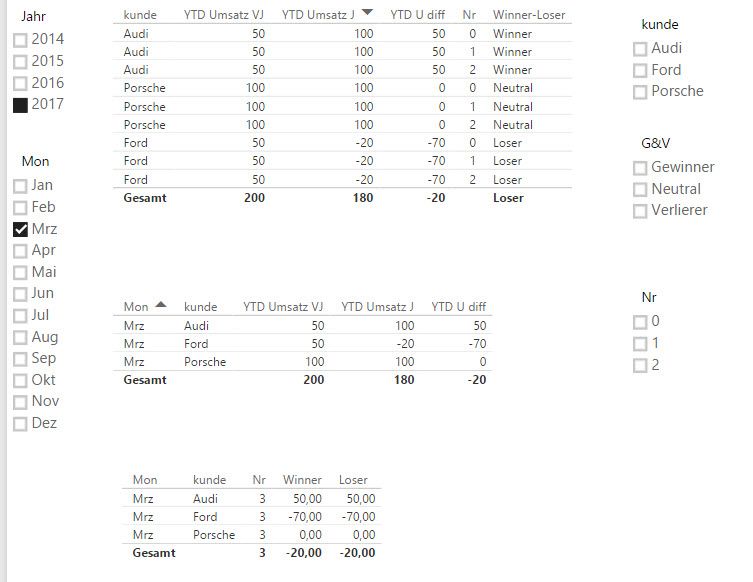
without slicer.jpg


and when I use the slicer, I have not the expected result - I only want to see the winner.
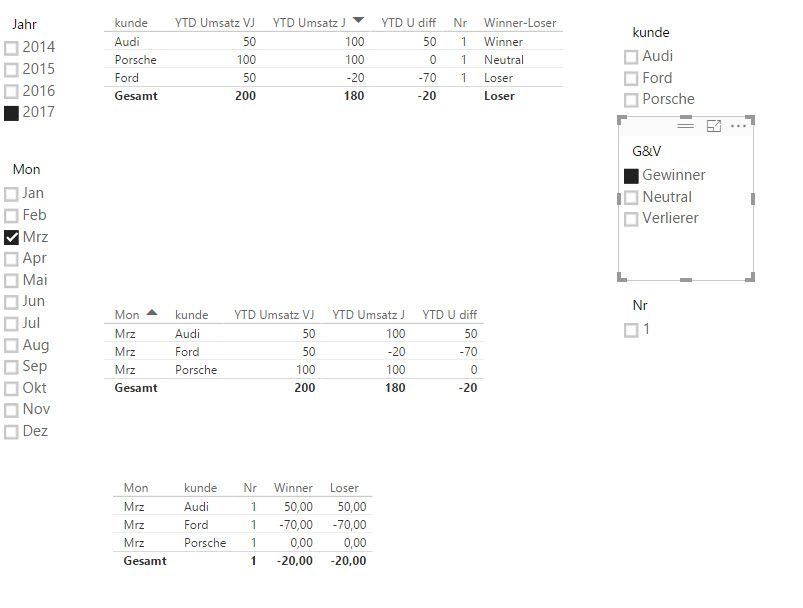
with slicer.jpg

1 ACCEPTED SOLUTION
v-caliao-msft
Microsoft Employee
Microsoft Employee

@JWE,


Please create a measure below. 
Measure =
var selectedvalue = IF(HASONEFILTER(Slicer[Type]),LASTNONBLANK(Slicer[Type],0),BLANK())
return IF(HASONEFILTER(Slicer[Type]),IF(ISERROR(SEARCH(salestable[Winner-Loser],selectedvalue)),0,1),1)

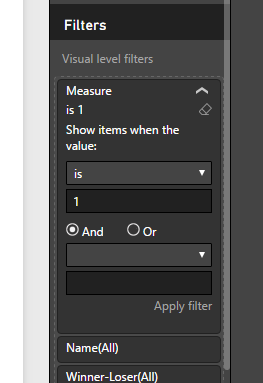
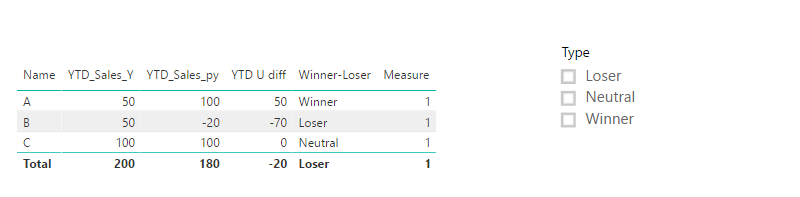
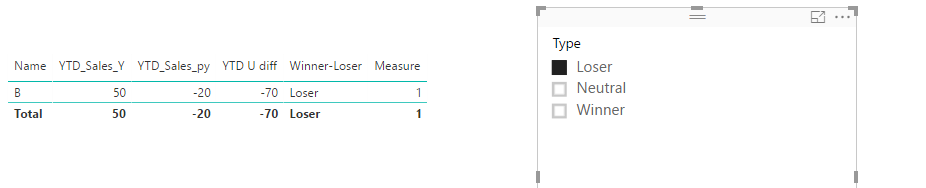
And use this measure in your visual as a filter.

Capture.PNGCapture1.PNGCapture2.PNG


Regards,

Charlie Liao

View solution in original post

2 REPLIES 2
v-caliao-msft
Microsoft Employee
Microsoft Employee

@JWE,


Please create a measure below. 
Measure =
var selectedvalue = IF(HASONEFILTER(Slicer[Type]),LASTNONBLANK(Slicer[Type],0),BLANK())
return IF(HASONEFILTER(Slicer[Type]),IF(ISERROR(SEARCH(salestable[Winner-Loser],selectedvalue)),0,1),1)

And use this measure in your visual as a filter.

Capture.PNGCapture1.PNGCapture2.PNG


Regards,

Charlie Liao

Hi Charlie


thanks a lot. I was able to reconstruct it with your sample.


I hope I can combine other measures in my page. I want to use it furthermore for new and old customers, I will try it with your example.


Follow on question:

-- How can I COUNT the results of this measure, means when I have one more "winner", I want to use a pie chart for visuals the numbers of winner/loser/neutral.


Thanks for more help.


Cheers Jorg

Helpful resources

Announcements
Power BI DataViz World Championships

Power BI Dataviz World Championships

The Power BI Data Visualization World Championships is back! Get ahead of the game and start preparing now!

December 2025 Power BI Update Carousel

Power BI Monthly Update - December 2025

Check out the December 2025 Power BI Holiday Recap!

FabCon Atlanta 2026 carousel

FabCon Atlanta 2026

Join us at FabCon Atlanta, March 16-20, for the ultimate Fabric, Power BI, AI and SQL community-led event. Save $200 with code FABCOMM.