cancel
Showing results for 
Search instead for 
Did you mean: 

Next up in the FabCon + SQLCon recap series: The roadmap for Microsoft SQL and Maximizing Developer experiences in Fabric. All sessions are available on-demand after the live show. Register now

Reply
Anonymous
Not applicable

reset slicers with bookmarks

Hi


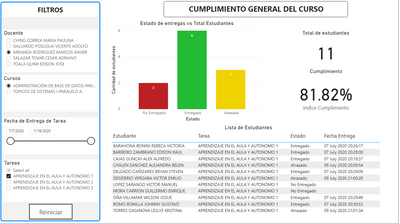
I have the following slicers to filter data: 


juanbonosoinn_0-1595720295106.png

I have a teacher slicer(docente) to get the courses for the selected teacher(cursos). My idea is the following:


  • I have published these reports as an power bi app, so I can share them to the teachers.
  • I pass the id of the teacher as a query string through the url, when doing this only one teacher appears on the teacher slicer. 
  • I want the reset button(Reiniciar) to clear all the selections, however when i do this the whole list of teacher appears again because the bookmark has all the teachers unselected.


I have two questions:

  1. Do you have a better approach to share reports across different teachers? for the moment the approach of sending the id is working, but not sure if its the best solution
  2. How to use/create a bookmark to clear the slicers without showing the entire list of teachers? If there's another solution rathern than bookmarks, it would be good to know


1 ACCEPTED SOLUTION

RLS will restrict the entire report based on filters you set ,so you can set it up so that each teacher only sees their own info. That way, when you reset the slicers as you are currently doing, it will still only show the data for the teacher who is logged in, so while RLS doesn't help directly with resetting slicers, it will help with this scenario.
https://docs.microsoft.com/en-us/power-bi/admin/service-admin-rls

Please @mention me in your reply if you want a response.

Copying DAX from this post? Click here for a hack to quickly replace it with your own table names

Has this post solved your problem? Please Accept as Solution so that others can find it quickly and to let the community know your problem has been solved.
If you found this post helpful, please give Kudos C

I work as a Microsoft trainer and consultant, specialising in Power BI and Power Query.
www.excelwithallison.com

View solution in original post

4 REPLIES 4
Robert1981
Helper III
Helper III

In my report I want to be able to switch all metrics in the dashboard between monhtly value or annual values.

How do I alter between both slicers and have the values alter dependent what slicer is used?


If both slicers are on screen, how do I ignore the month selection, if a year is selected?

Robert1981_0-1646791929698.png


AllisonKennedy
Community Champion
Community Champion

Do you ever need teachers to see other teachers data? If not, you could try Row Level Security instead of URL filter to limit the data each teacher sees to only their own.

Please @mention me in your reply if you want a response.

Copying DAX from this post? Click here for a hack to quickly replace it with your own table names

Has this post solved your problem? Please Accept as Solution so that others can find it quickly and to let the community know your problem has been solved.
If you found this post helpful, please give Kudos C

I work as a Microsoft trainer and consultant, specialising in Power BI and Power Query.
www.excelwithallison.com

Anonymous
Not applicable

No, I just need the teacher to see its own information.


I have not heard about Row Level Security, i'll check that. What about how to reset slicers? will the RLS helped me with that?

RLS will restrict the entire report based on filters you set ,so you can set it up so that each teacher only sees their own info. That way, when you reset the slicers as you are currently doing, it will still only show the data for the teacher who is logged in, so while RLS doesn't help directly with resetting slicers, it will help with this scenario.
https://docs.microsoft.com/en-us/power-bi/admin/service-admin-rls

Please @mention me in your reply if you want a response.

Copying DAX from this post? Click here for a hack to quickly replace it with your own table names

Has this post solved your problem? Please Accept as Solution so that others can find it quickly and to let the community know your problem has been solved.
If you found this post helpful, please give Kudos C

I work as a Microsoft trainer and consultant, specialising in Power BI and Power Query.
www.excelwithallison.com

Helpful resources

Announcements
New to Fabric survey Carousel

New to Fabric Survey

If you have recently started exploring Fabric, we'd love to hear how it's going. Your feedback can help with product improvements.

Power BI DataViz World Championships carousel

Power BI DataViz World Championships - June 2026

A new Power BI DataViz World Championship is coming this June! Don't miss out on submitting your entry.

Join our Fabric User Panel

Join our Fabric User Panel

Share feedback directly with Fabric product managers, participate in targeted research studies and influence the Fabric roadmap.

March Power BI Update Carousel

Power BI Community Update - March 2026

Check out the March 2026 Power BI update to learn about new features.