cancel
Showing results for 
Search instead for 
Did you mean: 

Data Days is here! Join us now for 60+ days of learning, challenges, and connection. Learn more

Reply
spathak04
Helper II
Helper II

replace button with Dropdown

Hello,

I have created a page with four buttons on it, and on click of each button map gets changed. I am doing this by showing hiding bookmark. 
My requirement is: Instead of buttons I need a dropdown list on whcih I select and Map gets change. Any possibility to do it?

Thanks 


button dropdown request.PNG

1 ACCEPTED SOLUTION


@spathak04 wrote:

Thank you for the help.
I am stuck with the legend thing. My four selections have a different legends associated with them. THose legends have the categories defined in it.  And based on legends my colors are defined.  I have four caculated column for four maps and those calculated columns are my legends. 

Right now I dont find any option to dynamically select legends based on my selection from slicer. 


@spathak04


So you also want to make the four calculate legend columns to be shown on the button based on the slicer, right? I'm afraid currently power bi doesn't support this. As a workaround, you may try Button and Bookmark in power bi.


Regards,

Jimmy Tao

View solution in original post

5 REPLIES 5
v-yuta-msft
Community Support
Community Support

Hi spathak04,


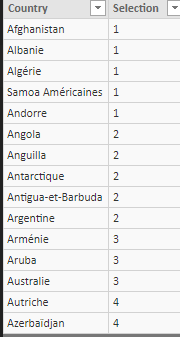
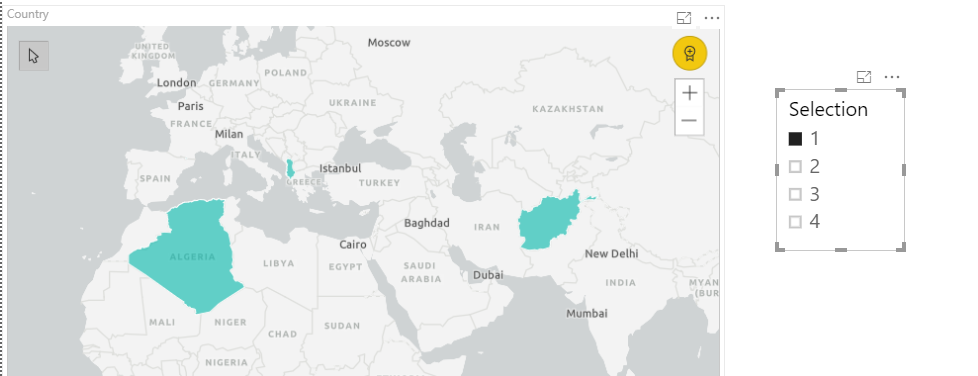
Based on your description, your 4 button actions(inside bookmarks) are based on the same dataset, right? If so, you can add a new column in your table which contains 4 flags like below and create a slicer based on the selection column:

Capture.PNG2.PNG 


Regards,

Jimmy Tao

Thank you for the help.
I am stuck with the legend thing. My four selections have a different legends associated with them. THose legends have the categories defined in it.  And based on legends my colors are defined.  I have four caculated column for four maps and those calculated columns are my legends. 

Right now I dont find any option to dynamically select legends based on my selection from slicer. 


@spathak04 wrote:

Thank you for the help.
I am stuck with the legend thing. My four selections have a different legends associated with them. THose legends have the categories defined in it.  And based on legends my colors are defined.  I have four caculated column for four maps and those calculated columns are my legends. 

Right now I dont find any option to dynamically select legends based on my selection from slicer. 


@spathak04


So you also want to make the four calculate legend columns to be shown on the button based on the slicer, right? I'm afraid currently power bi doesn't support this. As a workaround, you may try Button and Bookmark in power bi.


Regards,

Jimmy Tao

affan
Solution Sage
Solution Sage

Hi @spathak04,


what change does occur when you click on a button? Does this change the data shown on the map or it hides the map visual or shows the other one


Regards

Affan

When you click a button it shows a different map with different attributes. Basically I have four bookmarks which hides and show based on a button action.

Helpful resources

Announcements
Fabric Data Days is here Carousel

Fabric Data Days 2026

Don't miss out on Data Days, June 15 through August 7. Learn Fabric, Power BI, SQL, AI and more.

May Power BI Update Carousel

Power BI Monthly Update - May 2026

Check out the May 2026 Power BI update to learn about new features.

Power BI DataViz World Championships carousel

Power BI DataViz World Championships - June 2026

A new Power BI DataViz World Championship is coming this June! Don't miss out on submitting your entry.