FabCon is coming to Atlanta
Join us at FabCon Atlanta from March 16 - 20, 2026, for the ultimate Fabric, Power BI, AI and SQL community-led event. Save $200 with code FABCOMM.
Register now!- Power BI forums
- Get Help with Power BI
- Desktop
- Service
- Report Server
- Power Query
- Mobile Apps
- Developer
- DAX Commands and Tips
- Custom Visuals Development Discussion
- Health and Life Sciences
- Power BI Spanish forums
- Translated Spanish Desktop
- Training and Consulting
- Instructor Led Training
- Dashboard in a Day for Women, by Women
- Galleries
- Data Stories Gallery
- Themes Gallery
- Contests Gallery
- QuickViz Gallery
- Quick Measures Gallery
- Visual Calculations Gallery
- Notebook Gallery
- Translytical Task Flow Gallery
- TMDL Gallery
- R Script Showcase
- Webinars and Video Gallery
- Ideas
- Custom Visuals Ideas (read-only)
- Issues
- Issues
- Events
- Upcoming Events
The Power BI Data Visualization World Championships is back! Get ahead of the game and start preparing now! Learn more
- Power BI forums
- Forums
- Get Help with Power BI
- Desktop
- Re: remove duplicates names
- Subscribe to RSS Feed
- Mark Topic as New
- Mark Topic as Read
- Float this Topic for Current User
- Bookmark
- Subscribe
- Printer Friendly Page

- Mark as New
- Bookmark
- Subscribe
- Mute
- Subscribe to RSS Feed
- Permalink
- Report Inappropriate Content
remove duplicates names
Hello Everyone,
I been stuck on this problem for a bit now and reaching our for some help 🙂
I am looking to remove duplicate names for example
UsersName | Is-WindowFoundationReady
Bob | Foundation Ready
Bob | Not Foundation Ready
Yo | Not Foundation Ready
Nick | Foundation Ready
Is-WindowFoundationReady = IF('Table'[Office]="Office 2016","Foundation Ready", IF('Table'[Office]="Office 365","Foundation Ready", IF('Table'[Office]="Office 2013","Not Foundation Ready")))
How can I remove the duplicates, once a user is foundation ready then they shouldn't appear in as Not foundation ready?
Is-WindowFoundationReady = IF('Table'[Office]="Office 2016","Foundation Ready", IF('Table'[Office]="Office 365","Foundation Ready", IF('Table'[Office]="Office 2013","Not Foundation Ready")))
How can I remove the duplicates, once a user is foundation ready then they shouldn't appear in as Not foundation ready?
The result should list:
Users | Foundation Ready
Yo | Not Foundation Ready
Nick | Foundation Ready


- Mark as New
- Bookmark
- Subscribe
- Mute
- Subscribe to RSS Feed
- Permalink
- Report Inappropriate Content
This table will give you a distinct list of users who have at least one record where they are Foundation Ready according to what I think your rules are.
Let me know what you think
New Table = SUMMARIZE(
                 FILTER(
                    'Table',
                    'Table'[Office] IN {"Office 365","Office 2016"}
                    ),
                    'Table'[User Name] ,
                    "Is-WindowsFoundationReady" , "Foundation Ready"
                    )


- Mark as New
- Bookmark
- Subscribe
- Mute
- Subscribe to RSS Feed
- Permalink
- Report Inappropriate Content
@Phil_SeamarkJust out of curiosity, where can I find DAX complex examples to play? I have referred your answers to many threads, most of them out from DAX solutions. Can you please kindly provide some inputs, how I will be mastered with DAX.
Any reference links? Any Books?
- Mark as New
- Bookmark
- Subscribe
- Mute
- Subscribe to RSS Feed
- Permalink
- Report Inappropriate Content
Hi @rocky09
I reckon the best source of complex examples to play with are here in the community. There is a good variety in the types of problems posted and remember not every accepted answer is necessarily the best. Take a few problems and look to see what other solutions you can come up with.
Other than that, I think @Sean recommended the Definitive Guide to DAX the other day, and if he recommends it, it's probably pretty good.
- Mark as New
- Bookmark
- Subscribe
- Mute
- Subscribe to RSS Feed
- Permalink
- Report Inappropriate Content
- Mark as New
- Bookmark
- Subscribe
- Mute
- Subscribe to RSS Feed
- Permalink
- Report Inappropriate Content
Hi Phil, when I tried to implement the new table it is giving me this error "The expression refers to multiple columns. Multiple columns cannot be converted to a scalar value."


- Mark as New
- Bookmark
- Subscribe
- Mute
- Subscribe to RSS Feed
- Permalink
- Report Inappropriate Content
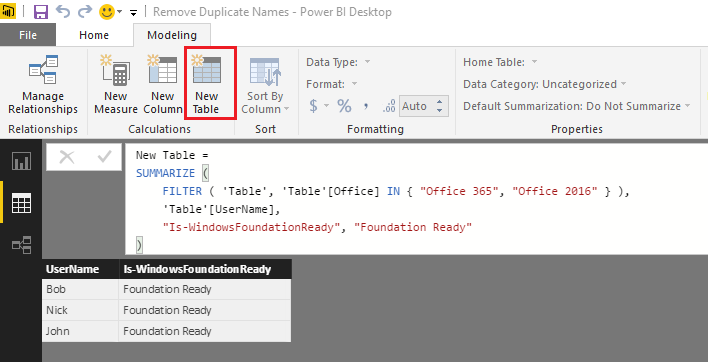
- Mark as New
- Bookmark
- Subscribe
- Mute
- Subscribe to RSS Feed
- Permalink
- Report Inappropriate Content
I see, thank you! @Phil_Seamarkhow can I also provide users that are not foundation ready?
- Mark as New
- Bookmark
- Subscribe
- Mute
- Subscribe to RSS Feed
- Permalink
- Report Inappropriate Content
@Phil_Seamark nice touch with the IN operator! 
so basically the above is equivalent to...
New Table ALT =
SUMMARIZE (
    FILTER (
        'Table',
        'Table'[Office] = "Office 365"
            || 'Table'[Office] = "Office 2016"
    ),
    'Table'[User Name],
    "Is-WindowsFoundationReady", "Foundation Ready"
)
- Mark as New
- Bookmark
- Subscribe
- Mute
- Subscribe to RSS Feed
- Permalink
- Report Inappropriate Content
I think the challenge there is that Bob will appear twice with two states (ready and not ready). Bit that is just my interpretation, which can be miles off 🙂

Helpful resources

Power BI Dataviz World Championships
The Power BI Data Visualization World Championships is back! Get ahead of the game and start preparing now!

Power BI Monthly Update - December 2025
Check out the December 2025 Power BI Holiday Recap!

FabCon Atlanta 2026
Join us at FabCon Atlanta, March 16-20, for the ultimate Fabric, Power BI, AI and SQL community-led event. Save $200 with code FABCOMM.

| User | Count |
|---|---|
| 38 | |
| 36 | |
| 33 | |
| 32 | |
| 29 |


| User | Count |
|---|---|
| 129 | |
| 88 | |
| 79 | |
| 68 | |
| 63 |


