Join us at FabCon Atlanta from March 16 - 20, 2026, for the ultimate Fabric, Power BI, AI and SQL community-led event. Save $200 with code FABCOMM.
Register now!The Power BI Data Visualization World Championships is back! Get ahead of the game and start preparing now! Learn more
Hi all
I have trouble with relationships. Hope someone can help with this issue.
I have two lookup tables:
1.Product groups, product names
2.Currency, currency classification
and I also have 2 data tables. I have connected my data tables to the Product table. It seems ok.
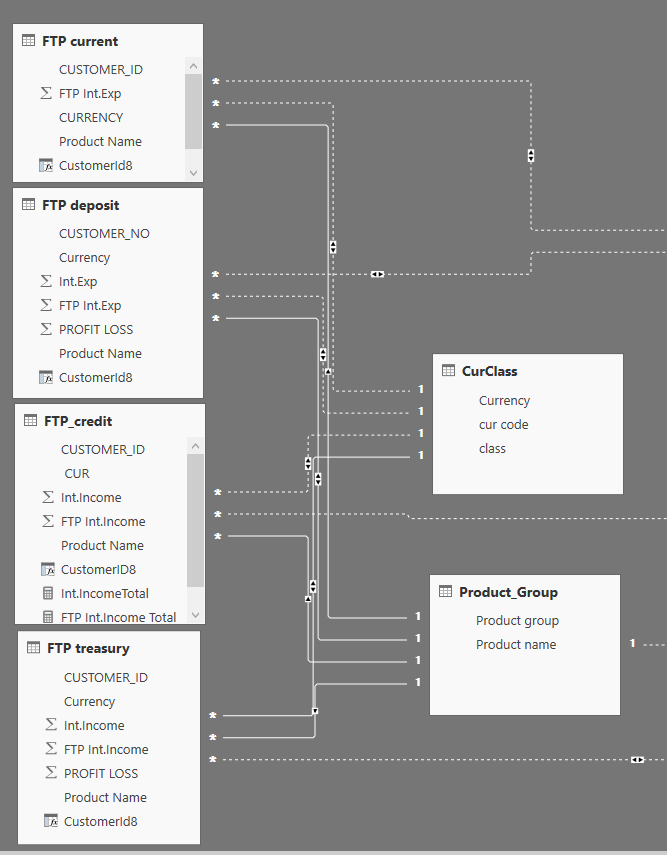
However I need to use currency tables also an cannot create relationship. Only one oy of my data table is connected to the currency table. The second one creates inactive relationship. When I am trying to get data from the second table results disappear.
I have set both sided relationship.
Please help me with this issue.
Thank in advance
Solved! Go to Solution.
it looks a bit messy. I would sit down and try to redesign it if I were you, and would get rid of the bi-directional relationships which, I think, only bring problems
Did I answer your question correctly? Mark my answer as a solution!
Proud to be a Datanaut!
Hi @OSS
what does your data model look like?
Did I answer your question correctly? Mark my answer as a solution!
Proud to be a Datanaut!
Hi @LivioLanzo
I am afraid I don't understand what do you mean. But I add screen view of my data. Hope it will help.
it looks a bit messy. I would sit down and try to redesign it if I were you, and would get rid of the bi-directional relationships which, I think, only bring problems
Did I answer your question correctly? Mark my answer as a solution!
Proud to be a Datanaut!
This is exactly my problem. Let me ask question in another way. I will delete all relationships. Please help me with this issue. How do I need connect two vlookup tables (they are in the right side) with four data tables (on the left side)
I need connect data tables via product name (in one table) and currency (in another table)
dear @LivioLanzo thank you for your suggestion. Changing filter direction to single solved my problem. Thank you
The Power BI Data Visualization World Championships is back! Get ahead of the game and start preparing now!
| User | Count |
|---|---|
| 40 | |
| 37 | |
| 33 | |
| 29 | |
| 26 |
| User | Count |
|---|---|
| 134 | |
| 104 | |
| 63 | |
| 60 | |
| 55 |