Join us at FabCon Atlanta from March 16 - 20, 2026, for the ultimate Fabric, Power BI, AI and SQL community-led event. Save $200 with code FABCOMM.
Register now!The Power BI Data Visualization World Championships is back! It's time to submit your entry. Live now!
Hi all
I have trouble with relationships. Hope someone can help with this issue.
I have two lookup tables:
1.Product groups, product names
2.Currency, currency classification
and I also have 2 data tables. I have connected my data tables to the Product table. It seems ok.
However I need to use currency tables also an cannot create relationship. Only one oy of my data table is connected to the currency table. The second one creates inactive relationship. When I am trying to get data from the second table results disappear.
I have set both sided relationship.
Please help me with this issue.
Thank in advance
Solved! Go to Solution.
it looks a bit messy. I would sit down and try to redesign it if I were you, and would get rid of the bi-directional relationships which, I think, only bring problems
Did I answer your question correctly? Mark my answer as a solution!
Proud to be a Datanaut!
Hi @OSS
what does your data model look like?
Did I answer your question correctly? Mark my answer as a solution!
Proud to be a Datanaut!
Hi @LivioLanzo
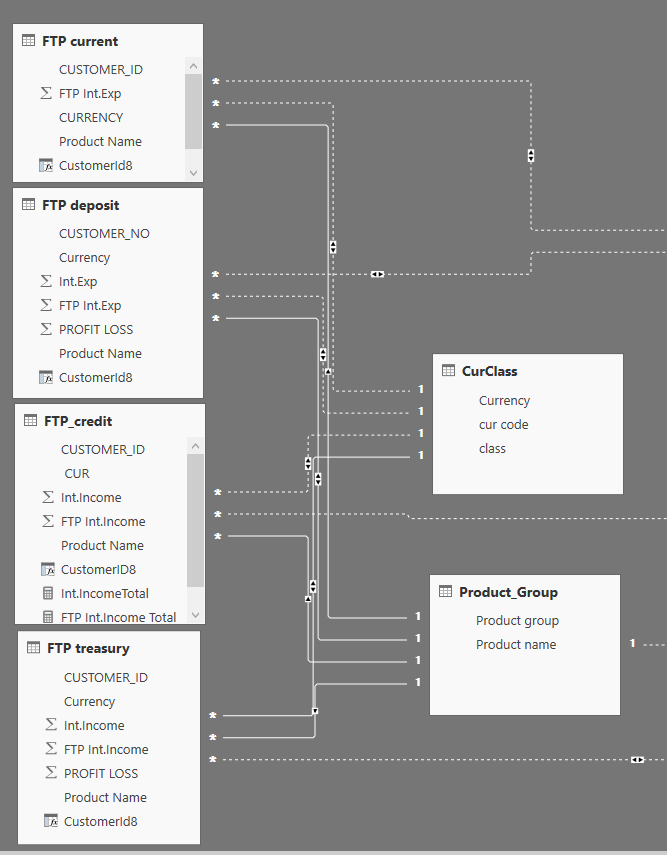
I am afraid I don't understand what do you mean. But I add screen view of my data. Hope it will help.
it looks a bit messy. I would sit down and try to redesign it if I were you, and would get rid of the bi-directional relationships which, I think, only bring problems
Did I answer your question correctly? Mark my answer as a solution!
Proud to be a Datanaut!
This is exactly my problem. Let me ask question in another way. I will delete all relationships. Please help me with this issue. How do I need connect two vlookup tables (they are in the right side) with four data tables (on the left side)
I need connect data tables via product name (in one table) and currency (in another table)
dear @LivioLanzo thank you for your suggestion. Changing filter direction to single solved my problem. Thank you
| User | Count |
|---|---|
| 51 | |
| 40 | |
| 35 | |
| 23 | |
| 22 |
| User | Count |
|---|---|
| 134 | |
| 103 | |
| 57 | |
| 43 | |
| 38 |