cancel
Showing results for 
Search instead for 
Did you mean: 

The Power BI Data Visualization World Championships is back! Get ahead of the game and start preparing now! Learn more

Reply
Djackso1976
Frequent Visitor

reference layers

  • Hi All, Hoping someone can help with an issue I am having with reference layers in Arcgis. 
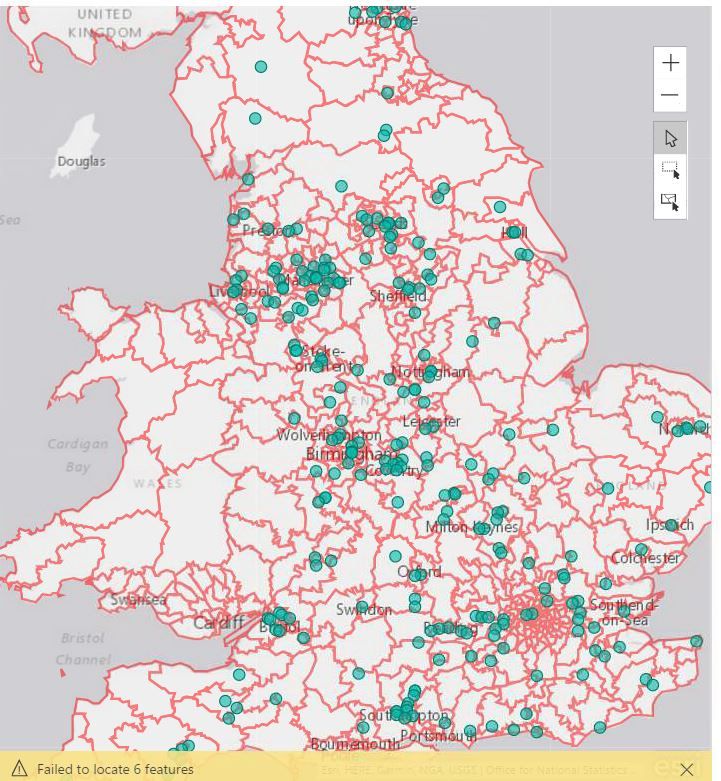
  • I've created a map using Arcgis and have added lots of individual projects (green dots) to the map using longtitude and latitude  and then added boundaries (red lines) using a reference layer in Arcgis. When I select a particular area using the pointer it captures the all the individual projects within a boundary. Which is exactly what I want.
  • But what I can't work out is if there is a way to create/link a drop down menu which lists all of the names of the individual boundary araes i.e. red outlined areas. There are 600 hundred or so and some are very small. 
  • Welcome any thoughts . 

Cheers


Dave Capture.JPG

2 REPLIES 2
Chidi2
Regular Visitor

Please, all I am new to this forum. I am not able to find what I am looking for. 


I am trying to create a reference layer using the same Lat , long. So that when I plot one of the coordinates on the maps one will serve as reference while I use slicer or slider to toggle the other. 


How owe can I do that on Power Bi.

Anonymous
Not applicable

Hi @Djackso1976,


For add reference layers, you can take a look at following links which told about how to do it:

Add custom reference layers to ArcGIS

Add a reference layer


Actually, currently there are a few locations which cannot be properly recognized on arcgis visual.


In my opinion, I'd like recommend you to create calculate column with detail location information(country, city , place...) as 'location' field, it may fix the issue.


BTW, I'd like to suggest you not use abbreviation location, it will also caused the recognize issue.


Reference:

Note: When working with countries or regions, use the three-letter abbreviation to ensure that geocoding works properly in map visualizations. Do not use two-letter abbreviations, as some countries or regions may not be properly recognized.

If you only have two-letter abbreviations, check out this external blog post for steps on how to associate your two-letter country/region abbreviations with three-letter country/region abbreviations.


How to Use Map Visualizations


If above still not help, I'd like to suggest you contact to arcgis team to ensure if your locations are supported on arcgis map.


Regards,

Xiaoxin Sheng

Helpful resources

Announcements
Power BI DataViz World Championships

Power BI Dataviz World Championships

The Power BI Data Visualization World Championships is back! Get ahead of the game and start preparing now!

December 2025 Power BI Update Carousel

Power BI Monthly Update - December 2025

Check out the December 2025 Power BI Holiday Recap!

FabCon Atlanta 2026 carousel

FabCon Atlanta 2026

Join us at FabCon Atlanta, March 16-20, for the ultimate Fabric, Power BI, AI and SQL community-led event. Save $200 with code FABCOMM.