FabCon is coming to Atlanta
Join us at FabCon Atlanta from March 16 - 20, 2026, for the ultimate Fabric, Power BI, AI and SQL community-led event. Save $200 with code FABCOMM.
Register now!- Power BI forums
- Get Help with Power BI
- Desktop
- Service
- Report Server
- Power Query
- Mobile Apps
- Developer
- DAX Commands and Tips
- Custom Visuals Development Discussion
- Health and Life Sciences
- Power BI Spanish forums
- Translated Spanish Desktop
- Training and Consulting
- Instructor Led Training
- Dashboard in a Day for Women, by Women
- Galleries
- Data Stories Gallery
- Themes Gallery
- Contests Gallery
- QuickViz Gallery
- Quick Measures Gallery
- Visual Calculations Gallery
- Notebook Gallery
- Translytical Task Flow Gallery
- TMDL Gallery
- R Script Showcase
- Webinars and Video Gallery
- Ideas
- Custom Visuals Ideas (read-only)
- Issues
- Issues
- Events
- Upcoming Events
Get Fabric Certified for FREE during Fabric Data Days. Don't miss your chance! Request now
- Power BI forums
- Forums
- Get Help with Power BI
- Desktop
- Re: ranking on text column
- Subscribe to RSS Feed
- Mark Topic as New
- Mark Topic as Read
- Float this Topic for Current User
- Bookmark
- Subscribe
- Printer Friendly Page


- Mark as New
- Bookmark
- Subscribe
- Mute
- Subscribe to RSS Feed
- Permalink
- Report Inappropriate Content
ranking on text column
I have one table, where I want to create rank on basis of text value,
The table is with one column which is sorted like this as shown below, and would like a rank on just this only, there is no corresponding aggregate function, neither any number column for this, Can anyone please help me achieve the desired output.
Input:-
| batch |
| 2 |
| 3 |
| 4 |
| a3 |
| a56 |
| dfg |
Output:-
| batch | rank |
| 2 | 1 |
| 3 | 2 |
| 4 | 3 |
| a3 | 4 |
| a56 | 5 |
| dfg | 6 |
I have tried these measures, but it is not working,
Measure =
RANKX ( ALL ( 'Table1'[FullName] ), CALCULATE ( SUM ( 'Table1'[Index] ) ) )
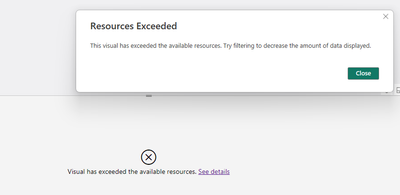
It is showing error as data value is exceeded where original data has just 200 rows only.
Solved! Go to Solution.


- Mark as New
- Bookmark
- Subscribe
- Mute
- Subscribe to RSS Feed
- Permalink
- Report Inappropriate Content
to know how to do this watch my video
- Mark as New
- Bookmark
- Subscribe
- Mute
- Subscribe to RSS Feed
- Permalink
- Report Inappropriate Content
you can do this in power query.
it will be better this way
- Mark as New
- Bookmark
- Subscribe
- Mute
- Subscribe to RSS Feed
- Permalink
- Report Inappropriate Content
- Mark as New
- Bookmark
- Subscribe
- Mute
- Subscribe to RSS Feed
- Permalink
- Report Inappropriate Content
to help you, tell us what didn’t work for and where
show on the screenshot or post the data where the rank is violated
- Mark as New
- Bookmark
- Subscribe
- Mute
- Subscribe to RSS Feed
- Permalink
- Report Inappropriate Content
HI @Ahmedx
I am getting this error while using measures provided by other folks or even creating index column in power query.
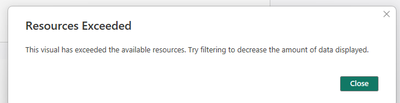
measure I am using is this
RANKX(all('TableA cycle_step'[eq_no],'TableA cycle_step'[job_id], 'TableA cycle_step'[cntr_no], 'TableAcycle_step'[job_cmpl_time], 'TableAcycle_step'[job_fetching_time], 'TableAcycle_step'[from_loc]),'TableAcycle_step'[eq_no],MIN('TableAcycle_step'[eq_no]),ASC)
@Ritaf1983 , @Dangar332
Here is the sample screenshot of original data , with the error by applying your method
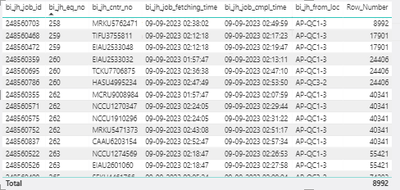
and also a measure is being used to filtere this data
ME =
VAR HourStep = SELECTEDVALUE('TableBhist cycle_step'[Hour_step])
VAR JobID = SELECTEDVALUE('TableAcycle_step'[job_id])
RETURN
IF(min('TableAcycle_step'[Hour_step]) = sELECTEDVALUE('TableBhist job_activity'[Hour_step]),1,0)
when this filter is applied the number also gets changed.
- Mark as New
- Bookmark
- Subscribe
- Mute
- Subscribe to RSS Feed
- Permalink
- Report Inappropriate Content
to know how to do this watch my video
- Mark as New
- Bookmark
- Subscribe
- Mute
- Subscribe to RSS Feed
- Permalink
- Report Inappropriate Content
HI @Ahmedx
Will this be feasible method even after the data source connectivity method gets changed to direct query in future?
- Mark as New
- Bookmark
- Subscribe
- Mute
- Subscribe to RSS Feed
- Permalink
- Report Inappropriate Content
yes it will work
- Mark as New
- Bookmark
- Subscribe
- Mute
- Subscribe to RSS Feed
- Permalink
- Report Inappropriate Content

- Mark as New
- Bookmark
- Subscribe
- Mute
- Subscribe to RSS Feed
- Permalink
- Report Inappropriate Content
- Mark as New
- Bookmark
- Subscribe
- Mute
- Subscribe to RSS Feed
- Permalink
- Report Inappropriate Content
Hi, @Jessica_17
try below
just adjust table and column name
Measure 4 = RANKX(all('Table (2)'[batch]),'Table (2)'[batch],MIN('Table (2)'[batch]),ASC)
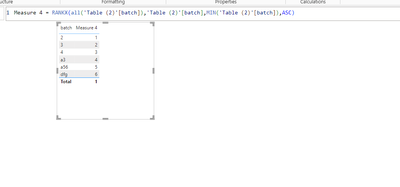
- Mark as New
- Bookmark
- Subscribe
- Mute
- Subscribe to RSS Feed
- Permalink
- Report Inappropriate Content
Hi @Dangar332
by using your solution I am getting count from 62, maybe because I have added other columns too. can this be changed irrespective of other column values too or by any other tables filter too.
- Mark as New
- Bookmark
- Subscribe
- Mute
- Subscribe to RSS Feed
- Permalink
- Report Inappropriate Content
hi, @Jessica_17
it might happen
but provide some data so see where problem occure

- Mark as New
- Bookmark
- Subscribe
- Mute
- Subscribe to RSS Feed
- Permalink
- Report Inappropriate Content
Hi @Jessica_17
Try to use the measure :
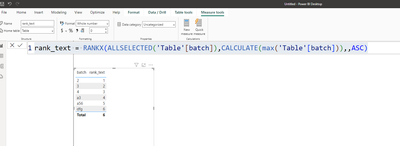
pbix is attached
If this post helps, then please consider Accepting it as the solution to help the other members find it more quicklyRita Fainshtein | Microsoft MVP
https://www.linkedin.com/in/rita-fainshtein/
Blog : https://www.madeiradata.com/profile/ritaf/profile
- Mark as New
- Bookmark
- Subscribe
- Mute
- Subscribe to RSS Feed
- Permalink
- Report Inappropriate Content
- Mark as New
- Bookmark
- Subscribe
- Mute
- Subscribe to RSS Feed
- Permalink
- Report Inappropriate Content
Hi @Jessica_17
Did you download a pbix and folllowed my steps?
If yes , please share link to the pbix of yours and i will try to help.
Rita Fainshtein | Microsoft MVP
https://www.linkedin.com/in/rita-fainshtein/
Blog : https://www.madeiradata.com/profile/ritaf/profile
- Mark as New
- Bookmark
- Subscribe
- Mute
- Subscribe to RSS Feed
- Permalink
- Report Inappropriate Content
Hi @Dangar332 ,@Ritaf1983 , @Ahmedx
The table visuals contains data like this, where Rank column should be shown as below.
| Jobs | Batch | cntr | starttime | endttime | FL | Rank |
| 456767 | 2 | ABC | Sat, 09 Sep 2023 02:38:02 | Sat, 09 Sep 2023 02:40:02 | APC | 1 |
| 456768 | 3 | NBX | Sat, 09 Sep 2023 02:39:03 | Sat, 09 Sep 2023 02:42:03 | APC | 2 |
| 456769 | 3 | KJH | Sat, 09 Sep 2023 02:03:04 | Sat, 09 Sep 2023 02:05:04 | APC | 3 |
| 456755 | a3 | UTG | Sat, 09 Sep 2023 02:39:05 | Sat, 09 Sep 2023 02:43:05 | APC | 4 |
| 456725 | a56 | SHY | Sat, 09 Sep 2023 02:04:06 | Sat, 09 Sep 2023 02:08:06 | KPF | 5 |
| 456771 | dfg | AKU | Sat, 09 Sep 2023 02:50:07 | Sat, 09 Sep 2023 02:57:07 | KPF | 6 |
- Mark as New
- Bookmark
- Subscribe
- Mute
- Subscribe to RSS Feed
- Permalink
- Report Inappropriate Content
hi, @Jessica_17
try below for measure formula
using measure = RANK(DENSE,ALL('Table'[Batch],'Table'[Jobs]),ORDERBY('Table'[Batch],ASC,'Table'[Jobs],ASC))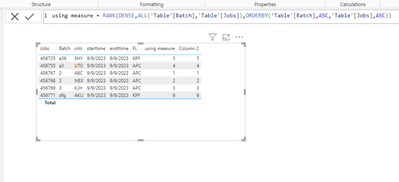
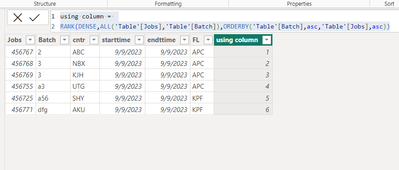
for column try below
using column =
RANK(DENSE,ALL('Table'[Jobs],'Table'[Batch]),ORDERBY('Table'[Batch],asc,'Table'[Jobs],asc))
If this post helps, then please consider Accept it as the solution to help the other members find it
- Mark as New
- Bookmark
- Subscribe
- Mute
- Subscribe to RSS Feed
- Permalink
- Report Inappropriate Content
Hi @Jessica_17 ,
You can create a measure as below to get it, please find the details in the attachment.
Rank = RANKX ( ALL ( 'Table1' ), CALCULATE ( MAX ( 'Table1'[Batch] ) ),, ASC, DENSE )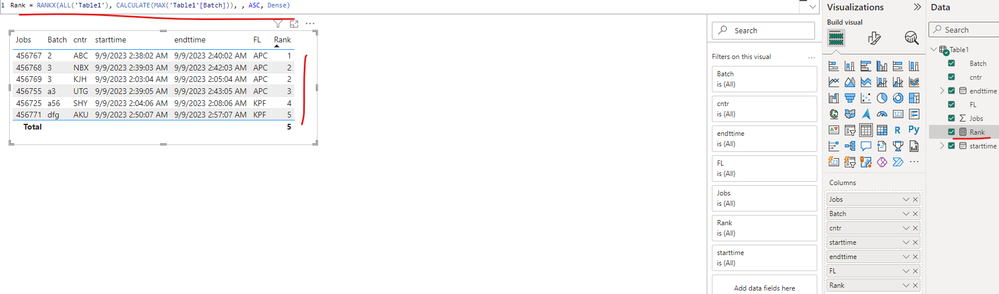
Best Regards
- Mark as New
- Bookmark
- Subscribe
- Mute
- Subscribe to RSS Feed
- Permalink
- Report Inappropriate Content
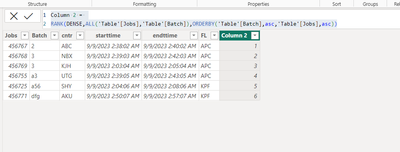
Hi, @Jessica_17
try below for new column
Column 2 =
RANK(DENSE,ALL('Table'[Jobs],'Table'[Batch]),ORDERBY('Table'[Batch],asc,'Table'[Jobs],asc))
- Mark as New
- Bookmark
- Subscribe
- Mute
- Subscribe to RSS Feed
- Permalink
- Report Inappropriate Content
Hi @Jessica_17
What is the ranking's purpose?
If the rank should be static, you can use @Ahmedx's suggestion.
If the table has duplicate batches.
You can duplicate the table, remove all unnecessary columns, and add an index column (with power query like in the attached images.
If the batches are unique you can just add an index.
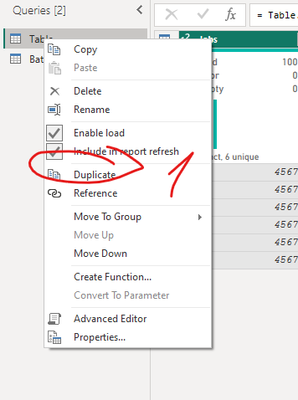
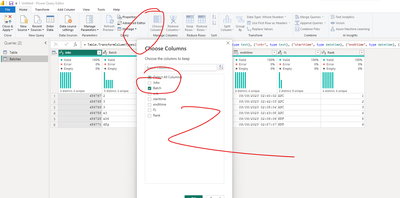
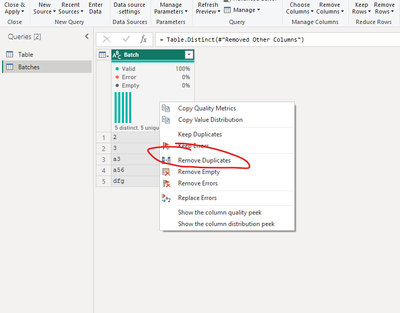
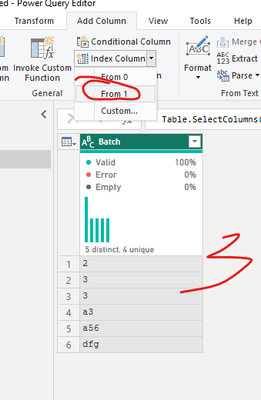
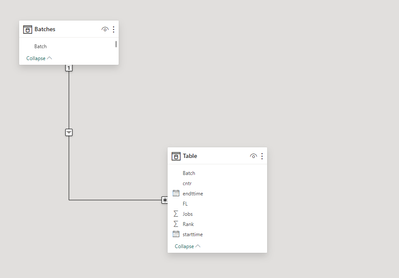
create a relationship
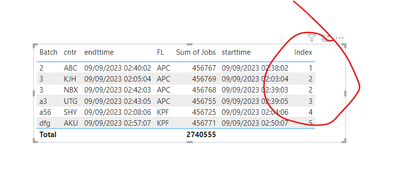
And use the index as a needed rank (note that you have duplicates)
if you need it as a dynamic measure :
Use a measure
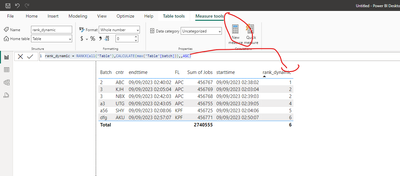
New pbix is attached
If this post helps, then please consider Accepting it as the solution to help the other members find it more quickly
Rita Fainshtein | Microsoft MVP
https://www.linkedin.com/in/rita-fainshtein/
Blog : https://www.madeiradata.com/profile/ritaf/profile

Helpful resources

Power BI Monthly Update - November 2025
Check out the November 2025 Power BI update to learn about new features.

Fabric Data Days
Advance your Data & AI career with 50 days of live learning, contests, hands-on challenges, study groups & certifications and more!

FabCon Atlanta 2026
Join us at FabCon Atlanta, March 16-20, for the ultimate Fabric, Power BI, AI and SQL community-led event. Save $200 with code FABCOMM.


